
Archive for the ‘programming’ Category
Say you want a vector that starts at 0 and goes to 1 in steps of 0.1
There are two ways you might do this in MATLAB
x=0:0.1:1
y=linspace(0,1,11)
If you display either x or y then you will get
[0 0.1000 0.2000 0.3000 0.4000 0.5000 0.6000 0.7000 0.8000 0.9000 1.0000]
So it looks like we are in clover. However if we do
x==y
we get
[1 1 1 0 1 1 1 1 1 1 1]
Which shows that the vectors x and y are not EXACTLY equal for all values (1 stands for true and 0 stands for false so one value is different). We can see that the difference is extremely small by doing
x-y
1.0e-16 *

0         0         0    0.5551         0         0         0         0         0         0         0
This tiny difference is almost certainly caused by the fact that the colon operator and linspace use slightly different methods to calculate the vectors as pointed out in the newsgroup post where I discovered this little piece of trivia. . If floating point arithmetic was exact then it wouldn’t matter what algorithm you used to calculate a vector like this – the result would always be the same as you would expect.
However, floating point arithmetic isn’t exact and so things like the order of operations matters. This sort of thing has been discussed many times by people considerably more erudite than me so I refer you to them for details.
What I was curious about was ‘How,exactly, does the colon operator calculate it’s values and how does this differ from linspace?’ Oh yes, I am a sucker for mathematical trivia.
If I didn’t have access to either of these methods in MATLAB then I would calculate our vector like this
n=0:10
a=n*0.1
But it turns out that this isn’t equal to either x or y so this isn’t how linspace or the colon operator works:
a==x (compare to colon operator)
1 1 1 1 1 1 0 0 1 1 1
a==y (compare to linspace)
1 1 1 0 1 1 0 0 1 1 1
Another way for calculating this vector that springs to mind is to start with 0 and repeatedly add 0.1 until you reach 1. I normally would never do it like this due to the possibility of accumulating rounding errors on each addition but let’s take a look.
b=[zeros(1,11)];

for i=2:11

b(i)=b(i-1)+0.1;

end
As I’d expect, this isn’t how MATLAB does it either.
b==x (compare to colon operator)
1 1 1 1 1 1 1 1 0 0 0
b==y (compare to linspace)
1 1 1 0 1 1 1 1 0 0 0
My methods don’t agree with each other either (do a==b to see) but I was expecting that.
So, I am non the wiser. How does linspace and the colon operator work? Thoughts and comments would be welcomed.
I needed to profile some MATLAB code recently to try and optimise it. It’s been a while since I have done this sort of thing so I first reminded myself of the details by reading the documentation. Eventually I came to a sage piece of advice concerning multi-core processors…
Note If your system uses Intel multi-core chips, you may want to restrict the active number of CPUs to 1 for the most accurate and efficient profiling. See Intel Multi-Core Processors — Setting for Most Accurate Profiling for details on how to do this.
‘Sounds fair enough‘ I thought so I clicked on the link and started reading the instructions. The first couple of steps were
1. Open Windows Task Manager.
2. On the Processes tab, right-click MATLAB.exe and then click Set Affinity.
Outrage! How dare they assume I am using Windows ;) A bit of searching through the documentation revealed that, sure enough, The Mathworks had forgotten about us Linux users in this particular instance. Mac users are left in the cold too for that matter.
So, I fired off a quick email to Mathworks support and asked them how I should proceed with setting the processor affinity as a Linux user. I got a reply within just a couple of hours. Here it is in full (edited very slightly by me) for anyone else who needs to do this:
The Linux taskset command (part of a scheduler utilities package) can be used to set the processor affinity for a certain Process ID (PID). To find MATLAB’s PID, you can execute
ps -C MATLAB
from a Linux terminal. Then, to set the processor affinity for MATLAB to one CPU (e.g. CPU #0), execute (also from a Linux terminal):
taskset -pc 0 PIDhere
The ‘-p’ option specifies that taskset should operate on an existing PID instead of creating a new task. The ‘-c’ option allows you to specify a list of processor numbers instead of a bitmask representing the processors you would like to use. For more information on the syntax of taskset, it is best to look at the manpage for this command (i.e. by executing man taskset from a Linux terminal).
The support analyst (who wishes to remain anonymous) who was helping me out then informed me that he had raised a request for enhancement with the Mathworks documentation team to try and get this information covered in future versions of the MATLAB docs.
I’m impressed with this level of service so thank you to everyone involved at the Mathworks for solving this little issue of mine.
I recently made a few minor updates to my original Fortran NAG / Excel tutorial and so am making it available here. If anyone finds this useful or has any other detail to add then let me know. I consider this to be an evolving document and will consider additions and modifications on request.
The tutorial assumes you are using the thread safe version of Mark 21 of the Fortran libraries – FLDLL214ML
Some people have questioned why I ever looked into this combination and my answer is simple – If you find yourself needing to do some serious numerical work with Microsoft Excel then (in my opinion at least) you are advised to hand over the numerical heavy lifting to something that is capable. The NAG library is more than capable.
Click here to download the tutorial in pdf format.
I don’t know what it is about Manchester University that turns its staff and students into bloggers but there seem to be more and more of us around these days.
One I had a lot of time for was the (sadly now closed to public) blog, Gooseania,where a maths PhD student chronicled his experiences from his first day through to graduation. Having gone through a PhD myself I understood only too well what he was going through and, thanks to his blog, I experienced some of the highs and lows with him.
Following on in this fine tradition is my friend Paul who has recently started a part-time MSc in Computer Science at Manchester. In his blog, Crossed Streams, he has started writing about his experiences of fitting a taught Masters degree around a full-time job along with other subjects such as Java programming, logic, Ubuntu fixes and the geek community in South Yorkshire.
If this sounds like an interesting set of topics to you then pop over, say hi and tell him Mike sent you :)
I’ve just installed the Intel C++ compiler on a Ubuntu 8.04 system and when I try to compile something I get the error message
Catastrophic error: could not set locale “” to allow processing of multibyte characters
I fixed this by adding the following to my .bashrc file
export LANG=C
Maybe this will help someone out there.
Almost 10 years ago now, I was a teaching assistant for an Introduction to Fortran course at the University of Sheffield. I remember being told by one of the other PhD students that ‘Fortran is a dying language and so we are wasting our time teaching this stuff. No one will be using Fortran in 10 years time.’
Fast forward 10 years and Fortran is still going strong in the research and numerical communities. If you are doing numerics and you want fast code then Fortran is an option that you simply can’t ignore. It is also required for doing things like writing user defined materials in the finite element analysis package, Abaqus. One of the best Fortran compilers on the market (in my opinion at least) is the NAG Fortran Compiler and their Linux version has recently been updated to version 5.2.
It now includes support for almost all of the features in the Fortran 2003 standard and they have also added quadruple precision support – something that the people I support have wanted for a long time. A full list of changes can be found on NAG’s website.
Finally a note to self – they have changed the name of the executable from f95 to nagfor – this will generate support queries…you know it will!
Part of my job is to look after Manchester University‘s site license for the NAG libraries. If you have never heard of the NAG (Numerical Algorithms Group) libraries before, and if your work involves any kind of numerical computation, then I highly recommend that you check them out as they are very good at what they do. One senior researcher at Manchester referred to them as ‘The gold standard of numerical computing.’ High praise indeed and praise that I completely agree with.
The NAG libraries are written in Fortran but you don’t have to be coding in Fortran in order to use them. With a bit of effort you can call them from many different programming environments such as Python, Visual Basic, C (in fact there are C-specific versions of the libraries) and MATLAB (via the NAG Toolbox for MATLAB).
A few months ago I had a visit from some very worried looking students who needed to call the NAG libraries from Excel using Visual Basic for Applications (VBA) and they had no idea where to start. Sure, NAG have some VBA examples on their website but they assume that the reader already knows a fair amount about both the NAG libraries and VBA – knowledge that these students simply didn’t have.
I took a look at what they wanted to do and said that if they came to meet me in a couple of days time then I would put together a simple piece of code that would push them in the right direction. The code would be well commented, I told them, and would cover all of the concepts that they would need in order to put together their application. They looked very grateful and relieved.
I didn’t have the heart to tell them that I had never written a single piece of VBA code in my life!
So, off I went, learning just enough VBA to work with the NAG libraries. The staff at NAG helped me out when I got stuck and, I’m happy to say, I had just what these students needed by the time of our next meeting. I’d like to stress that I didn’t do their work for them – not even close! They told me what NAG functions they wanted to use and all I did was code up example VBA scripts that called those functions for various sample problems. This was all the help I gave them as I felt that it fell within my remit of ‘supporting the NAG libraries at Manchester’ without crossing the line of actually doing their work for them.
I looked at the pile of hand written notes that had been made while I was learning VBA and thought that they could do with being typed up. After all, I would probably have forgotten most of it by the time I was next visited by some students.
To cut a long story short, these notes ended up becoming a technical report that was published on NAG’s website today. So, if you find yourself needing to call the NAG libraries from within Excel 2003 then you might find them useful. As always, feedback is welcomed.
Thanks to all of the Staff at NAG who helped me clean up the mess that was the first draft – I have really enjoyed working with you all and hope to do so again soon.
If you enjoyed this article, feel free to click here to subscribe to my RSS Feed.
Update (3rd March 2009): The article referred to in this article has been updated – click here for details.
A few years ago, while working through a degree in theoretical physics at Sheffield University, I took a course on special functions in physics that was given by the legendary lecturer Dr Stoddart (saviour of many a physics undergraduate, including me, during his many years there – please leave a comment if you studied at Sheffield and remember him).
This course introduced me to the fascinating world of the so called ‘higher transcendental functions’ of mathematical physics. I remember that we covered topics such as Bessel functions, Laguerre polynomials, Hermite Polynomials and the Gamma function among others but in a one semester course we only really scratched the surface of the subject.
Since then I have come across several other special functions during the course of my work such as the LambertW function, Mathieu functions, Chebyshev polynomials and more. I used to be a physicist and so, despite the fact that the theory behind these functions can often be fascinating, all I had time to consider back then was how to evaluate them.
In fact, as far as my professional life goes, the question of evaluation is still the only thing that I get asked about regarding special functions. Questions such as ‘How can I evaluate the LambertW function in MATLAB?’ (Answer – by using this user-defined function) or ‘Do you know of a free, open source, implementation of Bessel’s function?’ (Answer – the GNU Scientific Library).
The idea for this post came to me while reading an article written in 1994 (and subsequently updated in 2000) where the authors discussed the Numerical Evaluation of Special Functions. One of the features of this document was a list of various special functions combined with a list of software packages that could evaluate them. For example it lists Dawson’s integral and tells us that if you need to evaluate this then you can use various software packages such as the NAG libraries or Numerical Recipes.
I thought that this was a very useful document but a major problem with it is that it is rather out of date! Wouldn’t it be great if someone were to create an updated version that included all of the latest advances in software libraries and applications. I even idly thought of attempting to do this myself and publish the results here but it turns out that I have (thankfully) been beaten to it.
It’s not finished yet but the NIST Digital Library of Mathematical Functions looks like it is going to be exactly what I need. Apparently this project aims to be a sort of modern rewrite of Abramowitz and Stegun’s Handbook of Mathematical Functions, a book that almost every physicist I knew had a copy of. The preview looks very promising to say the least! For example, take the section on the Gamma Function. The library contains everything you might want to know about this function such as its definition, 2D and 3D plots of its graphs, its series expansion and, of course, a list of software packages and libraries that can be used to evaluate it. I note that, for the Gamma function, one can choose from MATLAB, Mathematica, MAPLE, NAG, Maxima, PARI-GP, the GSL, Numerical Recipes and several others – not exactly short of Gamma function implementations are we?
When it’s finished, the work will be published as a book called ‘Handbook of Mathematical Functions’ but will also be available freely online as a digital library – fabulous!
I work at the University of Manchester which is where the world’s first ever stored-program electronic digital computer was made back in 1948. It was originally called the Manchester Small Scale Experimental Machine but everyone called it Baby and it didn’t occur to it to mind. Before I get flamed to death by US computer historians – yes the ENIAC was built 2 years before Baby but it had a fundamentally different architecure (as explained by Alan Burlison in his blog – here). As Alan says, if you wanted to reprogram ENIAC, you needed a pair of pliars.
Many people who are a lot more eloquent than me have written a lot about the history of this machine (here for example) so I won’t say too much about it here except that it had only 128 bytes of memory which were arranged in 32 x 32 bit binary words and that it had an instruction set of only 7 commands which made programming it a bit tricky to say the least.
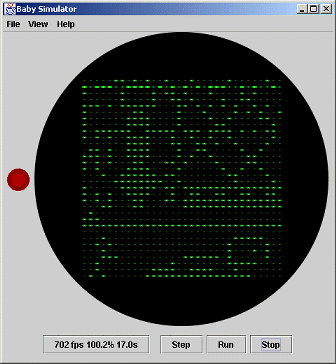
If you think you are a real programmer who is up to the challenge of coding for a 60 year old machine then Manchester University is holding a program “The Baby” competition (closing date 1 May 2008) to celebrate the Baby’s 60th anniversary. There is a photo realistic Java-based simulator of the machine, complete with example programs, over at the competition website along with an instruction manual to get you started. With only 7 instructions to learn how hard can it be?
Say you have just joined an applied-maths research group* where you are expected to write a lot of numerical simulations – numerical simulations that are going to require the use of big computers in large, air conditioned rooms with a great deal of impressive looking flashenlightenblinken. Naturally, you would like to use Python for all of your programming needs as you have recently fallen in love with it and you are convinced that it’s the future.
Your boss, Bob, completely disagrees with your take on the future of programming. He thinks that Python is a passing fad that will soon be forgotten. He sneeringly refers to it as a ‘ mere scripting language’ and constantly refers to you as the script kiddie. He thinks that Fortran is the only programming language worth bothering with when it comes to numerical simulations. According to Bob, Fortran is the past, present and future of computer programming – everything else is just mucking about.
You argue constantly with Bob concerning the relative merits of the two languages because, although you respect Fortran, you don’t think that it’s going to be much fun to use. Eventually he pulls out his trump card – “You can’t use Python in this group because all of our screamingly fast, highly accurate, tested and debugged numerical routines are written in Fortran. We won’t use any other libraries because these are the best so – give up on Python and start learning Fortran or get another job.”
Defeated…or so you thought…
After a bit of googling you realize that there is light at the end of the tunnel, this problem has been solved before by making use of the Python ctypes module. First of all let’s install this module on Ubuntu:
sudo apt-get install python-ctypes
Taking our cue from this solution lets say that one of the functions in the Fortran library is called ADD_II and has the following source code (filename add.f)
SUBROUTINE ADD_II(A,B)
INTEGER*4 A,B
A = A+B
END
Compile it into a shared library using gfortran as follows:
gfortran add.f -ffree-form -shared -o libadd.so
Now, create a file called add.py and copy the source code from our friendly usenet poster:
from ctypes import *
libadd = cdll.LoadLibrary(“./libadd.so”)
#
# ADD_II becomes ADD_II_
# in Python, C and C++
#
method = libadd.ADD_II_
x = c_int(47)
y = c_int(11)
print “x = %d, y = %d” % (x.value, y.value)
#
# The byref() is necessary since
# FORTRAN does references,
# and not values (like e.g. C)
#
method( byref(x), byref(y) )
print “x = %d, y = %d” % (x.value, y.value)
run the script as follows:
python add.py
and get the following error message:
AttributeError: ./libadd.so: undefined symbol: ADD_II_
So, despite what we may have thought, it looks like our function has not been given the name ADD_II_ in the shared library. So what name has it been given? We could just keep guessing what the compiler might have called it or we could just ask the library itself using the nm comand:
nm libadd.so
00001468 a _DYNAMIC
00001554 a _GLOBAL_OFFSET_TABLE_
w _Jv_RegisterClasses
00001458 d __CTOR_END__
00001454 d __CTOR_LIST__
00001460 d __DTOR_END__
0000145c d __DTOR_LIST__
00000450 r __FRAME_END__
00001464 d __JCR_END__
00001464 d __JCR_LIST__
00001570 A __bss_start
w __cxa_finalize@@GLIBC_2.1.3
00000400 t __do_global_ctors_aux
00000340 t __do_global_dtors_aux
00001568 d __dso_handle
w __gmon_start__
000003d7 t __i686.get_pc_thunk.bx
00001570 A _edata
00001574 A _end
00000434 T _fini
000002d8 T _init
000003dc T add_ii_
00001570 b completed.6030
000003a0 t frame_dummy
0000156c d p.6028
Now I have no idea what most of that output means but it looks like the .so file contains something called add_ii_ so if I use this instead of ADD_II_ in my python script I bet it will work.
python add.py
x = 47, y = 11
x = 58, y = 11
The sweet smell of success. You go to Bob and tell him that you have just come up with a test script that demonstrates that you are going to be able to use the group’s Fortran libraries in your Python scripts.
“That’s very nice” says Bob “but all of the really useful routines in the library make use of callback functions. Can you handle those yet?”
“yes I can” you reply smugly “but this post has gone on long enough so I’ll leave the details until another time”
*Note – In case you are my boss – I haven’t joined a research group so I won’t be quitting my job any day soon. I was just in a story telling mood. Oh..and this stuff will be useful for what we do – I promise!