January 13th, 2011 | Categories: math software, mathcad | Tags:

A man I have a lot of time for is Joel Spolsky, author, software developer and previously a program manager for Microsoft Excel.  Way back in the year 2000 he wrote an article called Things You Should Never Do, Part 1 where his main point was “The single worst strategic mistake that any software company can make is to rewrite your code from scratch.”  He exemplified this principle using products such as Quattro Pro and Netscape 6.0.

Not everyone agrees with Joel’s thesis and it seems that the managers at PTC, the owners of Mathcad, are among them.  The last major update of Mathcad was version 14.0 which was released back in 2007 (the recent Mathcad 15.0 was a relatively minor update despite the .0 version number).  To  some outsiders it appeared that PTC were doing very little with the product until it transpired that what they were actually doing was an almost complete rewrite from the ground up.

That rewrite has now been released in the form of Mathcad Prime 1.0.  I don’t have my hands on a copy yet so I have been scouring the web to try and determine exactly what this new version does right and what it does wrong.  Here’s what I’ve found so far.

  • Mathcad Prime 1.0 does not have everything that Mathcad 15 has.  Jackov Kucan, Director of development at PTC, has publicly stated that it won’t be until Prime 3.0 that users will be able to retire Mathcad 15 and migrate to Prime.
  • Relating to the above point,there is a thread over at the PTC Forums where several users are calling Mathcad Prime a big step backwards. Not everyone agrees though.
  • Another useful discussion thread is one started by PTC where they ask What new features do you want to see in Mathcad Prime?
  • According to one of the discussion threads above, Mathcad Prime doesn’t include several pieces of functionality (symbolics, 3d graphs and animation) that are considered bog standard by competitors such as Maple and Mathematica.  I haven’t confirmed this yet. (confirmed by email from a PTC employee)
  • At the time of writing, all purchasers of Mathcad Prime 1.0 will also receive Mathcad 15. Mathcad Prime 1.0 can be installed side by side with any previous versions of Mathcad. (source)
  • In the UK, Mathcad Prime currently costs £810 for a personal license. (source)

Here’s a nice demo of the new version by Jackov Kucan. The user interface looks great in my opinion although I confess to not being a fan of the Microsoft-like ribbon interface.

How about you?  Have you used MathCAD prime yet?  If so then what do you think of it?  If not then do you think you will try it?

Update (16th February 2011): I was recently contacted by an employee of PTC who told me ‘The internal engine has not been totally rewritten .  It’s the user interface, which includes the equation editor and plots that we rebuilt from scratch.’  Thanks for the clarification.

If you like this post then you may also be interested in the following:

January 11th, 2011 | Categories: math software, matlab | Tags:

MATLAB 2010b was released a couple of months ago and, as usual, it comes with a whole range of new features, performance enhancements and all important bug fixes.  Within the MATLAB 2010b documentation, there are lists of the new functionality but I like to dig in a bit deeper and pick out one or two things that are of personal interest to me.

64 bit integer support

Back in April 2010, I was working with the NAG Toolbox for MATLAB which makes use of 64 bit integers on 64 bit machines and I learned that MATLAB 2010a and earlier didn’t support even the most basic of operations on 64 bit integers. For example, on MATLAB 2010a:

a=int64(10);
b=int64(20);
a+b
??? Undefined function or method 'plus' for input arguments of type 'int64'.

I’m happy to report that this has now been fixed and The Mathworks have implemented 18 basic operators for 64bit integer types including arithmetic, the colon operator, bsxfun and more.  This has made my life (and the lives of some of the people I support) MUCH easier and I really appreciate The Mathworks work on this one.

Curve Fitting and Splines toolboxes merged

MATLAB has got a lot of toolboxes.  In fact, it’s got far too many in my opinion which makes the product more expensive and fragmented.  I have literally lost count of the amount of times someone has emailed me with a query like “I don’t suppose you have access to the XYZ toolbox because someone had sent me code that uses it and I can’t run it’  Quite frankly, it sucks.

So, when The Mathworks announce that they are merging the functionality of two related toolboxes into one, there is much rejoicing in Walking Randomly towers.  If The Mathworks would like to do some more toolbox merging then I have a couple of suggestions :)

CUDA support in the Parallel Computing Toolbox

These days, the hotness in research computing is to do as much of your calculation as possible on your graphics card.  If handled correctly, the hunk of silicon that was originally designed to make games look pretty can speed up scientific calculations hundreds of times compared to dull old CPUs.  There is a great deal of interest in GP-GPU programming at Manchester University (my employer), so much so that we have set up a GPU-Club for our researchers.

Arguably, the leader in GP-GPU (General Purpose – Graphics Processing Unit) hardware is NVIDIA who are the developers of the CUDA programming framework.  Until now, CUDA support in MATLAB has been provided by third-parties such as Jacket (Commerical) or GP-You (free) but as of 2010b, there is now official support for CUDA GPUs in MATLAB’s parallel computing toolbox.  At the moment, it is not as well developed as products such as Jacket but I would lay bets that this will change in the not too distant future.

My early experiments with this new functionality have met with zero success but I have new hardware on the way and I am really looking forward to getting my teeth into this.

Parallel Statistics

Parallel computing in MATLAB is more complicated than it should be.  Some functions make use of multicore processors automatically and you don’t need the parallel computing toolbox to feel the benefit.  On the other hand, there are an increasing number of functions in toolboxes such as statistics and optimisation, that additionally require the PCT in order to make maximum use of modern hardware.

The 2010b version of the statistics toolbox includes an extra 8 functions (candexch, cordexch, daugment, dcovary, nnmf, plsregress, rowexch and sequentialfs) that now make use of the PCT.  If you have the PCT, then this is wonderful news but if you don’t then there is nothing to see here.

Faster trig functions when the argument is in degrees

The standard trigonometric functions such as sin, cos, tan and the like all work in radians but MATLAB also has several functions that accept their arguments in degrees: sind, cosd and tand for example.  In MATLAB 2010b these functions have been made significantly faster.  Lets see how much faster using my 3Ghz quad Core 2 Q9650 running Ubuntu 9.10

In MATLAB 2010a

x=rand(1,1000000)*360;
>> tic;y=cosd(x);toc
Elapsed time is 0.120207 seconds.

In MATLAB 2010b

x=rand(1,1000000)*360;
>> tic;y=cosd(x);toc
Elapsed time is 0.021256 seconds.

A speed up of around 5.6 times!  What’s more, I’ve already come across a user’s code in the wild where this optimisation made a real difference to their execution time.  As far as I can tell, the speed up comes from the fact that 2010a and below uses MATLAB code for these functions whereas 2010b and above uses mex files.

What other bloggers say about MATLAB 2010b

January 9th, 2011 | Categories: Carnival of Math, general math | Tags:

73 is an awesome number.  In fact, one could argue that it’s the Chuck Norris of numbers.  Here’s why (courtesy of Wikipedia, and Number Gossip):

  • The mirror of 73, the 21st prime number, 37, is the 12th prime number. The number 21 has factors 7 and 3.
  • In binary, 73 is a palindrome – 1001001
  • Of the 7 binary digits representing 73, there are 3 ones.
  • Every positive integer is the sum of at most 73 sixth powers.
  • In octal, 73 is a repdigit – 111
  • Pi Day occurs on the 73rd day of the year (March 14) on non-leap years
  • 73 is the largest integer with the property that all permutations of all its substrings are primes
  • 73 is the largest two-digit Unholey prime: such primes do not have holes in their digits
  • 73 is the smallest number (besides 1) which is one less than twice its reverse
  • 73 is the alphanumeric value of the word NUMBER: 14 + 21 + 13 + 2 + 5 + 18 = 73

73 is also the edition number of this, the latest Carnival of Mathematics, to which I bid you welcome.  On with the show.

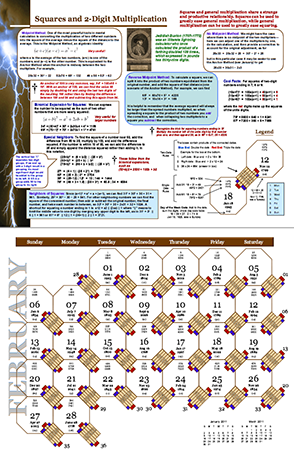
First up we have a mathematical calendar for 2011 courtesy of Ron Doerfler which focuses on Lightning Calculations.  I have written about Ron’s calendar before and highly recommend it to all.

The beginning of a new calendar year is an opportunity for all of us to sit back and take stock of everything that took place over the previous 12 months.  As a result you’ll find retrospectives of all kinds scattered around the internet and on TV such as The Best Tech Products of 2010, TV’s 11 best Watercooler Moments of the Year and so on.  Over at his blog, Wild About Math, Sol Lederman points us to a much more mathematical restrospective of the year 2010 by giving us a heads up about an awesome looking new book.

Next we have the 2011 Mathematics game from Denise of Let’s Play Math; the rules of which can be most simply stated as “Use the digits in the year 2011 to write mathematical expressions for the counting numbers 1 through 100.” Head over there to see more detailed rules, hints, tips, discussion and solutions found so far.

If all of that isn’t quite enough to sate your appetite for all things 2011 then I suggest that you take a look at Patrick Vennebush’s post entitled 2011 – Prime Time which inspired Brent Yorgey to follow up with Prime Time in Haskell.  I wonder if 2012 will inspire such mathematical and computational outpourings?

In her post, Two Planes, Tanya Khovanova stumbled across a seemingly innocent looking question in an old edition of Mathematics Teacher which made her take a deep breath and exclaim ‘Ooh, boy!’. Check it out to see what all the fuss is about.

In Redefining Great Britain, GrrlScientist highlights some new research that describes a clever way to redefine and redraw geographical areas using telephone communication networks — it relies on statistics and computing power.

Sander Huisman has a crack at inventing his own fractal based upon the q-gamma function using Mathematica and a heap of computer time.  The resulting fractal zoom looks great.  He’s also produced a really neat animation of a hinged tesselation.

TI - 73

How do you abbreviate the word ‘Mathematics’?  Some say ‘math’ others say ‘maths’ but which came first and which is the most popular?  In his post, Math/Maths in Google Books Ngrams, Peter Rowlett uses Google Ngrams to sample millions of books in order to try and determine the answer to these and similar questions.

The trapezoidal rule for numerical integration has been in the news recently and so John Cook of The Endeavour shows us Three surprises with the trapezoid rule.

Imagine that we want to bet on an event with m >= 2 possible outcomes, and that there are n >= 2 bookmakers taking bets on those outcomes. Note that the odds are known at the time the bets are placed, i.e., we have fixed-odds betting instead of pari-mutuel betting. We would like to know how to allocate our (limited) money, i.e., how much to bet on each outcome at each bookmaker. As we cannot foresee the future, we would very much like to lock in risk-less profits. In other words, we would like to find arbitrage opportunities (aka: “arbs”). In his post, Fixed-Odds Betting Arbitrage, Rod Carvalho discusses how, given the (fixed) odds posted by n bookmakers, we can detect the existence of arbitrage opportunities.

PhD student, Gianluigi Filippelli, considers a problem from way back in the 13th century in his post Fibonacci, Bombelli and imaginary numbers. Personally, I’ve always loved some of the historical aspects of mathematics and hope to attend a good course on it some day.

Finally, we have a post from Guillermo Bautista called Chess and the Axiomatic Systems where he provides an intuitive introduction to the notion of axiomatic systems through chess rules.

That’s it for this time but if you still need more mathematical blogging then check out The 12 Math Carnivals of 2010 and don’t forget to submit your articles to the forthcoming Math Teachers at Play carnival.

Follow the Carnival of Math on Twitter: @Carnivalofmath

January 7th, 2011 | Categories: matlab, programming | Tags:

Someone recently contacted me with a problem – she wanted to use MATLAB to perform a weighted quadratic curve fit to a set of data.  Now, if she had the curve fitting toolbox this would be nice and easy:

x=[ 1 2 3 4 5];
y=[1.4 2.2 3.5 4.9 2.3];
w=[1 1 1 1 0.1];

f=fittype('poly2');
options=fitoptions('poly2');
options.Weights=[1 1 1 1 0.1];
fun=fit(x',y',f,options);
p1=fun.p1;
p2=fun.p2;
p3=fun.p3;

myfit = [p1 p2 p3]

myfit =
   -0.1599    1.8554   -0.5014

So, our weighted quadratic curve fit is y = -0.4786*x^2 + 3.3214*x – 1.84

So far so good but she didn’t have access to the curve fitting toolbox so what to do? One function that almost meets her needs is the standard MATLAB function polyfit which can do everything apart from the weighted part.

polyfit(x,y,2)
ans =
   -0.4786    3.3214   -1.8400

which would agree with the curve fitting toolbox if we set the weights to all ones. Sadly, however, we cannot supply the weights to the polyfit function as it currently stands (as of 2010b). My solution was to create a new function, wpolyfit, that does accept a vector of weights:

wpolyfit(x,y,2,w)
ans =
   -0.1599    1.8554   -0.5014

So where is this new function I hear you ask? Normally this is where I would provide you with a download link but unfortunately I created wpolyfit by making a very small modification to the original built-in polyfit function and so I might be on dicey ground by distributing it. So, instead I will give you instructions on how to make it yourself.  I did this using MATLAB 2010b but it should work with other versions assuming that the polyfit function hasn’t changed much.

First, open up the polyfit function in the MATLAB editor

edit polyfit

change the first line so that it reads

function [p,S,mu] = wpolyfit(x,y,n,w)

Now, just before the line that reads

% Solve least squares problem.

add the following

w=sqrt(w(:));
y=y.*w;
for j=1:n+1
    V(:,j) = w.*V(:,j);
end

Save the file as wpolyfit.m and you are done. I won’t go over the theory of how this works because it is covered very nicely here.  Comments welcomed.

January 1st, 2011 | Categories: Carnival of Math, general math | Tags:

2010 was a great year for mathematical blogging and this was reflected in the monthly Carnivals of Mathematics.  Here they are again in case you missed them.

The cycle will be starting again next week when the 73rd carnival gets published right here at Walking Randomly.  What happens after that is up to you because I need volunteers to host future editions.  If you are interested then get in touch via the comments section of this post, via twitter or by email.

Links

December 28th, 2010 | Categories: iPad, math software, Mobile Mathematics | Tags:

This is the second post in a series. The third post is at https://www.walkingrandomly.com/?p=3512

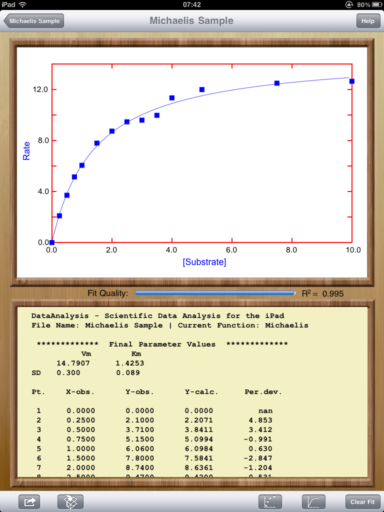
DataAnalysis – free curve fitting on iPad

DataAnalysis is a fantastic curve fitting and plotting package written by Evan Kantrowitz.  You can import your data (in .csv format) from a variety of sources including email, iTunes and Dropbox.  Once imported, DataAnalysis allows you to modify your data if necessary and then plot it in a variety of styles before fitting it to one of several different regression models.

There is a nice range of built in model types including polynomial (currently only up to order 3), power, exponential, gaussian and more with the full list detailed over at the DataAnalysis website.  New model-types are being added all the time and the developer is willing to consider specific requests. Fitting is performed in the least-squares sense and the user can choose which numerical algorithm to use – Newton or Levenberg-Marquardt.  My only gripe here is that it is not possible to define your own fit function so if the model you want to fit your data to has not been included then you are stuck.

Once you have completed plotting and fitting your data, you can export the whole thing in either .png or .pdf format via email, Dropbox or to the iPad Photos app.  Alternatively, you can copy the graph to the iPad clipboard for inclusion in other apps.

This is a fantastic app that delivers exactly what it promises at a price that’s impossible to beat.
DataAnalysis on iPad

December 21st, 2010 | Categories: Fractals, Wolfram Alpha | Tags:

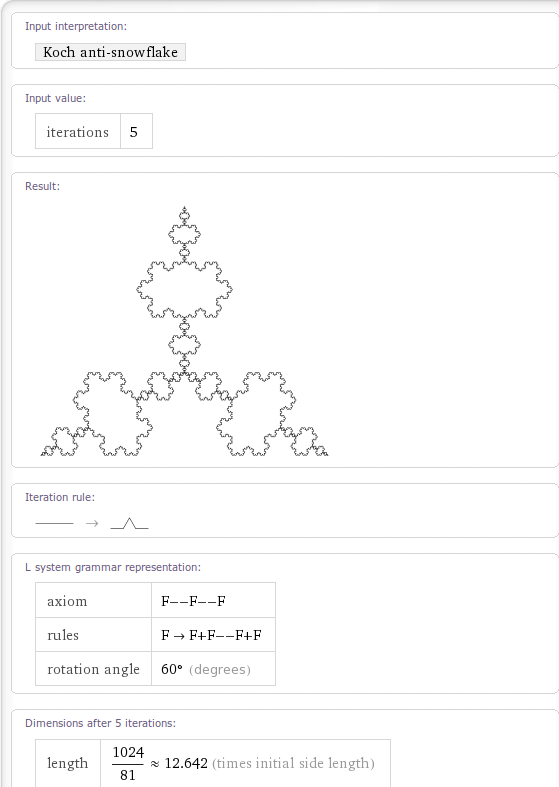
Back in May 2009, just after Wolfram Alpha was released, I had a look to see which fractals had been implemented.  Even at that very early stage there were a lot of very nice fractals that Wolfram Alpha could generate but I managed to come up with a list of fractals that Wolfram Alpha appeared to know about but couldn’t actually render.

On a whim I recently revisited that list and am very pleased to note that every single one of them has now been fully implemented!  Very nice.

Can you find any Wolfram Alpha fractals that I missed in the original post?

Koch AntiSnowflake

December 15th, 2010 | Categories: general math | Tags:

When I was 4 or 5 years old, my father taught me a lot of basic mathematics by exploiting my obsession with my grandmother’s collection of antiquated coins which I played with every chance I got.  I loved the weird and wonderful collection of shapes and denominations that made up old English money; thruppenny bits, florins, shillings, ha’pennys, crowns, guineas…..there seemed to be no end to the variety and I loved them all.  I was most definitely a noomtist which was the best rendition my  young self could give of the word ‘numismatist’.

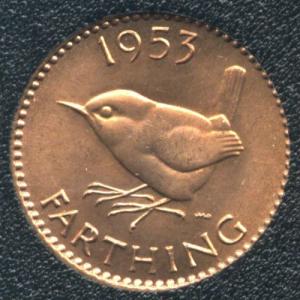
A farthing is an old English coin that was worth a quarter of a penny and Gran had lots of them.  Dad would ask me things like “I’ve got a halfpenny and a farthing, if I changed the lot to farthings then how many would I have?” and “How many farthings are there in a sixpence”.  Initially I would answer these questions by physically counting the coins.  For example, I knew that there were 4 farthings in a penny so I would make 6 stacks of 4 and then count them, one by one, to get the answer: 1,2,3,4,5……21,22,23,24

farthing coin

This became laborious so at some point I’d answer similar questions by ‘counting in 4s’: 4,8,12…. and so on.  Eventually, I didn’t need to count – I just knew that 6 stacks of 4 was 24 and so I had been tricked into learning my 4 times table before I had even started school.  Dad, for his part, hadn’t delivered a single maths lesson – he just spent a few hours playing shopkeeper with his son.

Later, dad  told me that there was such a thing as a third-farthing (1/12 of a penny) but Gran didn’t have any.  If she did though, and he had 2 of them along with a farthing and a half-penny coin then how much money would he have?  Questions such as this taught me about the arithmetic of fractions with no mention of the words ‘common denominator’ in sight.  Good job too because, back then, I doubt I would have been able to pronounce ‘denominator’.

In fact it would be more accurate to say that I ‘discovered how to add fractions’ – my wily old dad didn’t teach me a thing – he just asked me questions about the fascinating little shiny things while we played games together.

December 5th, 2010 | Categories: just for fun, physics, Science, walking randomly | Tags:

A couple of years ago I wrote an article called Christmas gifts for math geeks and it has proven to be quite popular so I decided to write a follow up.  As I started thinking about what I might include, however, I started to realise that I had produced a list for science geeks instead.  So, here it is – my recommendations for gifts for the scientist in your life.

Mathematica 8 Home Edition – This is the full version of Mathematica, possibly my favourite piece of mathematical computer software, at the extremely low price of 195 pounds + VAT.  I know what you are thinking ‘Over 200 quid is not an extremely low price.’ and I would tend to agree.  It is, however, very good value since a commercial license costs several thousand pounds and Mathematica is as good as MATLAB with a whole slew of toolboxes.  Mathematica is possibly the most feature complete piece of mathematical software available today and is infinitely better than any dedicated graphical calculator.
Mathematica 8 logo

Bigtrak – I don’t have a Bigtrak but I used to have one back in the 1980s.  Is the science geek in your life into computers and 30-40 years old?  If so then there is a distinct possibility that their first foray into the world of computer programming was with a Bigtrak back when they were 8 or so – I mean, this thing can even do loops!  This isn’t identical to the original but it is a very close facsimile and would be great for budding computer nerds or their misty eyed old dad.

200-in-1 electronic project lab.  Now this one brings back fond memories for me since it was given to me for my 10th birthday and is probably the reason I studied physics at A-Level since A-Level physics included the study of basic electronics.  I did well in A-Level physics and enjoyed it so I chose theoretical physics for my degree later moving on to a PhD so you could argue that this piece of kit changed my life!

I was overjoyed when I discovered that it was still being sold and was immensely pleased when I received it as a birthday present once again when I was 28.

The first thing you need to know about this wonderful piece of kit is that it requires no soldering; you wire up all of the components using bendy little springs – nothing could be more simple.  There is also no need to be able to read schematic diagrams (although this can be a great way to learn how to) since each spring is numbered so producing your own AM radio transmitter can be as simple as joining spring 1 to spring 10 to spring 53 and so on.

The practical upshot of all of this is that you can approach this thing at a variety of levels.  In the first instance you can just have fun building and playing with the various circuits which include things like a crystal set radio, a Morse code transmitter, a light detector, a sound detector and basic electronic games.  Once you’ve got that out of your system you can start to learn the basics of electronics if you wish.

I have since discovered 300 in 1 and even 500 in 1 electronic project labs which look great and all but this is the one that will forever be in my heart.

Wonders of the Solar System – I have always loved (although never practised) astronomy and avidly followed the adventures of Voyagers 1 and 2 when I was small.  Since then, modern space probes such as Cassini-Huygens, Galileo and Mars Odyssey have added more to our knowledge of our astronomical backyard  and we now know a tremendous amount about the solar system.  In this series, Brian Cox of the University of Manchester takes us on a grand-tour around the solar system.  The imagery is fantastic, Cox’s enthusiasm is infectious and the science is awesome.  Yep, I quite like this DVD :)

2011 ‘Lightning Calculation’ calendar – Ron Doerfler writes a blog called Dead Reckonings that specialises in the lost arts of the mathematical sciences.  Last year he designed a 2010 Graphical Computing calendar and made the designs available for free to allow you to print your own.  Centred around ancient computing devices called nomograms, the calendar was beautiful and after Ron very kindly sent me a copy, I encouraged him to make a version that he could sell.  Well, I guess he took my advice because Ron is back with a 2011 calendar with the theme of ‘Lightning Calculations’ and this time he is selling it from Lulu.com.

Since Ron is an all round nice guy, he also offers a high resolution pdf of the calendar to allow you to print it off yourself but personally I plan on showing my support by putting an order in with Lulu.com.  Nice work Ron!

2011 math calendar

November 23rd, 2010 | Categories: Android | Tags:

I bought a Samsung Galaxy S recently as a replacement for my dying HTC Hero and am mostly very pleased with it.  However, the built in email client is so slow that it’s embarrassing!  The Google Mail app is fine but the one that’s simply called Email does not work well for me at all which is a shame because that’s the app that I use to access my work email.

The ‘fix’ that I ended up doing isn’t really a fix at all because all I did was install the free K-9 mail client and use that instead.  It’s so much faster that it borders on the insane.  Just search for K9 mail in the Android Marketplace.