December 29th, 2012 | Categories: just for fun, Latex, math software, mathematica, matlab, programming, python, R | Tags:

xkcd is a popular webcomic that sometimes includes hand drawn graphs in a distinctive style.  Here’s a typical example
xkcd graph

In a recent Mathematica StackExchange question, someone asked how such graphs could be automatically produced in Mathematica and code was quickly whipped up by the community.  Since then, various individuals and communities have developed code to do the same thing in a range of languages.  Here’s the list of examples I’ve found so far

Any I’ve missed?

December 20th, 2012 | Categories: C/C++, programming, Windows | Tags:

I recently installed the 64bit version of the Intel C++ Composer XE 2013 on a Windows 7 desktop alongside Visual Studio 2010.  Here are the steps I went through to compile a simple piece of code using the Intel Compiler from within Visual Studio.

  • From the Windows Start Menu click on  Intel Parallel Studio XE 2013->Parallel Studio XE 2013 with VS2010

  • Open a new project within Visual Studio: File->New Project
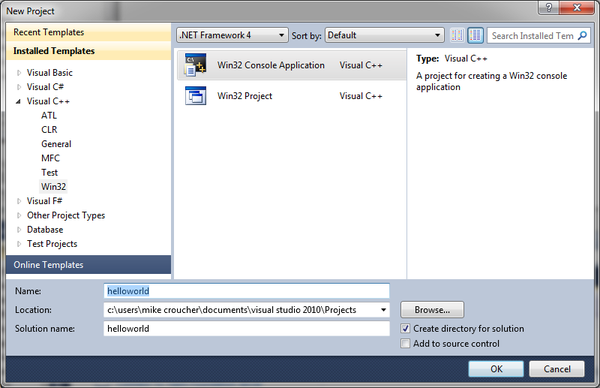
  • In the New Project window, in the Installed Templates pane, select Visual C++ and click on Win32 Console Application.  Give your project a name.  In this example, I have called my project ‘helloworld’. Click on OK.

  • When the Win32 Application Wizard starts, accept all of the default settings and click Finish.
  • An example source file will pop up called helloworld.cpp.  Modify the source code so that it reads as follows
#include "stdafx.h"
#include<iostream>
using namespace std;

int _tmain(int argc, _TCHAR* argv[])
{
	cout << "Hello World";
        cin.get(); 
	return 0;
}

We now need to target a 64bit platform as follows:

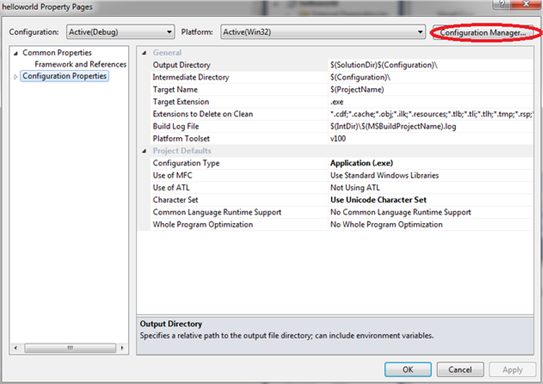
  • Click on Project->helloworld Properties->Configuration Properties and click on Configuration Manager.

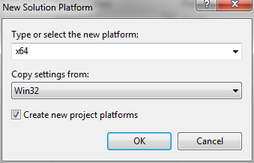
  • The drop down menu under Active Solution Platform will say Win32. Click on this and then click on New.

  • In the New Solution Platform window choose x64 and click on OK.

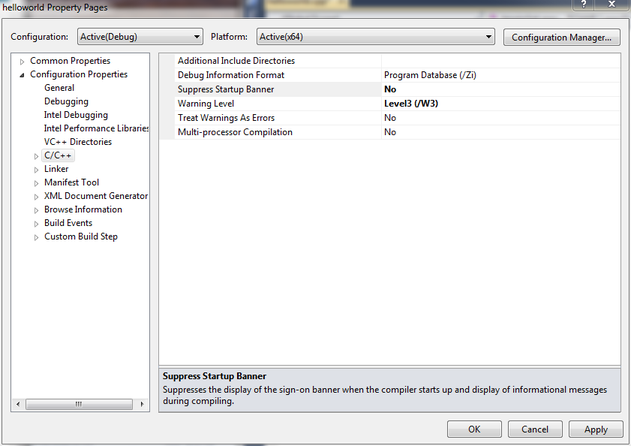
  • Close the Configuration Manager and to return to the helloworld Property Pages window.
  • At the helloworld Property Pages window click on C/C++ and ensure that Suppress Startup Banner is set to No and click OK.

  • Click on Project->Intel Composer XE 2013->Use Intel C++ followed by OK. This switches from the Visual Studio Compiler to the Intel C++ compiler.
  • Finally, build the project by clicking on Build->Build Solution.  Somewhere near the top of the output window you should see
    1> Intel(R) C++ Intel(R) 64 Compiler XE for applications running on Intel(R) 64, 
    Version 13.0.1.119 Build 20121008
    1> Copyright (C) 1985-2012 Intel Corporation. All rights reserved.

    This demonstrates that we really are using the Intel Compiler to do the compilation.

  • Once compilation has completed you can run the application by pressing F5. It should open a console window that will disappear when you press Enter.

December 14th, 2012 | Categories: math software, mathematica | Tags:

One of the best ways to learn how to use a piece of software such as Mathematica is simply to dive in and start using it.  If you get lost, consult the documentation and if you get really lost, ask for help…..but who to ask?

Ideally, you’d need a group of people who are friendly, knowledgeable and always around–no matter what time of day or night it is.  Wouldn’t that be great? It would be even better if they were to offer you all of this help and expertise for free.  Oh, and let’s have the moon on a stick while we’re at it.

The Mathematica StackExchange community offers Mathematica users all of the above requirements apart from the mounted satellite.  Based upon the same technology as the immensely popular Stack Overflow question and answer site for software developers, Mathematica StackExchange has over 3000 active Mathematica users.  Between them, these users have asked, and answered, over 4000 questions on almost every aspect of Mathematica you can imagine and then some.

A matter of reputation

Every user on Mathematica StackExchange has a reputation level which is essentially a measure of how much the rest of the community trusts that user.  Users are awarded reputation points (by other users) both for asking good questions and writing good answers which means that you don’t have to be a Mathematica master in order to succeed…inquisitive neophytes can also build up a solid level of reputation.  More details on the reputation system can be found at the site’s Frequenty Asked Questions section.

Starters for 10

To get a flavour of the site, I recommend taking a look at a few highly rated Q+As such as Where can I find examples of good Mathematica programming practice?, xkcd-stye graphs and How can I use Mathematica’s graph functions to cheat at Boggle?  Alternatively, take a browse through the list of questions sorted according to the number of votes they’ve recieved.

Before you ask a question of your own, it is recommended that you search the site to ensure that you’re not asking something that has been asked, and answered in the past.  Once that’s done feel free to ask away– you don’t even need to create an account and log-in (although it is highly recommended that you do)!

Make friends and influence people

I signed up for Mathematica StackExchange a couple of months ago (My profile’s here) but have only started using it in earnest for the last few weeks and I only wish I had started earlier.  Although I like to think that I know Mathematica pretty well, I’ve learned a lot more about it in a very short time from some very smart people.  I’ve also had a lot of fun, met some great people and maybe helped a few people out along the way.

So, if you have a Mathematica problem, and no one else can help, maybe you should try Mathematica StackExchange.

December 5th, 2012 | Categories: math software, Month of Math Software | Tags:

Since I am writing this article while on a train it seems only fitting that I say ‘Welcome to the slightly delayed November edition of a Month of Math software, the latest in a series of posts that have been going for almost two years‘  If you have any news for the final edition of 2012 feel free to contact me to tell me all about it.

General Mathematics

Libraries

  • The Fast Library for Number Theory, FLINT, was updated to version 2.3 on November 9th.  See what’s new in this C library by taking a look at the NEWS file.
  • MAGMA is a GPU accelerated linear algebra library from the Innovative Computing Laboratory (ICL) at the University of Tennessee.  According to the release announcement, version 1.3 of the library includes some performance improvements and support for the new NVIDIA-Kepler GPUs.
  • PLASMA is another linear algebra library from the people at ICL and it too has seen a new release.  Version 2.5.0 Beta 1 contains a couple of new algorithms, bug fixes and performance enhancements–check out the release announcement for the details.  A nice paper that explains the differences between PLASMA and Magma is available at http://icl.cs.utk.edu/news_pub/submissions/plasma-scidac09.pdf
  • The HSL library is ‘a collection of state-of-the-art packages for large-scale scientific computation written and developed by the Numerical Analysis Group at the STFC Rutherford Appleton Laboratory’  It saw a few updates throughout November – see the project’s change log for details.

Mobile

  • SoftMaker have released their office suite for Android devices and my first impressions are that it blows the competition out of the water.  Although the Word and Powerpoint alternatives are fine, the app that might be of most interest to readers of this article is, of course, the spreadsheet app, PlanMaker.  This initial release includes over 330 calculation functions and has support for complex numbers, arrays and 3d charts.
  • MathStudio, one of the best mathematical apps for mobile devices has been updated to version 5.4.Other than adding suport for iOS 6 and iPhone 5 I have no idea what’s new since the release annoucement is rather sparse.

Bits and pieces

  • The numeric javascript library has been updated to 1.2.4.  This is mainly a big-fix release with full details at http://numericjs.com/wordpress/?p=66
  • The commercial computer algebra system, Magma, is now at version 2.18-11.  See what’s new at http://magma.maths.usyd.edu.au/magma/releasenotes/2/18/12/
  • The free open-source linear algebra library ViennaCL  is now available in version 1.4.0. In addition to the OpenCL-based computing backend, the new release now also provides a CUDA- and an OpenMP-backend. Most noteworthy among the many new features and updates are the improved performance of ILU preconditioners including optional GPU-acceleration using level-scheduling, the incomplete Cholesky factorization preconditioner, a mixed-precision conjugate gradient solver, and further increased API compatibility with Boost.uBLAS.
November 13th, 2012 | Categories: CUDA, GPU, HPC, OpenCL, parallel programming, programming | Tags:

Intel have finally released the Xeon Phi – an accelerator card based on 60 or so customised Intel cores to give around a Teraflop of double precision performance.  That’s comparable to the latest cards from NVIDIA (1.3 Teraflops according to http://www.theregister.co.uk/2012/11/12/nvidia_tesla_k20_k20x_gpu_coprocessors/) but with one key difference—you don’t need to learn any new languages or technologies to take advantage of it (although you can do so if you wish)!

The Xeon Phi uses good, old fashioned High Performance Computing technologies that we’ve been using for years such as OpenMP and MPI.  There’s no need to completely recode your algorithms in CUDA or OpenCL to get a performance boost…just a sprinkling of OpenMP pragmas might be enough in many cases.  Obviously it will take quite a bit of work to squeeze every last drop of performance out of the thing but this might just be the realisation of ‘personal supercomputer’ we’ve all been waiting for.

Here are some links I’ve found so far — would love to see what everyone else has come up with.  I’ll update as I find more

I also note that the Xeon Phi uses AVX extensions but with a wider vector width of 512 bytes so if you’ve been taking advantage of that technology in your code (using one of these techniques perhaps) you’ll reap the benefits there too.

I, for one, am very excited and can’t wait to get my hands on one!  Thoughts, comments and links gratefully received!

November 4th, 2012 | Categories: Month of Math Software | Tags:

Welcome to the October edition of A Month of Math Software where I take a look at everything that is new and updated in the ever evolving world of mathematical software and programming.  If you’d like something included in the next edition please contact me via whatever method suits you best.

GPU accelerated mathematics

In the old days Graphics Processing Units (GPUs) were only used to make computer games look pretty.  These days they can do mathematics very quickly.

  • A new, free linear algebra library for OpenCL has been released, RaijinCL.  Brought to you by @codedevine (author of RGBench for android among other things) what makes this library different is that it is an auto-tuning library that works on lots of different hardware.  Instead of providing a single optimized implementation of kernels, it generates many different kernels, tests it on the user’s machine and records the best performing kernel.  It currently only has matrix-matrix multiplication but Rahul has lots of plans for the future.
  • The OpenCL version of MAGMA has seen a major update.  Version 1.0 of clMAGMA contains lots of new linear algebra routines.
  • After many release candidates, the production release of version 5 of NVIDIA’s CUDA Toolkit was made available this month.  The toolkit is the fundamental piece of software you need if you intend to devlop GPU accelerated applications on NVIDIA hardware. Mathematical updates include a couple of new basic statistical functions (normcdf and normcdfinv) in the CUDA math library, incomplete factorization preconditioners (ilu0 and ic0) in the CUDA Sparse Matrix library and the ability to generate Poisson distributed random numbers in the CUDA random number generation library.
  • Jacket from Accelereyes is a GPU accelerated toolbox for MATLAB and has been updated to verion 2.3.  See the release notes for more detailsI played with an older version of Jacket earlier this year.
  • CULA Dense is a GPU accelerated linear algebra library for NVIDIA CPUs.  Version 16 was released in October and the release notes are available at http://www.culatools.com/files/docs/R16/release_notes_R16.txt.  The CULA sparse library has also been updated (to version 4) but the only new stuff appears to be support for new hardware and CUDA version 5.

Plotting

  • Origin and OriginPro have both been upgraded to version 9.  These commercial plotting packages for Windows are very popular and easy to use (My university has a site license for them and they are used a lot) and this major new release includes lots of new functionality.
  • DISLIN, a scientific plotting library for multiple languages, is now at version 10.2.5 with the new stuff discussed at http://www.mps.mpg.de/dislin/news.html
  • A new release candidate of matplotlib is now available at https://github.com/matplotlib/matplotlib/downloads.  New features include PGF/TikZ backend for easier LaTeX integration and picklable figures.  The plots below were created using the new release candidate and come to you courtesy of @dmcdougall_

matplotlib
Free Statistics

Misc

Follow


October 22nd, 2012 | Categories: math software, mathematica, programming | Tags:

Of Mathematica and memory

A Mathematica user recently contacted me to report a suspected memory leak, wondering if it was a known issue before escalating it any further.  At the beginning of his Mathematica notebook he had the following command

Clear[Evaluate[Context[] <> "*"]]

This command clears all the definitions for symbols in the current context and so the user expected it to release all used memory back to the system. However, every time he re-evaluated his notebook, the amount of memory used by Mathematica increased. If he did this enough times, Mathematica used all available memory.

Looks like a memory leak, smells like a memory leak but it isn’t!

What’s happening?

The culprit is the fact that Mathematica stores an evaluation history.   This allows you to recall the output of the 10th evaluation (say) with the command

%10

As my colleague ran and re-ran his notebook, over and over again, this history grew without bound eating up all of his memory and causing what looked like a memory leak.

Limiting the size of the history

The way to fix this issue is simply to limit the length of the output history.  Personally, I rarely need more than the most recently evaluated output so I suggested that we limit it to one.

$HistoryLength = 1;

This fixed the problem for him. No matter how many times he re-ran his notebook, the memory usage remained roughly constant.  However, we observed (in windows at least) that if the Mathematica session was using vast amounts of memory due to history, executing the above command did not release it.  So, you can use this trick to prevent the history from eating all of your memory but it doesn’t appear to fix things after the event…to do that requires a little more work.  The easiest way, however, is to kill the kernel and start again.

Links


October 19th, 2012 | Categories: Android, matlab, Mobile Mathematics | Tags:

MATLAB Mobile has been around for Apple devices for a while now but Android users have had to make do with third party alternatives such as MATLAB Commander and MLConnect.  All that has now changed with the release of MATLAB Mobile for Android.

MATLAB Mobile is NOT MATLAB running on your phone

While MATLAB Mobile is a very nice and interesting product, there is one thing you should get clear in your mind– this is not a full version of MATLAB on your phone or Tablet.  MATLAB Mobile is essentially a thin client that connects to an instance of MATLAB running on your desktop or The Mathworks Cloud.  In other words, it doesn’t work at all if you don’t have a network connection or a licensed copy of MATLAB.

What if you do want to run MATLAB code directly on your phone?

While it is unlikely that we’ll see a full version of MATLAB compiled for Android devices any time soon, Android toting MATLABers have a couple of other options available to them in addition to MATLAB Mobile.

  • Octave for Android Octave is a free, open source alternative to MATLAB that can run many .m file scripts and functions.  Corbin Champion has ported it to Android and although it is still a work in progress, it works very well.
  • Mathmatiz – Small and light, this free app understands a subset of the MATLAB language and can do basic plotting.
  • Addi – Much smaller and less capable than Octave for Android, this is Corbin Champion’s earlier attempt at bringing a free MATLAB clone to Android.  It is based on the Java library, JMathLib.
October 12th, 2012 | Categories: Free software, math software, matlab, simulink | Tags:

Simulink from The Mathworks is widely used in various disciplines.  I was recently asked to come up with a list of alternative products, both free and commercial.

Here are some alternatives that I know of:

  • MapleSim – A commercial Simuink replacement from the makers of the computer algebra system, Maple
  • OpenModelica -An open-source Modelica-based modeling and simulation environment intended for industrial and academic usage
  • Wolfram SystemModeler – Very new commercial product from the makers of Mathematica.  Click here for Wolfram’s take on why their product is the best.
  • xcos – This free Simulink alternative comes with Scilab.

I plan to keep this list updated and, eventually, include more details.  Comments, suggestions and links to comparison articles are very welcome.  If you have taught a course using one of these alternatives and have experiences to share, please let me know.  Similarly for anyone who was switched (or attempted to switch) their research from Simulink.  Either comment to this post or contact me directly.

I’ve nothing against Simulink but would like to get a handle on what else is out there.


October 10th, 2012 | Categories: Android, Free software, Mobile Mathematics | Tags:

There are many ways to benchmark an Android device but the one I have always been most interested in is the Linpack for android benchmark by GreeneComputing.  The Linpack benchmarks have been used for many years by supercomputer builders to compare computational muscle and they form the basis of the Top 500 list of supercomputers.

Linpack measures how quickly a machine can solve a dense n by n system of linear equations which is a common task in scientific and engineering applications.  The results of the benchmark are measured in flops which stands for floating point operations per second.  A typical desktop PC might acheive around 50 gigaflops (50 billion flops) whereas the most powerful PCs on Earth are measured in terms of petaflops (Quadrillions of flops) with the current champion weighing in at 16 petaflops, that’s 16,000,000,000,000,000 floating point operations per second–which is a lot!

Acording to the Android Linpack benchmark, my Samsung Galaxy S2 is capable of 85 megaflops which is pretty powerful compared to supercomputers of bygone eras but rather weedy by today’s standards.  It turns out, however, that the Linpack for Android app is under-reporting what your phone is really capable of.  As the authors say ‘This test is more a reflection of the state of the Android Dalvik Virtual Machine than of the floating point performance of the underlying processor.’  It’s a nice way of comparing the speed of two phones, or different firmwares on the same phone, but does not measure the true performance potential of your device.Put another way, it’s like measuring how hard you can punch while wearing huge, soft boxing gloves.

Rahul Garg, a PhD. student at McGill University, thought that it was high time to take the gloves off!

rgbench – a true high performance benchmark for android devices

Rahul has written a new benchmark app called RgbenchMM that aims to more accurately reflect the power of modern Android devices.  It performs a different calculation to Linpack in that it meaures the speed of matrix-matrix multiplication, another common operation in sicentific computing.

The benchmark was written using the NDK (Native Development Kit) which means that it runs directly on the device rather than on the Java Virtual Machine, thus avoiding Java overheads.  Furthermore, Rahul has used HPC tricks such as tiling and loop unrolling to squeeze out the very last drop of performance from your phone’s processor . The code tests about 50 different variations and the performance of the best version found for your device is then displayed.

When I ran the app on my Samsung Galaxy S2 I noted that it takes rather longer than Linpack for Android to execute – several minutes in fact – which is probably due to the large number of variations its trying out to see which is the best.  I received the following results

  • 1 thread: 389 Mflops
  • 2 threads: 960 Mflops
  • 4 threads: 867.0 Mflops

Since my phone has a dual core processor, I expected performance to be best for 2 threads and that’s exactly what I got. Almost a Gigaflop on a mobile phone is not bad going at all! For comparison, I get around 85 Mflops on Linpack for Android.  Give it a try and see how your device compares.

Android MM benchmark

Links