Last week I gave a live demo of the IPython notebook to a group of numerical analysts and one of the computations we attempted to do was to solve the following linear system using Numpy’s solve command.
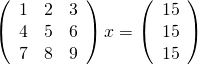
Now, the matrix shown above is singular and so we expect that we might have problems. Before looking at how Numpy deals with this computation, lets take a look at what happens if you ask MATLAB to do it
>> A=[1 2 3;4 5 6;7 8 9];
>> b=[15;15;15];
>> x=A\b
Warning: Matrix is close to singular
or badly scaled. Results may be
inaccurate. RCOND =  1.541976e-18.
x =
  -39.0000
   63.0000
  -24.0000
MATLAB gives us a warning that the input matrix is close to being singular (note that it didn’t actually recognize that it is singular) along with an estimate of the reciprocal of the condition number. It tells us that the results may be inaccurate and we’d do well to check. So, lets check:
>> A*x

ans =
   15.0000
   15.0000
   15.0000

>> norm(A*x-b)

ans =
2.8422e-14
We seem to have dodged the bullet since, despite the singular nature of our matrix, MATLAB has able to find a valid solution. MATLAB was right to have warned us though…in other cases we might not have been so lucky.
Let’s see how Numpy deals with this using the IPython notebook:
In [1]:
import numpy
from numpy import array
from numpy.linalg import solve
A=array([[1,2,3],[4,5,6],[7,8,9]])
b=array([15,15,15])
solve(A,b)

Out[1]:

array([-39.,  63., -24.])
It gave the same result as MATLAB [See note 1], presumably because it’s using the exact same LAPACK routine, but there was no warning of the singular nature of the matrix. During my demo, it was generally felt by everyone in the room that a warning should have been given, particularly when working in an interactive setting.
If you look at the documentation for Numpy’s solve command you’ll see that it is supposed to throw an exception when the matrix is singular but it clearly didn’t do so here. The exception is sometimes thrown though:
In [4]:

C=array([[1,1,1],[1,1,1],[1,1,1]])
x=solve(C,b)

---------------------------------------------------------------------------
LinAlgError                               Traceback (most recent call last)
 in ()
      1 C=array([[1,1,1],[1,1,1],[1,1,1]])
----> 2 x=solve(C,b)

C:\Python32\lib\site-packages\numpy\linalg\linalg.py in solve(a, b)
    326     results = lapack_routine(n_eq, n_rhs, a, n_eq, pivots, b, n_eq, 0)
    327     if results['info'] > 0:
--> 328         raise LinAlgError('Singular matrix')
    329     if one_eq:
    330         return wrap(b.ravel().astype(result_t))

LinAlgError: Singular matrix
It seems that Numpy is somehow checking for exact singularity but this will rarely be detected due to rounding errors. Those I’ve spoken to consider that MATLAB’s approach of estimating the condition number and warning when that is high would be better behavior since it alerts the user to the fact that the matrix is badly conditioned.
Thanks to Nick Higham and David Silvester for useful discussions regarding this post.
Notes
[1] – The results really are identical which you can see by rerunning the calculation after evaluating format long in MATLAB and numpy.set_printoptions(precision=15) in Python