
Archive for the ‘programming’ Category
Pop quiz: What does the following line of MATLAB code do?
rand('state',10)
If you said ‘It changes the seed of the random number generator to 10’ you get half a point.
‘Only half a point!?’ I hear you say accusingly ‘but it says so in my book [for example, 1-3], why not a full point?’
You only get a full point if you’d said something like ‘It changes the seed of the random number generator to 10 and it also changes the random number generator from the high quality, default Mersenne Twister generator to a lower quality legacy random number generator.‘
OK, how about this one?
rand('seed',10)
This behaves in a very similar manner– it changes both the seed and the type of the underlying generator. However, the random number generator it switches to this time is an even older one that was introduced as far back as MATLAB version 4. It is not very good at all by modern standards!
A closer look
Open up a fresh copy of a recent version of MATLAB and ask it about the random number generator it’s using
>> RandStream.getGlobalStream
ans =
mt19937ar random stream (current global stream)
             Seed: 0
  NormalTransform: Ziggurat
mt1993ar refers to a particular variant of the Mersenne Twister algorithm— an industry strength random number generator that’s used in many software packages and simulations. It’s been the default generator in MATLAB since 2007a. Change the seed using the modern (since 2011a), recommended syntax and ask again:
>> rng(10)
>> RandStream.getGlobalStream
ans =
mt19937ar random stream (current global stream)
             Seed: 10
  NormalTransform: Ziggurat
This is behaving exactly as you’d expect, you ask it to change the seed and it changes the seed…nothing more, nothing less. Now, let’s use the older syntax
>> rand('state',10)
>> RandStream.getGlobalStream
ans =
legacy random stream (current global stream)
  RAND algorithm: V5 (Subtract-with-Borrow), RANDN algorithm: V5 (Ziggurat)
The random number generator has completely changed! We are no longer using the Mersenne Twister algorithm, we are now using a ‘subtract with borrow’ [see reference 4 for implementation details] generator which has been shown to have several undesirable issues [5-7].
Let’s do it again but this time using the even older ‘seed’ version:
>> rand('seed',10)
>> RandStream.getGlobalStream
ans =
legacy random stream (current global stream)
  RAND algorithm: V4 (Congruential), RANDN algorithm: V5 (Ziggurat)
Now, this random number generator is ancient by computing standards. It also has a relatively tiny period of only 2 billion or so. For details see [4]
Why this matters
Now, all of this is well documented so you may wonder why I am making such a big issue out of it. Here are my reasons
- I often get sent MATLAB code for the purposes of code-review and optimisation. I see the old seeding syntax a LOT and the program’s authors are often blissfully unaware of the consequnces.
- The old syntax looks like all it should do is change the seed. It doesn’t! Before 2007a, however, it did!
- The old syntax is written in dozens of books because it was once the default, correct syntax to use.
- Many users don’t read the relevent section of the MATLAB documentation because they have no idea that there is a potential issue. They read a book or tutorial..it says to use rand(‘state’,10) so they do.
- MATLAB doesn’t use the old generators by default any more because they are not very good [4-7]!
- Using these old generators may adversely affect the quality of your simulation.
The bottom line
Don’t do either of these to change the seed of the default generator to 10:
rand('state',10)
rand('seed',10)
Do this instead:
rng(10)
Only if you completely understand and accept the consequences of the older syntax should you use it.
References
1. ‘MATLAB – A practical introduction to programming and problem solving’, 2009,Stormy Attaway
2. MATLAB Guide (Second Edition), 2005, Desmond Higham and Nicholas Higham
3. Essential MATLAB for Engineers and Scientists (Fourth Edition), 2009, Hahn and Valentine
4. Numerical Computing with MATLAB, 2004, Cleve Moler (available online)
5. Why does the random number generator in MATLAB fail a particular test of randomness? The Mathworks, retreived 26th September 2012
6. A strong nonrandom pattern in Matlab default random number generator, 2006, Petr Savicky, retreived 26th September 2012
7. Learning Random Numbers: A Matlab Anomaly, 2008, Petr Savicky and Marko Robnik-Šikonja, Applied Artificial Intelligence, Vol22 issue 3, pp 254-265
Other posts on random numbers in MATLAB
- Parallel Random Numbers in MATLAB #1 – An introduction to random numbers and seeding in MATLAB
- Probability of overlapping subsequences (How likely is it to get overlapping random sequences using two different seeds for the Mersenne Twister algorithm)
One of my favourite investment news sites is The Motley Fool which frequently run articles such as 10 Shares Trading Near 52 week lows and 15 Shares Trading Near 52 week Highs. The idea behind such filtering is to seek out shares that have done particularly badly (or well) over the last year and then subject them to further analysis in order to find opportunities. Thanks to Mathematica’s FinancialData command, it is rather easy to generate these lists yourself whenever you like.
15 Shares Trading Near 52 Week Highs
The original article selected the 15 largest cap shares from the FTSE All Share Index that were trading within 3% of their 52 week high at the time of publication. Let’s see how to do that using Mathematica.
The following code returns the tickers of all shares from the FTSE All Share Index that are trading within 3% of their 52 week high.
percentage = 3;
all52weekHighs =
 Select[FinancialData["^FTAS", "Members"],
 Abs[FinancialData[#, "FractionalChangeHigh52Week"]] < (percentage/100.) &];
The variable all52weekHighs contains a list of stock tickers (e.g. LLOY.L) that meet our criteria. The next thing to do is to find the market cap of each one:
all52WeekHighsWithCaps =
 Map[{#, FinancialData[#, "MarketCap"]} &, all52weekHighs];
This works fine for most shares. LloydsTSB for example returns {“LLOY.L”, 2.7746*10^10} at the time of writing but the MarketCap query fails for some tickers. For example, the Market Cap for HSL.L is not available and we get {“HSL.L”, Missing[“NotAvailable”]}. Let’s discard these by insisting that we only consider stocks that have a numeric market cap.
Goodall52WeekHighsWithCaps =
  Select[all52WeekHighsWithCaps, NumberQ[#[[2]]] &];
We sort the list according to MarketCap:
sorted = Sort[Goodall52WeekHighsWithCaps, #1[[2]] > #2[[2]] &];
Let’s prettify the list a little by iterating over all tickers and replacing the ticker with the associated stock name. Also, let’s divide the market cap by 1 million to make it more readable
finallist =
 Map[{FinancialData[#[[1]], "Name"], #[[2]]/1000000} &, sorted];
Now, you may be wondering why I haven’t been showing you the output of these commands. This is simply because even this final list is rather large at 118 entries at the time of writing
Length[finallist]

118
The original article only considered the top 15 sorted by Market Cap so let’s show those. Market Caps are given in millions.
top15 = finallist[[1;;15]]//Grid

HSBC Holdings PLC    94159.
National Grid    24432.
Prudential PLC    21775.
Centrica PLC    17193.
Rolls Royce Group    16363.
WPP Plc    10743.
Experian PLC    10197.
Old Mutual PLC    8400.
Legal & General Group PLC    8036.
Wolseley PLC    7955.
Standard Life    6662.
J Sainsbury plc    6401.
Aggreko PLC    6391.
Land Securities Group PLC    6180.
British Land Co PLC    4859.
and we are done.
Let’s use Mathematica to to discover the longest English words where the letters are in alphabetical order. The following command will give all such words
DictionaryLookup[x__ /; Characters[x] == Sort[Characters[x]]]
I’m not going to show all of the output because there are 562 of them (including single letter words such as ‘I’ and ‘a’) as we can see by doing
 Length[
 DictionaryLookup[x__ /; Characters[x] == Sort[Characters[x]]]
]

562
The longest of these words has seven characters:
Max[Map[StringLength,
  DictionaryLookup[x__ /; Characters[x] == Sort[Characters[x]]]]]

7
It turns out that only one such word has the maximum 7 characters
DictionaryLookup[x__ /; Characters[x] == Sort[Characters[x]] && StringLength[x] == 7]

{"billowy"}
There are 34 such words that contain 6 characters
 DictionaryLookup[
 x__ /; Characters[x] == Sort[Characters[x]] && StringLength[x] == 6]

{"abbess", "Abbott", "abhors", "accent", "accept", "access", \
"accost", "adders", "almost", "begins", "bellow", "Bellow", "bijoux", \
"billow", "biopsy", "bloops", "cellos", "chills", "chilly", "chimps", \
"chinos", "chintz", "chippy", "chivvy", "choosy", "choppy", "Deimos", \
"effort", "floors", "floppy", "flossy", "gloppy", "glossy", "knotty"}
If you insist on all letters being different, there are 9:
DictionaryLookup[
 x__ /; Characters[x] == Sort[Characters[x]] && StringLength[x] == 6 &&
    Length[Union[Characters[x]]] == Length[Characters[x]]]

{"abhors", "almost", "begins", "bijoux", "biopsy", "chimps", \
"chinos", "chintz", "Deimos"}
How about where all the letters are in reverse alphabetical order with no repeats? The longest such words have 7 characters
Max[
 Map[StringLength,
  DictionaryLookup[
   x__ /; Characters[x] == Reverse[Sort[Characters[x]]]]]]

7
Here they are
DictionaryLookup[
 x__ /; Characters[x] == Reverse[Sort[Characters[x]]] &&
   StringLength[x] == 7 &&
   Length[Union[Characters[x]]] == Length[Characters[x]]]

{"sponged", "wronged"}
Updated 26th March 2015
I’ve been playing with AVX vectorisation on modern CPUs off and on for a while now and thought that I’d write up a little of what I’ve discovered. The basic idea of vectorisation is that each processor core in a modern CPU can operate on multiple values (i.e. a vector) simultaneously per instruction cycle.
Modern processors have 256bit wide vector units which means that each CORE can perform up to 16 double precision or 32 single precision floating point operations (FLOPS) per clock cycle. So, on a quad core CPU that’s typically found in a decent laptop you have 4 vector units (one per core) and could perform up to 64 double precision FLOPS per cycle. The Intel Xeon Phi accelerator unit has even wider vector units — 512bit!
This all sounds great but how does a programmer actually make use of this neat hardware trick? There are many routes:-
Intrinsics
At the ‘close to the metal’ level you code for these vector units using instructions called AVX intrinsics. This is relatively difficult and leads to none-portable code if you are not careful.
- The Intel Intrinsics Guide – An interactive reference tool for Intel intrinsic instructions,
- Introduction to Intel Advanced Vector Extensions – includes some example C++ programs using AVX intinsics
- Benefits of Intel AVX for small matrices – More code examples along with speed comparisons.
Auto-vectorisation in compilers
Since working with intrinsics is such hard work, why not let the compiler take the strain? Many modern compilers can automatically vectorize your C, C++ or Fortran code including gcc, PGI and Intel. Sometimes all you need to do is add an extra switch at compile time and reap the speed benefits. In truth, vectorization isn’t always automatic and the programmer needs to give the compiler some assistance but it is a lot easier than hand-coding intrinsics.
- A Guide to Auto-vectorization with Intel C++ Compilers – Exactly what it says. In my experience, the intel compilers do auto-vectorisation better than other compilers.
- Auto-vectorisation in gcc 4.7 – A superb article showing how auto-vectorisation works in practice when using gcc 4.7. Lots of C code examples along with the emitted assembler and a good discussion of the hints you may need to give to the compiler to get maximum performance.
- Auto-vectorisation in gcc – The project page for auto-vectorisation in gcc
- Optimizing Application Performance on x64 Processor-based Systems with PGI Compilers and Tools – Includes discussion and example of auto-vectorisation using the PGI compiler
- Jim Radigan: Inside Auto-Vectorization, 1 of n – A video by a Microsoft engineer working on Visual Studio 2012. A superb introduction to what vectorisation is along with speed-up demonstrations and discussion on how the auto-vectoriser will work in Visual Studio 2012.
- Auto Vectorizer in Visual Studio 2012 – A series of blog articles about vectorization in Visual Studio 2012.
Intel SPMD Program Compiler (ispc)
There is a midway point between automagic vectorisation and having to use intrinsics. Intel have a free compiler called ispc (http://ispc.github.com/) that allows you to write compute kernels in a modified subset of C. These kernels are then compiled to make use of vectorised instruction sets. Programming using ispc feels a little like using OpenCL or CUDA. I figured out how to hook it up to MATLAB a few months ago and developed a version of the Square Root function that is almost twice as fast as MATLAB’s own version for sandy bridge i7 processors.
- http://ispc.github.com/ – The website for ispc
- http://ispc.github.com/perf.html – Some performance metrics. In some cases combining vectorisation and parallelisation can increase single precision throughput by more than a factor of 32 on a quad-core machine!
- ispc: A SPMD Compiler For High-Performance CPU Programming, Illinois-Intel Parallelism Center Distinguished Speaker Series (UIUC), March 15, 2012. (talk video–requires Windows Media Player.) This link was taken from Matt Pharr’s website (The author of ispc).
OpenMP
OpenMP is an API specification for parallel programming that’s been supported by several compilers for many years. OpenMP 4 was released in mid 2013 and included support for vectorisation.
- Performance Essentials with OpenMP 4.0 Vectorization – A series of seven videos from Intel covering performance essentials using OpenMP 4.0 Vectorization with C/C++.
- Explicit Vector Programming with OpenMP 4.0 SIMD Extensions – A tutorial from HPC today.
Vectorised Libraries
Vendors of numerical libraries are steadily applying vectorisation techniques in order to maximise performance. If the execution speed of your application depends upon these library functions, you may get a significant speed boost simply by updating to the latest version of the library and recompiling with the relevant compiler flags.
- Yeppp! – A fast, vectorised math library (benchmarks here)
- NAG Library for Xeon Phi – A huge, commercial library for the Intel Xeon Phi Accelerator
- Intel AVX optimization in Intel Math Kernel Library (MKL) – See what’s been vectorised in version 10.3 of the MKL
- Intel Integrated Performance Primitives (IPP) Functions Optimized for AVX – The IPP library includes many basic algorithms used in image and signal processing
- SIMD Library for Evaluating Elementary Functions (SLEEF) – An open-source, vectorised library for the calculation of various mathematical functions. Someone has done benchmarks for it here.
- SIMD-oriented Fast Mersenne Twister (SFMT) – Uses vectorisation to implement a very fast random number generation.
CUDA for x86
Another route to vectorised code is to make use of the PGI Compiler’s support for x86 CUDA. What you do is take CUDA kernels written for NVIDIA GPUs and use the PGI Compiler to compile these kernels for x86 processors. The resulting executables take advantage of vectorisation. In essence, the vector units of the CPU are acting like CUDA cores–which they sort of are anyway!
The PGI compilers also have technology which they call PGI Unified binary which allows you to use NVIDIA GPUs when present or default to using multi-core x86 if no GPU is present.
- PGI CUDA-x86 – PGI’s main page for their CUDA on x86 technologies
OpenCL for x86 processors
Yet another route to vectorisation would be to use Intel’s OpenCL implementation which takes OpenCL kernels and compiles them down to take advantage of vector units (http://software.intel.com/en-us/blogs/2011/09/26/autovectorization-in-intel-opencl-sdk-15/). The AMD OpenCL implementation may also do this but I haven’t tried it and haven’t had chance to research it yet.
WalkingRandomly posts
I’ve written a couple of blog posts that made use of this technology.
- Using Intel’s SPMD Compiler (ispc) with MATLAB on Linux
- Using the Portland PGI Compiler for MATLAB mex files in Windows
Miscellaneous resources
There is other stuff out there but the above covers everything that I have used so far. I’ll finish by saying that everyone interested in vectorisation should check out this website…It’s the bible!
Research Articles on SSE/AVX vectorisation
I found the following research articles useful/interesting. I’ll add to this list over time as I dig out other articles.
I first mentioned Julia, a new language for high performance scientific computing, back in the February edition of a Month of Math software and it certainly hasn’t stood still since then. A WalkingRandomly reader, Ohad, recently contacted me to tell me about a forum post announcing some Julia speed improvements.
Julia has a set of micro-benchmarks and the slowest of them is now only two times slower than the equivalent in C. That’s compiled language performance with an easy to use scripting language. Astonishingly, Julia is faster than gfortran in a couple of instances. Nice work!
Comparison times between Julia and other scientific scripting languages (MATLAB, Python and R for instance) for these micro-benchmarks are posted on Julia’s website. The Julia team have included the full benchmark source code used for all languages so if you are an expert in one of them, why not take a look at how they have represented your language and see what you think?
Let me know if you’ve used Julia at all, I’m interested in what people think of it.
Someone recently contacted me complaining that MATLAB could not do a QR factorisation of a variable precision arithmetic matrix. Double precision matrices work fine of course:
>> A=[2 1 3;-1 0 7; 0 -1 -1];
>> [Q R]=qr(A)

Q =
   -0.8944   -0.1826    0.4082
    0.4472   -0.3651    0.8165
         0    0.9129    0.4082

R =
   -2.2361   -0.8944    0.4472
         0   -1.0954   -4.0166
         0         0    6.5320
Variable precision matrices do not (I’m using MATLAB 2012a and the symbolic toolbox here).
>> a=vpa([2 1 3;-1 0 7; 0 -1 -1]);
>> [Q R]=qr(a)
Undefined function 'qr' for input arguments of type 'sym'.
It turns out that MATLAB and the symbolic toolbox CAN do variable precision QR factorisation….it’s just hidden a bit. The following very simple function, vpa_qr.m, shows how to get at it
function [ q,r ] = vpa_qr( x )
result = feval(symengine,'linalg::factorQR',x);
q=result(1);
r=result(2);
end
Let’s see how that does
>> a=vpa([2 1 3;-1 0 7; 0 -1 -1]);
>> [Q R]=vpa_qr(a);
I’ve suppressed the output because it’s so large but it has definitely worked. Let’s take a look at the first element of Q for example
>> Q(1)

ans =
0.89442719099991587856366946749251
Which is correct to the default number of variable precision digits, 32. Of course we could change this to anything we like using the digits function.
- Download vpa_qr.m (needs symbolic toolbox)
A MATLAB user at Manchester University contacted me recently asking about Black-Scholes option pricing. The MATLAB Financial Toolbox has a range of functions that can calculate Black-Scholes put and call option prices along with several of the sensitivities (or ‘greeks‘) such as blsprice, blsdelta and so on.
The user’s problem is that we don’t have any site-wide licenses for the Financial Toolbox. We do, however, have a full site license for the NAG Toolbox for MATLAB which has a nice set of option pricing routines. Even though they calculate the same things, NAG Toolbox option pricing functions look very different to the Financial Toolbox ones and so I felt that a Rosetta Stone type article might be useful.
For Black-Scholes option pricing, there are three main differences between the two systems:
- The Financial Toolbox has separate functions for calculating the option price and each greek (e.g. blsprice, blsgamma, blsdelta etc) whereas NAG calculates the price and all greeks simultaneously with a single function call.
- Where appropriate, The MATLAB functions calculate Put and Call values with one function call whereas with NAG you need to explicitly specify Call or Put.
- NAG calculates more greeks than MATLAB.
The following code example pretty much says it all. Any variable calculated with the NAG Toolbox is prefixed NAG_ whereas anything calculated with the financial toolbox is prefixed MW_. When I developed this, I was using MATLAB 2012a with NAG Toolbox Mark 22.
%Input parameters for both NAG and MATLAB.
Price=50;
Strike=40;
Rate=0.1;
Time=0.25;
Volatility=0.3;
Yield=0;

%calculate all greeks for a put using NAG
[NAG_Put, NAG_PutDelta, NAG_Gamma, NAG_Vega, NAG_PutTheta, NAG_PutRho, NAG_PutCrho, NAG_PutVanna,...
NAG_PutCharm, NAG_PutSpeed, NAG_PutColour, NAG_PutZomma,NAG_PutVomma, ifail] =...
 s30ab('p', Strike, Price, Time, Volatility, Rate, Yield);

%calculate all greeks for a Call using NAG
[NAG_Call, NAG_CallDelta, NAG_Gamma, NAG_Vega, NAG_CallTheta, NAG_CallRho, NAG_CallCrho, NAG_CallVanna,...
 NAG_CallCharm, NAG_CallSpeed, NAG_CallColour,NAG_CallZomma, NAG_CallVomma, ifail] = ...
s30ab('c', Strike, Price, Time, Volatility, Rate, Yield);

%Calculate the Elasticity (Lambda)
NAG_CallLambda = Price/NAG_Call*NAG_CallDelta;
NAG_PutLambda = Price/NAG_Put*NAG_PutDelta;

%Calculate the same set of prices and greeks using the MATLAB Finance Toolbox
[MW_Call, MW_Put] = blsprice(Price, Strike, Rate, Time, Volatility, Yield);
[MW_CallDelta, MW_PutDelta] = blsdelta(Price, Strike, Rate, Time, Volatility, Yield);
MW_Gamma = blsgamma(Price, Strike, Rate, Time, Volatility, Yield);
MW_Vega = blsvega(Price, Strike, Rate, Time, Volatility, Yield);
[MW_CallTheta, MW_PutTheta] = blstheta(Price, Strike, Rate, Time,Volatility, Yield);
[MW_CallRho, MW_PutRho]= blsrho(Price, Strike, Rate, Time, Volatility,Yield);
[MW_CallLambda,MW_PutLambda]=blslambda(Price, Strike, Rate, Time, Volatility,Yield);
Note that NAG doesn’t output the elasticity (Lambda) directly but it is trivial to obtain it using values that it does output. Also note that as far as I can tell, NAG outputs more Greeks than the Financial Toolbox does.
I’m not going to show the entire output of the above program because there are a lot of numbers. However, here are the Put values as calculated by NAG shown to 4 decimal places. I have checked and they agree with the Financial Toolbox to within numerical noise.
NAG_Put =0.1350
NAG_PutDelta =-0.0419
NAG_PutLambda =-15.5066
NAG_Gamma =0.0119
NAG_Vega =2.2361
NAG_PutTheta =-1.1187
NAG_PutRho =-0.5572
NAG_PutCrho = -0.5235
NAG_PutVanna =-0.4709
NAG_PutCharm =0.2229
NAG_PutSpeed =-0.0030
NAG_PutColour =-0.0275
NAG_PutZomma =0.0688
NAG_PutVomma =20.3560
This is a guest post by colleague and friend, Ian Cottam of The University of Manchester.
I recently implemented a lint program for Condor (unsurprisingly called: condor_lint), analogous to the famous one for C of days of yore. That is, it points out the fluff in a Condor script and suggests improvements. It is based on our local knowledge of how our Condor Pool is set up, here in Manchester, and also reflects recent changes to Condor.
Why I did it is interesting and may have wider applicability. Everything it reports is already written up on our extensive internal web site which users rarely read. I suspect the usual modus operandi of our users is to find, or be given, a Condor script, relevant to their domain, and make the minimum modifications to it that means it ‘works’. Subsequently, its basic structure is never updated (apart from referencing new data files, etc).
To be fair, that’s what we all do — is it not?
Ignoring our continually updated documentation means that a user’s job may make poor use of the Condor Pool, affecting others, and costing real money (in wasted energy) through such “bad throughput”.
Now, although we always run the user’s job if Condor’s basic condor_submit command accepts it, we first automatically run condor_lint. This directly tells them any “bad news” and also, in many cases, gives them the link to the specific web page that explains the issue in detail.
Clearly, even such “in your face” advice can still be ignored, but we are starting to see improvements.
Obviously such an approach is not limited to Condor, and we would be interested in hearing of “lint approaches” with other systems.
Links
Other WalkingRandomly posts by Ian Cottam
If you have an interest in mathematics, you’ve almost certainly stumbled across The Wolfram Demonstrations Project at some time or other. Based upon Wolfram Research’s proprietary Mathematica software and containing over 8000 interactive demonstrations, The Wolfram Demonstrations Project is a fantastic resource for anyone interested in mathematics and related sciences; and now it has some competition.
Sage is a free, open source alternative to software such as Mathematica and, thanks to its interact function, it is fully capable of producing advanced, interactive mathematical demonstrations with just a few lines of code. The Sage language is based on Python and is incredibly easy to learn.
The Sage Interactive Database has been launched to showcase this functionality and its looking great. There’s currently only 31 demonstrations available but, since anyone can sign up and contribute, I expect this number to increase rapidly. For example, I took the simple applet I created back in 2009 and had it up on the database in less than 10 minutes! Unlike the Wolfram Demonstrations Project, you don’t need to purchase an expensive piece of software before you can start writing Sage Interactions….Sage is free to everyone.
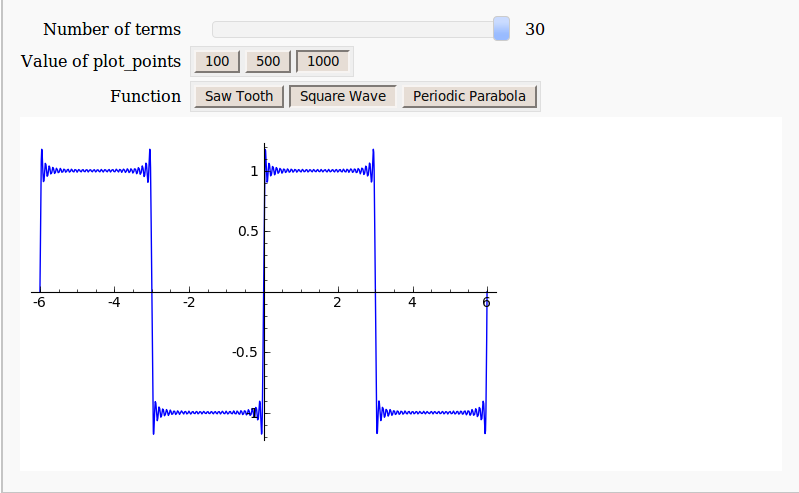
Not everything is perfect, however. For example, there is no native Windows version of Sage. Windows users have to make use of a Virtualbox virtual machine which puts off many people from trying this great piece of software. Furthermore, the interactive ‘applets’ produced from Sage’s interact function are not as smooth running as those produced by Mathematica’s Manipulate function. Finally, Sage’s interact doesn’t have as many control options as Mathematica’s Manipulate (There’s no Locator control for example and my bounty still stands).
The Sage Interactive Database is a great new project and I encourage all of you to head over there, take a look around and maybe contribute something.
I recently got access to a shiny new (new to me at least) set of compilers, The Portland PGI compiler suite which comes with a great set of technologies to play with including AVX vector support, CUDA for x86 and GPU pragma-based acceleration. So naturally, it wasn’t long before I wondered if I could use the PGI suite as compilers for MATLAB mex files. The bad news is that The Mathworks don’t support the PGI Compilers out of the box but that leads to the good news…I get to dig down and figure out how to add support for unsupported compilers.
In what follows I made use of MATLAB 2012a on 64bit Windows 7 with Version 12.5 of the PGI Portland Compiler Suite.
In order to set up a C mex-compiler in MATLAB you execute the following
mex -setup
which causes MATLAB to execute a Perl script at C:\Program Files\MATLAB\R2012a\bin\mexsetup.pm. This script scans the directory C:\Program Files\MATLAB\R2012a\bin\win64\mexopts looking for Perl scripts with the extension .stp and running whatever it finds. Each .stp file looks for a particular compiler. After all .stp files have been executed, a list of compilers found gets returned to the user. When the user chooses a compiler, the corresponding .bat file gets copied to the directory returned by MATLAB’s prefdir function. This sets up the compiler for use. All of this is nicely documented in the mexsetup.pm file itself.
So, I’ve had my first crack at this and the results are the following two files.
These are crude, and there’s probably lots missing/wrong but they seem to work. Copy them to C:\Program Files\MATLAB\R2012a\bin\win64\mexopts. The location of the compiler is hard-coded in pgi.stp so you’ll need to change the following line if your compiler location differs from mine
my $default_location = "C:\\Program Files\\PGI\\win64\\12.5\\bin";
Now, when you do mex -setup, you should get an entry PGI Workstation 12.5 64bit 12.5 in C:\Program Files\PGI\win64\12.5\bin which you can select as normal.
An example compilation and some details.
Let’s compile the following very simple mex file, mex_sin.c, using the PGI compiler which does little more than take an elementwise sine of the input matrix.
#include <math.h>
#include "mex.h"

void mexFunction( int nlhs, mxArray *plhs[], int nrhs, const mxArray *prhs[] )
{
    double *in,*out;
    double dist,a,b;
    int rows,cols,outsize;
    int i,j,k;

    /*Get pointers to input matrix*/
    in = mxGetPr(prhs[0]);
    /*Get rows and columns of input*/
    rows = mxGetM(prhs[0]);
    cols = mxGetN(prhs[0]);

    /* Create output matrix */
    outsize = rows*cols;
    plhs[0] = mxCreateDoubleMatrix(rows, cols, mxREAL);
    /* Assign pointer to the output */
    out = mxGetPr(plhs[0]);

    for(i=0;i<outsize;i++){
        out[i] = sin(in[i]);
    }

}
Compile using the -v switch to get verbose information about the compilation
mex sin_mex.c -v
You’ll see that the compiled mex file is actually a renamed .dll file that was compiled and linked with the following flags
pgcc -c -Bdynamic  -Minfo -fast
pgcc --Mmakedll=export_all  -L"C:\Program Files\MATLAB\R2012a\extern\lib\win64\microsoft" libmx.lib libmex.lib libmat.lib
The switch –Mmakedll=export_all is actually not supported by PGI which makes this whole setup doubly unsupported! However, I couldn’t find a way to export the required symbols without modifying the mex source code so I lived with it. Maybe I’ll figure out a better way in the future. Let’s try the new function out
>> a=[1 2 3];
>> mex_sin(a)
Invalid MEX-file 'C:\Work\mex_sin.mexw64': The specified module could not be found.
The reason for the error message is that a required PGI .dll file, pgc.dll, is not on my system path so I need to do the following in MATLAB.
setenv('PATH', [getenv('PATH') ';C:\Program Files\PGI\win64\12.5\bin\']);
This fixes things
>> mex_sin(a)
ans =
    0.8415    0.9093    0.1411
Performance
I took a quick look at the performance of this mex function using my quad-core, Sandy Bridge laptop. I highly doubted that I was going to beat MATLAB’s built in sin function (which is highly optimised and multithreaded) with so little work and I was right:
>> a=rand(1,100000000);
>> tic;mex_sin(a);toc
Elapsed time is 1.320855 seconds.
>> tic;sin(a);toc
Elapsed time is 0.486369 seconds.
That’s not really a fair comparison though since I am purposely leaving mutithreading out of the PGI mex equation for now. It’s a much fairer comparison to compare the exact same mex file using different compilers so let’s do that. I created three different compiled mex routines from the source code above using the three compilers installed on my laptop and performed a very crude time test as follows
>> a=rand(1,100000000);
>> tic;mex_sin_pgi(a);toc              %PGI 12.5 run 1
Elapsed time is 1.317122 seconds.
>> tic;mex_sin_pgi(a);toc              %PGI 12.5 run 2
Elapsed time is 1.338271 seconds.

>> tic;mex_sin_vs(a);toc               %Visual Studio 2008 run 1
Elapsed time is 1.459463 seconds.
>> tic;mex_sin_vs(a);toc
Elapsed time is 1.446947 seconds.      %Visual Studio 2008 run 2

>> tic;mex_sin_intel(a);toc             %Intel Compiler 12.0 run 1
Elapsed time is 0.907018 seconds.
>> tic;mex_sin_intel(a);toc             %Intel Compiler 12.0 run 2
Elapsed time is 0.860218 seconds.
PGI did a little better than Visual Studio 2008 but was beaten by Intel. I’m hoping that I’ll be able to get more performance out of the PGI compiler as I learn more about the compilation flags.
Getting PGI to make use of SSE extensions
Part of the output of the mex sin_mex.c -v compilation command is the following notice
mexFunction:
     23, Loop not vectorized: data dependency
This notice is a result of the -Minfo compilation switch and indicates that the PGI compiler can’t determine if the in and out arrays overlap or not. If they don’t overlap then it would be safe to unroll the loop and make use of SSE or AVX instructions to make better use of my Sandy Bridge processor. This should hopefully speed things up a little.
As the programmer, I am sure that the two arrays don’t overlap so I need to give the compiler a hand. One way to do this would be to modify the pgi.dat file to include the compilation switch -Msafeptr which tells the compiler that arrays never overlap anywhere. This might not be a good idea since it may not always be true so I decided to be more cautious and make use of the restrict keyword. That is, I changed the mex source code so that
double *in,*out;
becomes
double * restrict in,* restrict out;
Now when I compile using the PGI compiler, the notice from -Mifno becomes
mexFunction:
     23, Generated 3 alternate versions of the loop
         Generated vector sse code for the loop
         Generated a prefetch instruction for the loop
which demonstrates that the compiler is much happier! So, what did this do for performance?
>> tic;mex_sin_pgi(a);toc
Elapsed time is 1.450002 seconds.
>> tic;mex_sin_pgi(a);toc
Elapsed time is 1.460536 seconds.
This is slower than when SSE instructions weren’t being used which isn’t what I was expecting at all! If anyone has any insight into what’s going on here, I’d love to hear from you.
Future Work
I’m happy that I’ve got this compiler working in MATLAB but there is a lot to do including:
- Tidy up the pgi.dat and pgi.stp files so that they look and act more professionally.
- Figure out the best set of compiler switches to use– it is almost certain that what I’m using now is sub-optimal since I am new to the PGI compiler.
- Get OpenMP support working. I tried using the -Mconcur compilation flag which auto-parallelised the loop but it crashed MATLAB when I ran it. This needs investigating
- Get PGI accelerator support working so I can offload work to the GPU.
- Figure out why the SSE version of this function is slower than the non-SSE version
- Figure out how to determine whether or not the compiler is emitting AVX instructions. The documentation suggests that if the compiler is called on a Sandy Bridge machine, and if vectorisation is possible then it will produce AVX instructions but AVX is not mentioned in the output of -Minfo. Nothing changes if you explicity set the target to Sandy Bridge with the compiler switch –tp sandybridge–64.
Look out for more articles on this in the future.
Related WalkingRandomly Articles
- Which MATLAB functions make use of multithreading?
- Using Intel’s SPMD Compiler (ispc) with MATLAB on Linux
- Parallel MATLAB with OpenMP mex files
- MATLAB mex functions using the NAG C Library
My setup
- Laptop model: Dell XPS L702X
- CPU: Intel Core i7-2630QM @2Ghz software overclockable to 2.9Ghz. 4 physical cores but total 8 virtual cores due to Hyperthreading.
- GPU: GeForce GT 555M with 144 CUDA Cores. Graphics clock: 590Mhz. Processor Clock:1180 Mhz. 3072 Mb DDR3 Memeory
- RAM: 8 Gb
- OS: Windows 7 Home Premium 64 bit.
- MATLAB: 2012a
- PGI Compiler: 12.5