
Archive for the ‘math software’ Category
One of the best ways to learn how to use a piece of software such as Mathematica is simply to dive in and start using it. If you get lost, consult the documentation and if you get really lost, ask for help…..but who to ask?
Ideally, you’d need a group of people who are friendly, knowledgeable and always around–no matter what time of day or night it is. Wouldn’t that be great? It would be even better if they were to offer you all of this help and expertise for free. Oh, and let’s have the moon on a stick while we’re at it.
The Mathematica StackExchange community offers Mathematica users all of the above requirements apart from the mounted satellite. Based upon the same technology as the immensely popular Stack Overflow question and answer site for software developers, Mathematica StackExchange has over 3000 active Mathematica users. Between them, these users have asked, and answered, over 4000 questions on almost every aspect of Mathematica you can imagine and then some.
A matter of reputation
Every user on Mathematica StackExchange has a reputation level which is essentially a measure of how much the rest of the community trusts that user. Users are awarded reputation points (by other users) both for asking good questions and writing good answers which means that you don’t have to be a Mathematica master in order to succeed…inquisitive neophytes can also build up a solid level of reputation. More details on the reputation system can be found at the site’s Frequenty Asked Questions section.
Starters for 10
To get a flavour of the site, I recommend taking a look at a few highly rated Q+As such as Where can I find examples of good Mathematica programming practice?, xkcd-stye graphs and How can I use Mathematica’s graph functions to cheat at Boggle? Alternatively, take a browse through the list of questions sorted according to the number of votes they’ve recieved.
Before you ask a question of your own, it is recommended that you search the site to ensure that you’re not asking something that has been asked, and answered in the past. Once that’s done feel free to ask away– you don’t even need to create an account and log-in (although it is highly recommended that you do)!
Make friends and influence people
I signed up for Mathematica StackExchange a couple of months ago (My profile’s here) but have only started using it in earnest for the last few weeks and I only wish I had started earlier. Although I like to think that I know Mathematica pretty well, I’ve learned a lot more about it in a very short time from some very smart people. I’ve also had a lot of fun, met some great people and maybe helped a few people out along the way.
So, if you have a Mathematica problem, and no one else can help, maybe you should try Mathematica StackExchange.
Since I am writing this article while on a train it seems only fitting that I say ‘Welcome to the slightly delayed November edition of a Month of Math software, the latest in a series of posts that have been going for almost two years‘ If you have any news for the final edition of 2012 feel free to contact me to tell me all about it.
General Mathematics
- After a two year wait, version 9 of Mathematica is now available. There are 400 new functions in areas such as Time Series, Stochastic Differential Equations, Markov Chains, Survival Analysis and Reliability Analysis. There’s also built in integration with R, 3D Volumetric image processing, enhanced control system support and much more. More details on what’s new in 9 can be found at http://www.wolfram.co.uk/mathematica/new-in-9/.
- Version 4.2 of Geogebra is now available. See http://blog.geogebra.org/2012/11/4-2-release-candidate/ for the new stuff. One of the most exciting new developments is the new Computer Algebra System (CAS) view.
- Version 5.4.1 of Sage, the free alternative to Mathematica,Maple,Magma and MATLAB and been released. See http://www.sagemath.org/mirror/src/changelogs/sage-5.4.1.txt for what’s new.
- A minor upgrade to Maple has been released. The enhancements available in 16.02 are detailed at http://www.maplesoft.com/support/downloads/m16_02update.aspx
Libraries
- The Fast Library for Number Theory, FLINT, was updated to version 2.3 on November 9th. See what’s new in this C library by taking a look at the NEWS file.
- MAGMA is a GPU accelerated linear algebra library from the Innovative Computing Laboratory (ICL) at the University of Tennessee. According to the release announcement, version 1.3 of the library includes some performance improvements and support for the new NVIDIA-Kepler GPUs.
- PLASMA is another linear algebra library from the people at ICL and it too has seen a new release. Version 2.5.0 Beta 1 contains a couple of new algorithms, bug fixes and performance enhancements–check out the release announcement for the details. A nice paper that explains the differences between PLASMA and Magma is available at http://icl.cs.utk.edu/news_pub/submissions/plasma-scidac09.pdf
- The HSL library is ‘a collection of state-of-the-art packages for large-scale scientific computation written and developed by the Numerical Analysis Group at the STFC Rutherford Appleton Laboratory’ It saw a few updates throughout November – see the project’s change log for details.
Mobile
- SoftMaker have released their office suite for Android devices and my first impressions are that it blows the competition out of the water. Although the Word and Powerpoint alternatives are fine, the app that might be of most interest to readers of this article is, of course, the spreadsheet app, PlanMaker. This initial release includes over 330 calculation functions and has support for complex numbers, arrays and 3d charts.
- MathStudio, one of the best mathematical apps for mobile devices has been updated to version 5.4.Other than adding suport for iOS 6 and iPhone 5 I have no idea what’s new since the release annoucement is rather sparse.
Bits and pieces
- The numeric javascript library has been updated to 1.2.4. This is mainly a big-fix release with full details at http://numericjs.com/wordpress/?p=66
- The commercial computer algebra system, Magma, is now at version 2.18-11. See what’s new at http://magma.maths.usyd.edu.au/magma/releasenotes/2/18/12/
- The free open-source linear algebra library ViennaCL is now available in version 1.4.0. In addition to the OpenCL-based computing backend, the new release now also provides a CUDA- and an OpenMP-backend. Most noteworthy among the many new features and updates are the improved performance of ILU preconditioners including optional GPU-acceleration using level-scheduling, the incomplete Cholesky factorization preconditioner, a mixed-precision conjugate gradient solver, and further increased API compatibility with Boost.uBLAS.
Of Mathematica and memory
A Mathematica user recently contacted me to report a suspected memory leak, wondering if it was a known issue before escalating it any further. At the beginning of his Mathematica notebook he had the following command
Clear[Evaluate[Context[] <> "*"]]
This command clears all the definitions for symbols in the current context and so the user expected it to release all used memory back to the system. However, every time he re-evaluated his notebook, the amount of memory used by Mathematica increased. If he did this enough times, Mathematica used all available memory.
Looks like a memory leak, smells like a memory leak but it isn’t!
What’s happening?
The culprit is the fact that Mathematica stores an evaluation history. This allows you to recall the output of the 10th evaluation (say) with the command
%10
As my colleague ran and re-ran his notebook, over and over again, this history grew without bound eating up all of his memory and causing what looked like a memory leak.
Limiting the size of the history
The way to fix this issue is simply to limit the length of the output history. Personally, I rarely need more than the most recently evaluated output so I suggested that we limit it to one.
$HistoryLength = 1;
This fixed the problem for him. No matter how many times he re-ran his notebook, the memory usage remained roughly constant. However, we observed (in windows at least) that if the Mathematica session was using vast amounts of memory due to history, executing the above command did not release it. So, you can use this trick to prevent the history from eating all of your memory but it doesn’t appear to fix things after the event…to do that requires a little more work. The easiest way, however, is to kill the kernel and start again.
Links
- Memory Management in Mathematica
- Mathematica Session History
- ClearSystemCache[] – The system cache is another area of Mathematica that can use up some memory.
Simulink from The Mathworks is widely used in various disciplines. I was recently asked to come up with a list of alternative products, both free and commercial.
Here are some alternatives that I know of:
- MapleSim – A commercial Simuink replacement from the makers of the computer algebra system, Maple
- OpenModelica -An open-source Modelica-based modeling and simulation environment intended for industrial and academic usage
- Wolfram SystemModeler – Very new commercial product from the makers of Mathematica. Click here for Wolfram’s take on why their product is the best.
- xcos – This free Simulink alternative comes with Scilab.
I plan to keep this list updated and, eventually, include more details. Comments, suggestions and links to comparison articles are very welcome. If you have taught a course using one of these alternatives and have experiences to share, please let me know. Similarly for anyone who was switched (or attempted to switch) their research from Simulink. Either comment to this post or contact me directly.
I’ve nothing against Simulink but would like to get a handle on what else is out there.
Pop quiz: What does the following line of MATLAB code do?
rand('state',10)
If you said ‘It changes the seed of the random number generator to 10’ you get half a point.
‘Only half a point!?’ I hear you say accusingly ‘but it says so in my book [for example, 1-3], why not a full point?’
You only get a full point if you’d said something like ‘It changes the seed of the random number generator to 10 and it also changes the random number generator from the high quality, default Mersenne Twister generator to a lower quality legacy random number generator.‘
OK, how about this one?
rand('seed',10)
This behaves in a very similar manner– it changes both the seed and the type of the underlying generator. However, the random number generator it switches to this time is an even older one that was introduced as far back as MATLAB version 4. It is not very good at all by modern standards!
A closer look
Open up a fresh copy of a recent version of MATLAB and ask it about the random number generator it’s using
>> RandStream.getGlobalStream
ans =
mt19937ar random stream (current global stream)
             Seed: 0
  NormalTransform: Ziggurat
mt1993ar refers to a particular variant of the Mersenne Twister algorithm— an industry strength random number generator that’s used in many software packages and simulations. It’s been the default generator in MATLAB since 2007a. Change the seed using the modern (since 2011a), recommended syntax and ask again:
>> rng(10)
>> RandStream.getGlobalStream
ans =
mt19937ar random stream (current global stream)
             Seed: 10
  NormalTransform: Ziggurat
This is behaving exactly as you’d expect, you ask it to change the seed and it changes the seed…nothing more, nothing less. Now, let’s use the older syntax
>> rand('state',10)
>> RandStream.getGlobalStream
ans =
legacy random stream (current global stream)
  RAND algorithm: V5 (Subtract-with-Borrow), RANDN algorithm: V5 (Ziggurat)
The random number generator has completely changed! We are no longer using the Mersenne Twister algorithm, we are now using a ‘subtract with borrow’ [see reference 4 for implementation details] generator which has been shown to have several undesirable issues [5-7].
Let’s do it again but this time using the even older ‘seed’ version:
>> rand('seed',10)
>> RandStream.getGlobalStream
ans =
legacy random stream (current global stream)
  RAND algorithm: V4 (Congruential), RANDN algorithm: V5 (Ziggurat)
Now, this random number generator is ancient by computing standards. It also has a relatively tiny period of only 2 billion or so. For details see [4]
Why this matters
Now, all of this is well documented so you may wonder why I am making such a big issue out of it. Here are my reasons
- I often get sent MATLAB code for the purposes of code-review and optimisation. I see the old seeding syntax a LOT and the program’s authors are often blissfully unaware of the consequnces.
- The old syntax looks like all it should do is change the seed. It doesn’t! Before 2007a, however, it did!
- The old syntax is written in dozens of books because it was once the default, correct syntax to use.
- Many users don’t read the relevent section of the MATLAB documentation because they have no idea that there is a potential issue. They read a book or tutorial..it says to use rand(‘state’,10) so they do.
- MATLAB doesn’t use the old generators by default any more because they are not very good [4-7]!
- Using these old generators may adversely affect the quality of your simulation.
The bottom line
Don’t do either of these to change the seed of the default generator to 10:
rand('state',10)
rand('seed',10)
Do this instead:
rng(10)
Only if you completely understand and accept the consequences of the older syntax should you use it.
References
1. ‘MATLAB – A practical introduction to programming and problem solving’, 2009,Stormy Attaway
2. MATLAB Guide (Second Edition), 2005, Desmond Higham and Nicholas Higham
3. Essential MATLAB for Engineers and Scientists (Fourth Edition), 2009, Hahn and Valentine
4. Numerical Computing with MATLAB, 2004, Cleve Moler (available online)
5. Why does the random number generator in MATLAB fail a particular test of randomness? The Mathworks, retreived 26th September 2012
6. A strong nonrandom pattern in Matlab default random number generator, 2006, Petr Savicky, retreived 26th September 2012
7. Learning Random Numbers: A Matlab Anomaly, 2008, Petr Savicky and Marko Robnik-Šikonja, Applied Artificial Intelligence, Vol22 issue 3, pp 254-265
Other posts on random numbers in MATLAB
- Parallel Random Numbers in MATLAB #1 – An introduction to random numbers and seeding in MATLAB
- Probability of overlapping subsequences (How likely is it to get overlapping random sequences using two different seeds for the Mersenne Twister algorithm)
While on the train to work I came across a very interesting blog entry. Full LaTeX support (on device compilation and .dvi viewer) is now available on iPad courtesy of TeX Writer By FastIntelligence. Here is the blog post telling us the good news http://litchie.com/blog/?p=406
At the time of writing, the blog is down (Update: working again), possibly because of the click storm that my twitter announcement caused..especially after it was picked up by @TeXtip. So, here is the iTunes link http://itunes.apple.com/us/app/tex-writer/id552717222?mt=8
I haven’t tried this yet but it looks VERY interesting. If you get a chance to try it out, feel free to let me know how you get on in the comments section.
Update 1: This version of TeX writer(1.1) cannot output to .pdf. Only .dvi output is supported at the moment.
Someone recently contacted me complaining that MATLAB could not do a QR factorisation of a variable precision arithmetic matrix. Double precision matrices work fine of course:
>> A=[2 1 3;-1 0 7; 0 -1 -1];
>> [Q R]=qr(A)

Q =
   -0.8944   -0.1826    0.4082
    0.4472   -0.3651    0.8165
         0    0.9129    0.4082

R =
   -2.2361   -0.8944    0.4472
         0   -1.0954   -4.0166
         0         0    6.5320
Variable precision matrices do not (I’m using MATLAB 2012a and the symbolic toolbox here).
>> a=vpa([2 1 3;-1 0 7; 0 -1 -1]);
>> [Q R]=qr(a)
Undefined function 'qr' for input arguments of type 'sym'.
It turns out that MATLAB and the symbolic toolbox CAN do variable precision QR factorisation….it’s just hidden a bit. The following very simple function, vpa_qr.m, shows how to get at it
function [ q,r ] = vpa_qr( x )
result = feval(symengine,'linalg::factorQR',x);
q=result(1);
r=result(2);
end
Let’s see how that does
>> a=vpa([2 1 3;-1 0 7; 0 -1 -1]);
>> [Q R]=vpa_qr(a);
I’ve suppressed the output because it’s so large but it has definitely worked. Let’s take a look at the first element of Q for example
>> Q(1)

ans =
0.89442719099991587856366946749251
Which is correct to the default number of variable precision digits, 32. Of course we could change this to anything we like using the digits function.
- Download vpa_qr.m (needs symbolic toolbox)
The Mathworks sell dozens of toolboxes for MATLAB but they are not the only ones doing it. Many 3rd party vendors also sell MATLAB toolboxes and many of them are of extremely high quality. Here are some of my favourites
- The NAG Toolbox for MATLAB – Over 1500 high quality numerical routines from the Numerical Algorithms Group. Contains local and global optimisation, statistics, finance, wavelets, curve fitting, special functions and much much more. Superb!
- AccelerEyes Jacket – Very fast and comprehensive GPU computing toolbox for MATLAB. I’ve used it a lot.
- Multi-precision toolbox for MATLAB – A colleague at Manchester recently told me about this one as his group uses it a lot in their research. I’ve yet to play with it but it looks great.
Which commercial, 3rd party toolboxes do you use/rate and why?
If you like this list, you may also like my list of high quality, free MATLAB toolboxes
If you have an interest in mathematics, you’ve almost certainly stumbled across The Wolfram Demonstrations Project at some time or other. Based upon Wolfram Research’s proprietary Mathematica software and containing over 8000 interactive demonstrations, The Wolfram Demonstrations Project is a fantastic resource for anyone interested in mathematics and related sciences; and now it has some competition.
Sage is a free, open source alternative to software such as Mathematica and, thanks to its interact function, it is fully capable of producing advanced, interactive mathematical demonstrations with just a few lines of code. The Sage language is based on Python and is incredibly easy to learn.
The Sage Interactive Database has been launched to showcase this functionality and its looking great. There’s currently only 31 demonstrations available but, since anyone can sign up and contribute, I expect this number to increase rapidly. For example, I took the simple applet I created back in 2009 and had it up on the database in less than 10 minutes! Unlike the Wolfram Demonstrations Project, you don’t need to purchase an expensive piece of software before you can start writing Sage Interactions….Sage is free to everyone.
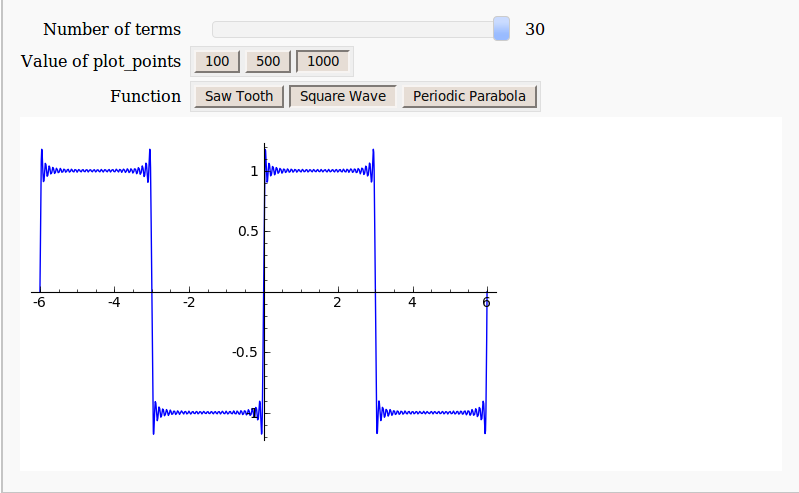
Not everything is perfect, however. For example, there is no native Windows version of Sage. Windows users have to make use of a Virtualbox virtual machine which puts off many people from trying this great piece of software. Furthermore, the interactive ‘applets’ produced from Sage’s interact function are not as smooth running as those produced by Mathematica’s Manipulate function. Finally, Sage’s interact doesn’t have as many control options as Mathematica’s Manipulate (There’s no Locator control for example and my bounty still stands).
The Sage Interactive Database is a great new project and I encourage all of you to head over there, take a look around and maybe contribute something.
The MATLAB language has become ubiquitous in many fields of applied mathematics such as linear algebra, differential equations, control systems and signal processing among many others. MATLAB is a great tool but it also costs a lot! If you are not a student then MATLAB is a very expensive piece of software. For example, my own academic licensed copy with just 4 toolboxes cost more than the rather high powered laptop I use it on. If I left academia then there would be no chance of me owning a copy unless I found an employer willing to stump up the cash for a commercial license. Commercial licenses cost a LOT more than academic licenses.
Octave – The free alternative
The good news is that there is a free alternative to MATLAB in the form of Octave. Octave attempts to be source compatible with MATLAB which means that, in many cases, your MATLAB code will run as-is on Octave. Many of the undergraduate courses taught at my university (The University of Manchester) could be taught using Octave with little or no modification and I imagine that this would be the case elsewhere. One area where Octave falls down is in the provision of toolboxes but this is improving thanks to the Octave-Forge project.
Addi – The beginnings of MATLAB/Octave on Android
As Dylan said The Times They Are a-Changin’ and there is an ever-increasing segment of world-society that are simply skipping over the PC and going straight to mobile devices for their computing needs. It is possible to get your hands on a functional Android mobile phone or tablet for significantly less than the cost of a PC. These cheap mobile devices may be a lot less powerful than even the cheapest of PCs but they are powerful enough for many purposes and are perfectly capable of outgunning Cray supercomputers from the past.
There is, however, no MATLAB for Android devices. The best we have right now is in the form of Addi, a free Android app that makes use of JMathLib to provide a very scaled-back MATLAB-like experience. Addi is the work of Corbin Champion, an android developer from Portland in the US, and he has much bigger plans for the future.
Full Octave/GNUPlot on Android with no caveats
Corbin is working on a full Octave and GNUPlot* port for Android. He has already included a proof of concept in the latest release of Addi which includes an experimental Octave interpreter. To go from this proof of concept to a fully developed Android port, however, is going to take a lot of work. Corbin is up to the task but he would like our help.
[* – GNUPLot is used as the plotting engine for Octave and includes support for advanced 3D graphics]
Donate as little as $1 to help make this project possible
Corbin has launched a Kickstarter project in order to try to obtain funding for this project. He freely admits that he’ll do the work whether or not it gets funded but will be able to devote much more of his time to the project if the funding request is successful. After all, we all need to eat, even great sotware developers.
Although I have never met him, I believe in Corbin and strongly believe that he will deliver on his promise. So much so that I have pledged $100 to the project out of my own pocket.
If, like me, you want to see a well-developed and supported version of Octave on Android then watch the video below and then head over to Corbin’s kickstarter page to get the full details of his proposal. The minimum donation is only $1 and your money will only be taken if the full funding requirement is met.
Update (16th May 2012): The project (and this post) made it to Slashdot :)