
Archive for the ‘python’ Category
Update (5th November 2009): PyNAG has been updated several times since this post was written. The latest version will always be available from https://www.walkingrandomly.com/?page_id=1662
This is part 6 of a series of articles devoted to demonstrating how to call the Numerical Algorithms Group (NAG) C library from Python. Click here for the index to this series.
Over the last few articles I have demonstrated that it is relatively straightforward to interface Python to the NAG C library. The resulting code, however, looks a bit ugly and overly verbose since you have to include a lot of boiler plate code such as telling Python where the C library is, defining pythonic versions of C structures, defining various constants and so on. I found myself doing a lot of copying and pasting in the early stages of working all this stuff out.
Just recently I made a small step forward by moving all of this boilerplate into a Python package which I have called PyNAG. It’s a relatively simple package since all it does is define Pythonic versions of various C-structures, link to the NAG library, perform restypes on the function names, define a few often used NAG variables such as NAGERR_DEFAULT and so on.
The practical upshot is that you need to write a lot less code when interfacing with the C library. For example here is the Python code to minimise a 2D function via the simplex method using e04ccc of the NAG library.
#!/usr/bin/env python
#Mike Croucher - April 2008
#A minimisation problem solved using e04ccc
from PyNAG import e04ccc,NAGERR_DEFAULT,E04_DEFAULT,Nag_Comm
from ctypes import *
from math import *

#Create the communication structure
comm = Nag_Comm()

#set up the objective function
def py_obj_func(n,xc,objf,comm):
	objf[0] = exp(xc[0]) * (xc[0] * 4.0 * ( xc[0]+xc[1] ) + xc[1] * 2.0 * (xc[1] +1.0) +1.0 )
C_FUNC = CFUNCTYPE(None,c_int,POINTER(c_double),POINTER(c_double),POINTER(Nag_Comm) )
c_obj_func = C_FUNC(py_obj_func)

#Set up the starting point
n=2
x=(c_double*2)()
x[0]=c_double(0.4)
x[1]=c_double(-0.8)

#Set up other variables
objf = c_double()

e04ccc(n, c_obj_func, byref(x), byref(objf),E04_DEFAULT,comm,NAGERR_DEFAULT)
It’s still not as pretty as it would it if it were written in pure python but it’s a (small) step in the right direction I think.
The good
- PyNAG is free and always will be. You’ll obviously need to buy a copy of the NAG C library though.
- It includes a definition of one of the largest C-Structures I have ever seen – Nag_E04_Opt – which has over 130 members. This took me quite a while to get working and now you don’t need to go through the same pain I did. All the C structures mentioned in these tutorials have been included to save your typing fingers.
- PyNAG has been tested on 32bit and 64bit flavours of Linux and seems to work fine.
- It is relatively easy to add definitions for NAG functions that are not already currently included. In the best case scenario all you need to do is add two lines of code per NAG function. (They’re not all this easy though!)
- It comes with a set of fully functional examples (15 so far with more on the way) along with expected output. This output has been checked against the original C versions of the code to ensure that the results are correct
The bad
- It only works on Linux at the moment. Depending on interest levels (mine and yours) I may get it working on Mac OS X and Windows.
- It only includes all the boilerplate needed to interface with 22 NAG functions at the time of writing. This is a very small percentage of the library as a whole.
- It doesn’t include all of the structures you might need to use throughout the entire library at the moment.
- It doesn’t include any of the enumerations that the NAG C library uses. I plan to include some of the most commonly used ones but will simply have to define them as variables since ctypes doesn’t support enumerations as far as I know.
- This is my first ever Python package so things may be a bit rough around the edges. I welcome advice from more experienced Pythonistas concerning things like package deployment.
- The Python version of the NagError structure has a member called pprint rather than the original print. This is because print is a reserved keyword in Python so I couldn’t use it.
- It has only been tested on Python versions 2.5.x and 2.6.x. I have no idea if it will work on other versions at the moment.
- Documentation is rather sparse at the moment. I haven’t had time to do a better job.
TheUgly
- All PyNAG really does is save you from having to type in a load of boilerplate. It doesn’t properly ‘pythonise’ the NAG C library and so it is painfully obvious that your code is talking to a C library and not a Python library. Ideally I would like to change this and make the user interface a lot more user-friendly. Any input on how best to go about this would be gratefully received.
The Installation
The first public release of PyNAG is version 0.12 and is currently available here (Linux only). Installation instructions are
- Download the tar gzip file above and run the following commands
- tar -xvzf ./PyNAG-0.12.tar.gz
cd PyNAG-0.12/src - edit the following line in the file __init__.py so that it points to your installation of the library
C_libnag= ctypes.cdll.LoadLibrary(“/opt/NAG/cllux08dgl/lib/libnagc_nag.so.8”) - Move back into the root PyNAG-0.12 directory:
cd.. - run the following command with administrator priviledges
python setup.py install
The installer will scatter the PyNAG files where ever your machine is set up to put them. On my machine it was put in the following location but your mileage may vary
/usr/local/lib/python2.6/dist-packages/PyNAG
The Examples
I have written a set of example scripts that show PyNAG in use and these can be found in the src/examples directory of the PyNAG distribution. Mathematically speaking they are all rather dull but they do show how you can call the routines I have included so far. More interesting examples will be appearing soon.
The Future
Getting the NAG C library to work with Python has always been a side project for me and I never expected to take it even this far. Most of this work has been done on the train while commuting to and from work and, although it is far from perfect, I am happy with it so far. There is much to do though and the rate it gets done depends on user-interest. Things that spring to mind (in no particular order) are
- Get PyNAG on a proper CVS system such as github so that other people can easily contribute.
- Add support for Numpy matrices.
- Add support for more of the most commonly used NAG functions.
- Get a windows version up and running.
- Write some more interesting demos.
- Write some sort of automated test script that runs all the examples and compares the results with a set of expected results.
- See if I get any users and take requests :)
Final points.
I do not work for NAG – I just like their products. My professional involvement with them is via the University of Manchester where I am the site-license administrator for NAG products (among many other things). I have a vested interest in getting the best out of their products as well as getting the best out of the likes of Wolfram, Mathworks and a shed-load of other software vendors.
One of my hobbies is pointing out to NAG where their library could do with extra functionality. I am aided in this venture by a load of academics who use the library in it’s various guises and who contact me to say ‘I like NAG but it would be much better if it had the ability to do XYZ’. I am very grateful to NAG for accepting my steady stream of emails with good grace and also for implementing some of our suggestions in the latest version of their library. Feel free to point out any of your favourite algorithms that are missing from the library and why it should have them.
Finally, I’d like to thank the various people at NAG who helped me get my head around their library and for helping me test my initial tentative steps into the NAG/Python world. I owe many of you several beverages of your choice.
As always, comments are welcomed.
Update (5th November 2009): PyNAG has been updated several times since this post was written. The latest version will always be available from https://www.walkingrandomly.com/?page_id=1662
This is part 5 of a series of articles devoted to demonstrating how to call the Numerical Algorithms Group (NAG) C library from Python. Click here for the index to this series.
The Optimisation chapter of the NAG C library is one of the most popular chapters in my experience. It is also one of the most complicated from a programming point of view but if you have been working through this series from the beginning then you already know all of the Python techniques you need. From this point on it’s just a matter of increased complexity.
As always, however, I like to build the complexity up slowly so let’s take a look at possibly the simplest NAG optimisation routine – e04abc. This routine minimizes a function of one variable, using function values only. In other words – you don’t need to provide it with derivative information which simplifies the programming at the cost of performance.
The example Python code I am going to give will solve a very simple local optimisation problem – The minimisation of the function sin(x)/x in the range [3.5,5.0] or, put another way, what are the x and y values of the centre of the red dot in the picture below.
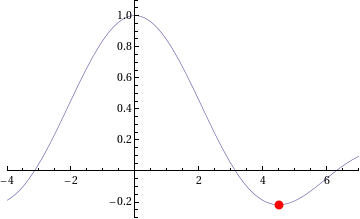
The NAG/Python code to do this is given below (or you can download it here).
#!/usr/bin/env python
#Example 4 using NAG C library and ctypes - e04abc
#Mike Croucher - April 2008
#Concepts : Communication callback functions that use the C prototype void funct(double, double *,Nag_comm *)
from ctypes import *
from math import *
libnag = cdll.LoadLibrary("/opt/NAG/cllux08dgl/lib/libnagc_nag.so.8")
e04abc = libnag.e04abc
e04abc.restype=None
class Nag_Comm(Structure):
	_fields_ = [("flag", c_int),
                ("first", c_int),
 		("last", c_int),
		("nf",c_int),
		("it_prt",c_int),
		("it_maj_prt",c_int),
		("sol_sqp_prt",c_int),
		("sol_prt",c_int),
		("rootnode_sol_prt",c_int),
		("node_prt",c_int),
		("rootnode_prt",c_int),
		("g_prt",c_int),
		("new_lm",c_int),
		("needf",c_int),
		("p",c_void_p),
		("iuser",POINTER(c_int) ),
		("user",POINTER(c_double) ),
		("nag_w",POINTER(c_double) ),
		("nag_iw",POINTER(c_int) ),
		("nag_p",c_void_p),
		("nag_print_w",POINTER(c_double) ),
		("nag_print_iw",POINTER(c_int) ),
		("nrealloc",c_int)
		]
#define python objective function
def py_obj_func(x,ans,comm):
  ans[0] = sin(x) / x
  return
#create the type for the c callback function
C_FUNC = CFUNCTYPE(None,c_double,POINTER(c_double),POINTER(Nag_Comm))
#now create the c callback function
c_func = C_FUNC(py_obj_func)
#Set up the problem parameters
comm = Nag_Comm()
#e1 and e2 control the solution accuracy.  Setting them to 0 chooses the default values.
#See the documentation for e04abc for more details
e1 = c_double(0.0)
e2 = c_double(0.0)
#a and b define our starting interval
a = c_double(3.5)
b = c_double(5.0)
#xt will contain the x value of the minimum
xt=c_double(0.0)
#f will contain the function value at the minimum
f=c_double(0.0)
#max_fun is the maximum number of function evaluations we will allow
max_fun=c_int(100)
#Yet again I cheat for fail parameter.
fail=c_long(0)
e04abc(c_func,e1,e2,byref(a),byref(b),max_fun,byref(xt),byref(f),byref(comm),fail)
print "The minimum is in the interval  [%s,%s]" %(a.value,b.value)
print "The estimated result = %s" % xt.value
print "The function value at the minimum is %s " % f.value
print "%s evaluations were required" % comm.nf
If you run this code then you should get the following output
The minimum is in the interval  [4.4934093959,4.49340951173]
The estimated result = 4.49340945381
The function value at the minimum is -0.217233628211
10 evaluations were required
IFAIL oddness
My original version of this code used the trick of setting the NAG IFAIL parameter to c_int(0) to save me from worrying about the NagError structure (this is first explained in part 1) but when this example was tested it didn’t work on 64bit machines although it worked just fine on 32bit machines. Changing it to c_long(0) (as I have done in this example) made it work on both 32 and 64bit machines.
What I find odd is that in all my previous examples, c_int(0) worked just fine on both architectures. Eventually I will cover how to use the IFAIL parameter ‘properly’ but for now it is sufficient to be aware of this issue.
Scary Structures
Although this is the longest piece of code we have seen so far in this series, it contains no new Python/ctypes techniques at all. The only major difficulty I faced when writing it for the first time was making sure that I got the specification of the Nag_Comm structure correct by carefully working though the C specification of it in the nag_types.h file (included with the NAG C library installation) and transposing it to Python.
One of the biggest hurdles you will face when working with the NAG C library and Python is getting these structure definitions correct and some of them are truly HUGE. If you can get away with it then you are advised to copy and paste someone else’s definitions rather than create your own from scratch. In a later part of this series I will be releasing a Python module called PyNAG which will predefine some of the more common structures for you.
Callback functions with Communication
The objective function (that is, the function we want to minimise) is implemented as a callback function but it is a bit more complicated than the one we saw in part 3. This NAG routine expects the C prototype of your objective function to look like this:
void funct(double xc, double *fc, Nag_Comm *comm)
- xc is an input argument and is the point at which the value of f(x) is required.
- fc is an output argument and is the value of the function f at the current point x. Note that it is a pointer to double.
- Is a pointer to a structure of type Nag_Comm. Your function may or may not use this directly but the NAG routine almost certainly will. It is through this structure that the NAG routine can communicate various things to and from your function as and when is necessary.
so our C-types function prototype looks like this
C_FUNC = CFUNCTYPE(None,c_double,POINTER(c_double),POINTER(Nag_Comm))
whereas the python function itself is
#define python objective function
def py_obj_func(x,ans,comm):
  ans[0] = sin(x) / x
  return
Note that we need to do
ans[0] = sin(x) / x
rather than simply
ans = sin(x) / x
since ans is a pointer to double rather than just a double.
In this particular example I have only used the simplest feature provided by the Nag_Comm structure and that is to ask it how many times the objective function was called.
print "%s evaluations were required" % comm.nf
That’s it for this part of the series. Next time I’ll be looking at a more advanced optimisation routine. Feel free to post any comments, questions or suggestions.
This is part 4 of a series of articles devoted to demonstrating how to call the Numerical Algorithms Group (NAG) C library from Python. Click here for the index to this series.
The NAG C library makes extensive use of C structures throughout its code base and so we will need to know how to represent them in Python. For example, the NAG routine d01ajc is a general purpose one dimensional numerical integrator and one of it’s arguments is a structure called Nag_QuadProgress with the following prototype (found in the nag_types.h file that comes with the NAG C library)
  typedef struct
  {
    Integer num_subint;
    Integer fun_count;
    double *sub_int_beg_pts;
    double *sub_int_end_pts;
    double *sub_int_result;
    double *sub_int_error;
  } Nag_QuadProgress;
following the ctypes documentation on Structures and Unions, I came up with the following Python representation of this structure and it seems to work just fine.
class Nag_QuadProgress(Structure):
    _fields_ = [("num_subint", c_int),
                ("funcount", c_int),
		("sub_int_beg_pts",POINTER(c_double) ),
                ("sub_int_end_pts",POINTER(c_double)),
		("sub_int_result",POINTER(c_double)  ),
		("sub_int_error",POINTER(c_double)  )
		]
This is the only extra information we need in order to write a Python program that calculates the numerical approximation to an integral using the NAG routine d01ajc. Let’s calculate the integral of the function 4/(1.0+x*x) over the interval [0,1]. The code is as follows:
#!/usr/bin/env python
#Example 3 using NAG C library and ctypes
#d01ajc - one dimensional quadrature
#Mike Croucher - April 2008
#Concept introduced : Creating and using Python versions of structures such as Nag_QuadProgress
from ctypes import *
libnag = cdll.LoadLibrary("/opt/NAG/cllux08dgl/lib/libnagc_nag.so.8")

d01ajc = libnag.d01ajc
d01ajc.restype=None

class Nag_QuadProgress(Structure):
    _fields_ = [("num_subint", c_int),
                ("funcount", c_int),
		("sub_int_beg_pts",POINTER(c_double) ),
                ("sub_int_end_pts",POINTER(c_double)),
		("sub_int_result",POINTER(c_double)  ),
		("sub_int_error",POINTER(c_double)  )
		]

#define python function
def py_func(x):
	return 4./(1.0+x*x)

#create the prototype for the c callback function
C_FUNC = CFUNCTYPE(c_double,c_double )

#now create the c callback function
c_func = C_FUNC(py_func)

#set up the problem
a = c_double(0.0)
b = c_double(1.0)
nlimit = c_int(100)
epsr = c_double(0.00001)
ifail = c_int(0)

max_num_subint=c_int(200)
nlimit = c_int(0)
result=c_double(0.0)
epsabs= c_double(0.0)
epsrel=c_double(0.0001);
abserr=c_double(0.0);
qp=Nag_QuadProgress()

d01ajc(c_func,a,b,epsabs,epsrel,max_num_subint,byref(result) ,byref(abserr),byref(qp),ifail )
print "Approximation of integral= %s" %(result.value)
print "Number of function evaluations=%s" % qp.funcount
print "Number of subintervals used= %s" % qp.num_subint
Copy and paste (or download) this to a file called d01ajc.py, make it executable and run it by typing the following at a bash prompt.
chmod +x ./d01ajc.py

./d01ajc.py
If all has gone well then you should get following result
Approximation of integral= 3.14159265359
Number of function evaluations=21
Number of subintervals used= 1
Note that in order to create an instance of the Nag_QuadProgress structure I just do
qp=Nag_QuadProgress()
It is also useful to compare the C prototype of d01ajc
void nag_1d_quad_gen (double (*f)(double x),

double a, double b, double epsabs, double epsrel,

Integer max_num_subint, double *result, double *abserr,

Nag_QuadProgress *qp, NagError *fail)
with the way I called it in Python
d01ajc(c_func,a,b,epsabs,epsrel,max_num_subint,byref(result) ,byref(abserr),byref(qp),ifail )
Note how pointer arguments such as
double *abserr
are called as follows
byref(abserr)
Yet again I have cheated with the NagError parameter and just used c_int(0) instead of a proper NagError structure. NagError will be treated properly in a future article.
This is part 3 of a series of articles on how to use the NAG C Library with Python using the ctypes module. Click here for the introduction and index to the series.
Now that we have seen how to call the simplest of NAG functions from Python, it is time to move on and consider callback functions. If you don’t know what a callback function is then I think that the current version of the relevant Wikipedia article explains it well:
A callback is executable code that is passed as an argument to other code.
For example, say you want to want to find the zero of the function exp(-x)/x using a routine from the NAG library. Your first step would be to create a function that evaluates exp(-x)/x for any given x. You’ll later pass this function to the NAG routine to allow the routine to evaluate exp(-x)/x wherever it needs to.
Let’s take a look at some Python code that performs the calculation described above. The NAG routine I am using locates a zero of a continuous function in a given interval by a combination of the methods of linear interpolation, extrapolation and bisection and is called c05adc.
#!/usr/bin/env python

#Example 2 using NAG C libray and ctypes

#Mike Croucher - April 2008

#Concept Introduced : Callback functions
from ctypes import *

from math import *

libnag = cdll.LoadLibrary("/opt/NAG/cllux08dgl/lib/libnagc_nag.so.8")
c05adc = libnag.c05adc

c05adc.restype=None
#define python function
def py_func(x):
     return exp(-x)-x
#create the type for the c callback function

C_FUNC = CFUNCTYPE(c_double,c_double )
#now create the c callback function

c_func = C_FUNC(py_func)
a=c_double(0.0)

b=c_double(1.0)

xtol=c_double(0.00001)

ftol=c_double(0.0)

x=c_double(0.0)

fail=c_int(0)
c05adc(a, b, byref(x), c_func, xtol, ftol, fail );
print "result = %s" % (x.value)
Copy and paste (or download) this to a file called c05adc.py, make it executable and run it by typing the following at a bash prompt.
chmod +x ./c05adc.py

./c05adc.py
If all has gone well then you should get following output
result = 0.567143306605
Most of the code above will be familiar to anyone who worked through part 1 of this series. The first unfamiliar part might be
#define python function
def py_func(x):
     return exp(-x)-x
Which is nothing more than a standard Python function for calculating exp(-x)-x.
C_FUNC = CFUNCTYPE(c_double,c_double )
Here I have created a new C function prototype called C_FUNC by using the CFUNCTYPE function from the ctypes module. The general syntax of CFUNCTYPE is
CFUNCTYPE(return_type,input_arg1,input_arg2,input_arg3)
where the list of input arguments can be as long as you like. The C function I want to create from my Python function should return a c_double and have a single c_double input argument so I end up with CFUNCTYPE(c_double,c_double )
c_func = C_FUNC(py_func)
Here I have used the function prototype created earlier to generate a C function called c_func based on my Python function py_func.
c05adc(a, b, byref(x), c_func, xtol, ftol, fail );
Finally, I call the NAG routine c05adc using all of the arguments set up earlier. Note that I can pass my C function, c_func, to the NAG routine just as easily as I would any other argument. For reference, here is the original C prototype of the NAG routine along with a list of its arguments and what they mean
void nag_zero_cont_func_bd(double a, double b, double *x,

double (*f)(double x), double xtol,

double ftol, NagError *fail)
- a – (Input) The lower bound of the interval [a,b] in which the search for a zero will take place.
- b – (Input) The upper bound of the interval
- x – (Output) The approximation to the zero. Note that the C prototype uses a pointer to double and I have emulated this in python using the byref() function to pass x by reference.
- f – (Input) A pointer to the function who’s zeros we want to find. The C prototype might look complicated but, as you have seen, the implementation in Python is quite straightforward.
- xtol – (Input) The absolute tolerance to which the zero is required.
- ftol – (Input) a value such that if |f (x)| < ftol, x is accepted as the zero. ftol may be specified as0.0
- fail – The NAG error parameter. We haven’t covered structures yet so we can’t use NAGError properly but I have used the trick that the NAG routines will accept c_int(0) in order to accept the default error handling behaviour.
That’s it for now. Next time I will be looking at numerical integration using the NAG library which will require the introduction of structures.
As always, comments, queries and corrections are gratefully received.
This is part 2 of a series of articles devoted to demonstrating how to call the Numerical Algorithms Group (NAG) C library from Python. Click here for the index to this series.
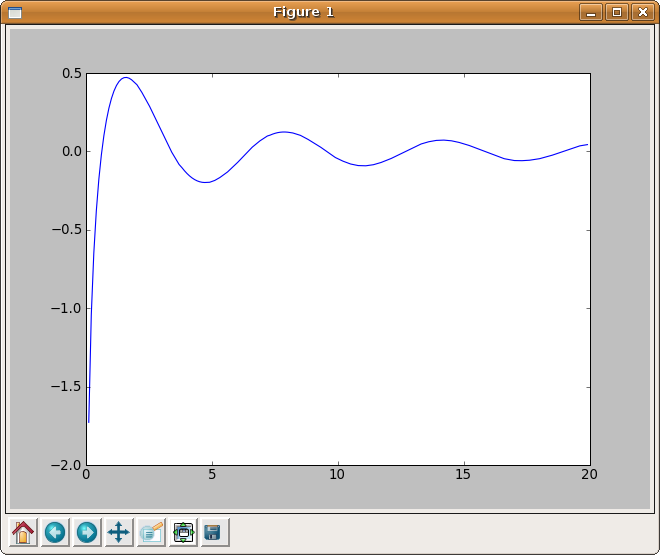
In part 1 I explained how to calculate the Cosine Integral, Ci(x), using Python and the NAG C library but the example code was a little dull in that it only calculated Ci(0.2). Before moving onto more advanced topics I thought it would be fun to use the python module, matplotlib, to generate a plot of the cosine integral.
#!/usr/bin/env python
from ctypes import *
import matplotlib.pyplot as plt

libnag = cdll.LoadLibrary("/opt/NAG/cllux08dgl/lib/libnagc_nag.so.8")
s13acc = libnag.s13acc
s13acc.restype=c_double

fail=c_int(0)
def nag_cos_integral(x):
	x=c_double(x)
	result= s13acc(x,fail)
	return result

xvals = [x*0.1 for x in range(1,200)]
yvals = map(nag_cos_integral,xvals)

plt.plot(xvals,yvals)
plt.show()
Click here to download this program – you’ll need a copy of the NAG C library to make it work. The output is shown below.
This is part 1 of a series of articles devoted to demonstrating how to call the Numerical Algorithms Group (NAG) C library from Python. Click here for the index to this series.
Our first NAG/Python example is going to use the NAG function s13acc which calculates the Cosine integral Ci(x) defined as

According to the NAG documentation, the algorithm used is based on several Chebyshev expansions. So, let’s see what we need to do to access this function from Python.
Assuming that you have installed the cllux08dgl implementation of the NAG C library, you should find that the following Python code evaluates Ci(x) for x=0.2.
#!/usr/bin/env python

from ctypes import *
libnag = cdll.LoadLibrary("/opt/NAG/cllux08dgl/lib/libnagc_nag.so.8")

nag_cos_integral = libnag.s13acc

nag_cos_integral.restype=c_double
x = c_double(0.2)

ifail=c_int(0)
y= nag_cos_integral( x, ifail )

print "x= %s, cos_integral= %s" % (x.value,y)
Save (or download) this to a file called s13acc.py, make it executable and run it by typing the following at a bash prompt.
chmod +x ./s13acc.py

./s13acc.py
If all has gone well then you should get following result
x= 0.2, cos_integral= -1.04220559567
Since this our first piece of NAG/Python code let’s go through it line by line.
from ctypes import *
This simply imports everything from the standard ctypes module and makes it available in the global namespace.
libnag = cdll.LoadLibrary("/opt/NAG/cllux08dgl/lib/libnagc_nag.so.8")

nag_cos_integral = libnag.s13acc
The first line loads the NAG library using the cldll.LoadLibrary() function and associates it with an object I have named libnag whereas the second line pulls the function s13acc out of libnag and associates it with an object having the more user-friendly name of nag_cos_integral.
This is the least portable part of the code. If you are using a different implementation of the NAG C library then you will need to change the path in the LoadLibrary function.
nag_cos_integral.restype=c_double
The ctypes module provides us with a set of C compatible data-types such as c_int, c_double, c_char and so on, and we have to use these when we interact with C functions. The object nag_cos_integral represents the NAG C function we wish to call and by default ctypes assumes that the return type of all C functions is of type c_int unless we tell it otherwise.
We know from the documentation for s13acc that its return type is double and so here we are using the restype method function to set the return type of nag_cos_integral to c_double.
x = c_double(0.2)

ifail=c_int(0)
Here, we are setting up our input arguments. x is straightforward enough but the observant reader will notice that there is something fishy going on with the ifail parameter. The NAG documentation tells us that the ifail parameter of s13acc should be a pointer to a NagError structure but structures are a complication that I don’t want to deal with here so I have cheated and used the fact that the integer 0 is defined as NAGERR_DEFAULT via an enumeration in the C library header file. In short, this means that I don’t have to use a NagError structure if I don’t want to. Full details can be found in section 2.6 of the Essential Introduction to the NAG C Library.
We’ll look at how to use the NagError structure properly via Python in a later article for those who need it.
y= nag_cos_integral( x, ifail )
Here we pass our input parameters to the nag_cos_integral function and store the result in y. When I was working all of this out for the first time, I expected y to be of type c_double. After all, we earlier used restype to set the return type of nag_cos_integral to c_double so that’s what I expected to get but it turns out that y is a plain old python double. This is clearly explained in the ctypes documentation and I quote the relevant section below
‘Fundamental data types, when returned as foreign function call results, or, for example, by retrieving structure field members or array items, are transparently converted to native Python types. In other words, if a foreign function has a restype of c_char_p, you will always receive a Python string, not a c_char_p instance.’
print "x= %s, cos_integral= %s" % (x.value,y)
Finally, we actually print the output. Since x is a c_double we need to use the value attribute to ensure that 0.2 gets printed rather than c_double(0.2). The variable y is a python double as explained earlier so it needs no special treatment.
That’s it for this article in the series. Next time I’ll give an example using this function along with matplotlib to produce some more interesting output before moving onto callback functions.
As always, questions and comments are welcomed.
The NAG library is possibly the most comprehensive numerical library available today with over 1500 functions and a long and distinguished history going back almost 40 years. Although it is commercial, NAG is a not-for-profit company and has donated large amounts of code to the open source community over the years. The library covers many application areas including special functions, optimization, curve fitting, statistics, numerical differentiation and linear algebra among others with even more coming up in the next release. It has been available in several different programming languages over the years but these days you can get it in essentially four flavours – The NAG Fortran Library, The NAG C Library, the Maple-NAG connector and the NAG Toolbox for MATLAB.
I have been supporting users of the NAG library at Manchester University for a few years now and one of the most common reactions I get from a potential user of the NAG libraries when they see the list of available languages is to say ‘I don’t program in any of those – I program in XYZ – so the NAG library is no use to me.’ where XYZ might be Java, Perl, Visual Basic, Python, R or one of any number of weird and wonderful possibilities.
It turns out that YOUR choice of language almost doesn’t matter as far as NAG is concerned since, with a bit of work, you can call the NAG routines from pretty much any language you care to mention. Put another way, NAG program in Fortran (and C) so you don’t have to. One language that has been mentioned a lot recently is Python.
Mat Cross, an employee of NAG, wrote a guide a little while ago giving detailed instructions on how to call the NAG Fortran library from Python using a module called F2PY and very nice it is too. However, some people are never happy and almost as soon as the article was published I started getting queries about the NAG C library and Python. As far as I could tell this particular combination hadn’t been covered by anyone before so I rolled up my sleeves to see what I could come up with.
After all, how hard could it be?
I have lost count of the number of times I have regretted uttering that particular phrase but in this case, thanks to a wonderful Python module called ctypes, the answer turns out to be ‘Not nearly as hard as you might expect’.
The results of my investigations will be posted on Walking Randomly over the next few weeks and will include several examples of how to use the NAG C library within Python. I’ll start off with the simplest of NAG functions and steadily move towards some of the most complex. On the way we will cover several areas of numerical mathematics including special functions, numerical quadrature, root finding and optimization.
I will initially be concentrating on Ubuntu Linux since that is my favourite development environment but I am aware that users of both NAG and Python make use of many platforms including Windows and Mac OS X. If there is sufficient interest then I will make other platform-specific articles available in the future.
The list below contains links to all of the articles published in the series so far and will be expanded as new ones come online so this post will eventually serve as an index to the whole series. Extra topics may be considered on request.
Topic List (will be expanded as new articles are available)
- Making simple NAG C functions available to Python
- Plotting the Cosine Integral using NAG and matplotlib
- Callback functions (The example code given is for finding the zero’s of an equation)
- Structures (The example code given is for Numerical Integration)
- Callback functions with communication (The example code solves a simple 1d minimization problem)
- PyNAG – A Python package for interfacing with the NAG C Library
Implementation specifics
The NAG C library is available for a wide range of platforms and C compilers (representing 26 different combinations when I last counted) but I only wanted to focus on one for the sake of sanity! In particular, I am using cllux08dgl throughout this series which is for 32bit Linux and was compiled using the gcc compiler. I am using version 8.10 of Ubuntu Linux.
I imagine that most of what I write will be directly transferable, with minor modifications, to other versions of the NAG C library. After all Python is quite portable but there may be some differences if you are using a platform wildly different from mine. Where I am able, I will help people get the examples working on their platform of choice but reserve the right to refer you to the NAG support team if necessary.
Finally, I have developed all of this series using 2.5.2 and have no idea if it will work in later versions or not.
Say you have just joined an applied-maths research group* where you are expected to write a lot of numerical simulations – numerical simulations that are going to require the use of big computers in large, air conditioned rooms with a great deal of impressive looking flashenlightenblinken. Naturally, you would like to use Python for all of your programming needs as you have recently fallen in love with it and you are convinced that it’s the future.
Your boss, Bob, completely disagrees with your take on the future of programming. He thinks that Python is a passing fad that will soon be forgotten. He sneeringly refers to it as a ‘ mere scripting language’ and constantly refers to you as the script kiddie. He thinks that Fortran is the only programming language worth bothering with when it comes to numerical simulations. According to Bob, Fortran is the past, present and future of computer programming – everything else is just mucking about.
You argue constantly with Bob concerning the relative merits of the two languages because, although you respect Fortran, you don’t think that it’s going to be much fun to use. Eventually he pulls out his trump card – “You can’t use Python in this group because all of our screamingly fast, highly accurate, tested and debugged numerical routines are written in Fortran. We won’t use any other libraries because these are the best so – give up on Python and start learning Fortran or get another job.”
Defeated…or so you thought…
After a bit of googling you realize that there is light at the end of the tunnel, this problem has been solved before by making use of the Python ctypes module. First of all let’s install this module on Ubuntu:
sudo apt-get install python-ctypes
Taking our cue from this solution lets say that one of the functions in the Fortran library is called ADD_II and has the following source code (filename add.f)
SUBROUTINE ADD_II(A,B)
INTEGER*4 A,B
A = A+B
END
Compile it into a shared library using gfortran as follows:
gfortran add.f -ffree-form -shared -o libadd.so
Now, create a file called add.py and copy the source code from our friendly usenet poster:
from ctypes import *
libadd = cdll.LoadLibrary(“./libadd.so”)
#
# ADD_II becomes ADD_II_
# in Python, C and C++
#
method = libadd.ADD_II_
x = c_int(47)
y = c_int(11)
print “x = %d, y = %d” % (x.value, y.value)
#
# The byref() is necessary since
# FORTRAN does references,
# and not values (like e.g. C)
#
method( byref(x), byref(y) )
print “x = %d, y = %d” % (x.value, y.value)
run the script as follows:
python add.py
and get the following error message:
AttributeError: ./libadd.so: undefined symbol: ADD_II_
So, despite what we may have thought, it looks like our function has not been given the name ADD_II_ in the shared library. So what name has it been given? We could just keep guessing what the compiler might have called it or we could just ask the library itself using the nm comand:
nm libadd.so
00001468 a _DYNAMIC
00001554 a _GLOBAL_OFFSET_TABLE_
w _Jv_RegisterClasses
00001458 d __CTOR_END__
00001454 d __CTOR_LIST__
00001460 d __DTOR_END__
0000145c d __DTOR_LIST__
00000450 r __FRAME_END__
00001464 d __JCR_END__
00001464 d __JCR_LIST__
00001570 A __bss_start
w __cxa_finalize@@GLIBC_2.1.3
00000400 t __do_global_ctors_aux
00000340 t __do_global_dtors_aux
00001568 d __dso_handle
w __gmon_start__
000003d7 t __i686.get_pc_thunk.bx
00001570 A _edata
00001574 A _end
00000434 T _fini
000002d8 T _init
000003dc T add_ii_
00001570 b completed.6030
000003a0 t frame_dummy
0000156c d p.6028
Now I have no idea what most of that output means but it looks like the .so file contains something called add_ii_ so if I use this instead of ADD_II_ in my python script I bet it will work.
python add.py
x = 47, y = 11
x = 58, y = 11
The sweet smell of success. You go to Bob and tell him that you have just come up with a test script that demonstrates that you are going to be able to use the group’s Fortran libraries in your Python scripts.
“That’s very nice” says Bob “but all of the really useful routines in the library make use of callback functions. Can you handle those yet?”
“yes I can” you reply smugly “but this post has gone on long enough so I’ll leave the details until another time”
*Note – In case you are my boss – I haven’t joined a research group so I won’t be quitting my job any day soon. I was just in a story telling mood. Oh..and this stuff will be useful for what we do – I promise!
Over the years I have programmed in a reasonable number of languages but the ones I am actually using right now are Fortran, C++, Mathematica, Matlab and Perl. The one I would choose would depend on what I needed to accomplish, maybe Fotran for high speed numerics, Matlab for quick numerical algorithm development or Perl for sysadmin work and for the most part this tool-set serves my purposes well.
Just recently, however, I have been getting itchy feet and have been wanting to learn another programming language as it is a process I quite enjoy and last time I did it (with Perl) it turned out to be pretty useful. The question, of course, is which one to choose? I want a language that is going to be fun to use (to keep up my interest) and useful in my day job (so I can justify the time spent).
For me, one language stuck out more than all of the others – Python. I have always been dimly aware of it but until recently you could summarize my knowledge of it as follows
- It’s free
- It’s not a traditional compiled language (like C or Fortran) – it uses bytecodes and a virtual machine like Java
- It’s the one where white space matters
- Perl and Python people argue a lot
More recently, however, I have discovered a few more things about it piqued my interest.
- The open source CAS system – SAGE – is implemented in Python
- There are mature python libraries for doing numerical computing – numpy and scipy
- There is a wonderful looking matlab-like plotting library for it – matplotlib
- There are a lot of scientific applications developed using it
- I can install it on my mobile phone
- There is a number-theoretic (another emerging interest I have) library for it – NZMATH
So python it is then. Although there are a lot of great looking python tutorials on the web, I prefer to do my learning from a book, I am showing my age I guess. When I was learning Perl I used the O’Reilly book, learning perl

