
Archive for the ‘matlab’ Category
A little while ago I was having a nice tea break when all hell broke loose. Complaint after complaint started rolling in about lack of network licenses for the MATLAB statistics toolbox and everyone was wondering what I intended to do about it. A quick look at our license server indicated that someone had started a large number of MATLAB jobs on a Beowulf cluster and all of them used the statistics toolbox. Slowly but surely, he was eating up every statistics toolbox license in the university.
I contacted him, explained the problem and he terminated all of his jobs. Life returned to normal for the rest of the university but now he couldn’t work. What to do?
One option was to compile his code using the MATLAB compiler and send the resulting binaries to the cluster but I took another route. I had a look through his code and discovered that he was only ever calling one function from the Statistics toolbox and that was
random('unif',0,1)
All this does is give a uniform random number between 0 and 1. However, if you code it like this
rand()
then you won’t use a license from the statistics toolbox since rand() is part of basic MATLAB. Of course most people don’t want a random number between 0 and 1; instead they will want a random number between two constants, a and b. In almost all cases the following two statements are mathematically equivalent
r = a + (b-a).*rand();     %Doesn't use a license for the statistics toolbox
r = random('unif',a,b);    %Does use a license for the statistics toolbox
The statistics toolbox function, random(), is much more general than rand() since it can give you random numbers from many different distributions but you are wasting a license token if you use it for the uniform distribution. The same goes for the normal distribution for that matter since basic MATLAB has randn().
random('norm',mu,sigma);  %does use a stats license
r = randn()* sigma + mu;  %doesn't use a stats license
The moral of the story is that when you are using MATLAB in a network licensed environment, it can sometimes pay to consider how you spell your functions ;)
One of MATLAB’s strengths is that it has a toolbox for almost everything. One of it’s weaknesses is that you have to pay separately for them all! Basic MATLAB is cheaper for most people than basic Mathematica but, in my experience at least, many people need access to statistics, optimization,symbolics, curve fitting and (increasingly) parallel toolboxes before they get functionality equivalent to Mathematica. By the time one has bought all of those additional toolboxes, MATLAB doesn’t look quite so cheap!
I am growing a list of quality, free MATLAB toolboxes and it is clear that the world could do with more. So, I have a question for you all. If you could have one MATLAB toolbox for free then which one would it be?
The Problem
A MATLAB user came to me with a complaint recently. He had a piece of code that made use of the MATLAB Statistics toolbox but couldn’t get reliable access to a stats toolbox license from my employer’s server. You see, although we have hundreds of licenses for MATLAB itself, we only have a few dozen licenses for the statistics toolbox. This has always served us well in the past but use of this particular toolbox is on the rise and so we sometimes run out which means that users are more likely to get the following error message these days
??? License checkout failed.
License Manager Error -4
Maximum number of users for Statistics_Toolbox reached.
Try again later.
To see a list of current users use the lmstat utility or contact your License Administrator.
The user had some options if he wanted to run his code via our shared network licenses for MATLAB (rather than rewrite in a free language or buy his own, personal license for MATLAB):
- Wait until a license became free.
- Wait until we found funds for more licenses.
- Buy an additional license token for himself and add it to the network (235 pounds +VAT currently)
- Allow me to gave a look at his code and come up with another way
He went for the final option. So, I sat with a colleague of mine and we looked through the code. It turned out that there was only one line in the entire program that used the Statistics toolbox and all that line did was call binopdf. That one function call almost cost him 235 quid!
Now, binopdf() simply evaluates the binomial probability density function and the definition doesn’t look too difficult so you may wonder why I didn’t just cook up my own version of binopdf for him? Quite simply, I don’t trust myself to do as good a job as The Mathworks. There’s bound to be gotchas and I am bound to not know them at first. What would you rather use, binpodf.m from Mathworks or binopdf.m from ‘Dodgy Sysadmin’s Functions Inc.’? Your research depends upon this function remember…
NAG to the rescue!
I wanted to use a version of this function that was written by someone I trust so my mind immediately turned to NAG (Numerical Algorithms Group) and their MATLAB toolbox which my employer has a full site license for. The NAG Toolbox for MATLAB has a function called g01bj which does what we need and a whole lot more. The basic syntax is
[plek, pgtk, peqk, ifail] = g01bj(n, p, x)
From the NAG documentation: Let X denote a random variable having a binomial distribution with parameters n and p. g01bj calculates the following probabilities
- plek = Prob{X<=x}
- pgtk = Prob{X > x}
- peqk = Prob{X = x}
MATLAB’s binopodf only calculates Prob(X=x) so the practical upshot is that for the following MATLAB code
n=200;
x=0;
p=0.02;
y=binopdf(x,n,p)
the corresponding NAG Toolbox code (on a 32bit machine) is
n=int32(200);
x=int32(0);
p=0.02;
[plek, pgtk, y, ifail] = g01bj(n, p, x);
both of these code snippets gives
y =
    0.0176
Further tests show that NAG’s and MATLAB’s results agree either exactly or to within what is essentially numerical noise for a range of values. The only thing that remained was to make NAG’s function look more ‘normal’ for the user in question which meant creating a file called nag_binopdf.m which contained the following
function pbin = nag_binopdf(x,n,p)
   x=int32(x);
   n=int32(n);
   [~,~,pbin,~] = g01bj(n,p,x);
end
Now the user had a function called nag_binopdf that behaved just like the Statistics toolbox’s binopdf, for his particular application, argument order and everything.
It’s not all plain sailing though!
As good as the NAG toolbox is, it’s not perfect. Note that I placed particular emphasis on the fact that we had come up with a suitable, drop-in replacement for binopdf for this user’s particular application. The salient points of his application are:
- His input argument, x, is just a single value – not a vector of values. The NAG library wasn’t written with MATLAB in mind, it’s written in Fortran, and so many of its functions are not vectorised (some of them are though). In Fortran this is no problem at all but in MATLAB it’s a pain. I could, of course, write a nag_binopodf that looks like it’s vectorised by putting g01bj in a loop hidden away from the user but I’d soon get found out because the performance would suck. To better support MATLAB users, NAG needs to write properly vectorised versions of its functions.
- He only wanted to run his code on 32bit machines. If he had wanted to run it on a 64bit machine then he would have to change all of those int32() calls to int64(). I agree that this is no big deal but it’s something that he wouldn’t have to worry about if he had coughed up the cash for a Mathworks statistics license.
Final thoughts
I use the NAG toolbox for MATLAB to do this sort of thing all the time and have saved researchers at my university several thousand pounds over the last year or so through unneeded Mathworks toolbox licenses. As well as statistics, the NAG toolbox is also good for optimisation (local and global), curve fitting, splines, wavelets, finance,partial differential equations and probably more. Not everyone likes this approach and it is not always suitable but when it works, it works well. Sometimes, you even get a significant speed boost into the bargain (check out my interp1 article for example).
Comments are, as always, welcomed.
Blog posts similar to this one
MATLAB is an extremely popular system in which to do computation of any kind. In addition to the basic MATLAB package, The Mathworks sell dozens of add-on toolboxes for specialist (and not-so specialist) subject areas including curve fitting, statistics, bioinformatics, wavelet analysis, splines, optimisation, parallel computing and much more. Although they are very good, these toolboxes can be rather expensive, especially if you find yourself needing several of them.
There are many free MATLAB toolboxes available which vary in quality from superb to complete trash and, obviously, you are only interested in the superb ones. The following MATLAB toolboxes are all free and they are all very good – in every case I know at least one research group (who’s opinion I respect) that uses them extensively.
- Chebfun – The chebfun project is a collection of algorithms, and a software system in object-oriented MATLAB, which extends familiar powerful methods of numerical computation involving numbers to continuous or piecewise-continuous functions.
- IFISS Software Package – The IFISS software can be used to generate typical linear systems arising from finite element discretizations of steady and unsteady diffusion, convection-diffusion, Stokes flow and Navier-Stokes flow problems.
- NaN Toolbox for MATLAB and Octave – A statistics and machine learning toolbox for MATLAB
- N-Way Toolbox for MATLAB – The N-way Toolbox for MATLAB is a freely available collection of functions and algorithms for modelling multiway data sets by a range of multilinear models.
- MATLAB tensor toolbox – Tensors (also known as multidimensional arrays or N-way arrays) are used in a variety of applications ranging from chemometrics to psychometrics.
- NLEVP: A Collection of Nonlinear Eigenvalue Problems – This contains problems from models of real-life applications as well as problems constructed specifically to have particular properties.
- pMATLAB – A free parallel computing toolbox for MATLAB. Check out the book here
.
- Poblano toolbox for MATLAB – Poblano is a Matlab toolbox of large-scale algorithms for unconstrained nonlinear optimization problems.
- Statistical Parametric Mapping – The SPM software package has been designed for the analysis of brain imaging data sequences. The sequences can be a series of images from different cohorts, or time-series from the same subject.
- The Matrix Computation Toolbox – The Matrix Computation Toolbox is a collection of MATLAB M-files containing functions for constructing test matrices, computing matrix factorizations, visualizing matrices, and carrying out direct search optimization.
- The Matrix Function Toolbox – The Matrix Function Toolbox is a MATLAB toolbox connected with functions of matrices.
- Wavelab – A free wavelets toolbox from Stanford.
I’ll update this page whenever I come across other quality free toolboxes. Feel free to point me to more in the comments section but please only do so if you have used the toolbox extensively and you are willing to talk to me about it via email.
Update (29th March 2010):Added the Poblano and Tensor toolboxes along with several from Manchester University.
It’s been a great week for Open Source maths software this week with new releases of both Maxima and Scilab.
Maxima is a computer algebra system written in lisp that runs on most operating systems including Linux, Mac OS X and Windows. The latest version, Maxima 5.20.1, was released on Sunday 13th December and the full list of changes can be found here. Highlights include improvements to the calculation of special functions, faster fourier transform routines and a general mechanism for functions to distribute over operators.
This last item is pretty cool since it allows you to map functions over lists in a similar manner to Mathematica. For example, if you apply the sin function to a list in Maxima then you’ll now get a list containing the sines of each element of that list:
(%i1) sin([1,2,3]);
(%o1) [sin(1),sin(2),sin(3)]
Here are some examples of this new functionality for two-argument functions such as expintegral_e (taken from a post of Dieter Kaiser’s) include :
(%i2) expintegral_e([1,2,3],x);
(%o2) [expintegral_e(1,x),expintegral_e(2,x),expintegral_e(3,x)]

(%i3) expintegral_e(1,[x,y,z]);
(%o3) [expintegral_e(1,x),expintegral_e(1,y),expintegral_e(1,z)]

(%i4) expintegral_e([1,2,3],[x,y,z]);
(%o4) [[expintegral_e(1,x),expintegral_e(1,y),expintegral_e(1,z)],
       [expintegral_e(2,x),expintegral_e(2,y),expintegral_e(2,z)],
       [expintegral_e(3,x),expintegral_e(3,y),expintegral_e(3,z)]]
Head over to sourceforge to download Maxima for your operating system of choice. Now, onto Scilab….
Scilab is a fantastic open source numerical mathematics environment that always seems to come top of the list when people start discussing free MATLAB alternatives. December 17th saw the release of Scilab 5.20 and the list of changes is epic (warning:pdf file).
The first new Scilab feature that caught my eye is the addition of a module called Xcos. Xcos 1.0 is based on Scicos 4.3 which is a “graphical dynamical system modeler and simulator.” Now I’ve not used any of this stuff before but as far as I can tell it could be considered as a free version of Simulink. A bit of googling turned up a paper by M.G.J.M. Maassen, a student at the Eindoven University of Technology, who looked at the issue of migrating from Simulink to Scicos with respect to real time programs. Written in 2006, this paper is slightly out of date but is a great start for anyone who is considering moving away from Simulink.
Along with other free mathematical software applications such as Octave, Sage, Python/Numpy and freemat, these new releases demonstrate that the world of free, open source mathematical applications has never looked better.
Earlier this month I had a query from a colleague who had installed MATLAB on some very large and powerful workstations which are used by many researchers at our University. This colleague is a sysadmin of the old school and he doesn’t like installing any program that doesn’t have some sort of validation suite since he wants to be sure that the program is working OK on his hardware for his people to the best of his ability.
He can do this for the NAG library and he can do it for SAGE math (among others) but not, as far as he knew,for MATLAB. So he asked me the question “Does MATLAB have a validation suite?” and since I didn’t have a clue I passed it onto Mathworks Tech support who quickly informed us that the answer was “No.”
The essential gist of the reply was that they assume that MATLAB produces the same results on different machines except, of course, when it doesn’t!
Of course, people such as my colleague feel that ASSUMING that MATLAB produces the same result on different machines is not good enough which is why he wanted a validation suite in the first place. Life is short though and we didn’t pursue it further – partly because we didn’t have an example which proved Mathwork’s assumption wrong.
We do now though!
On a 64bit Windows 7 install of MATLAB 2009b we get the following (incorrect) behaviour:
 p = [1,11-i;2,2;3,3;4,4;5,5;6,6;7,7;8,8;9,9;10,10;11,11];
sort(p)

ans =

   1.0000             2.0000 - 1.0000i
   2.0000             3.0000
   3.0000             4.0000
   4.0000             5.0000
   5.0000             6.0000
   6.0000             7.0000
   7.0000             8.0000
   8.0000             9.0000
   9.0000            10.0000
  10.0000            11.0000
  11.0000            11.0000
On the same machine but booted into 64bit Ubuntu 9.10 we get the correct behaviour:
 p = [1,11-i;2,2;3,3;4,4;5,5;6,6;7,7;8,8;9,9;10,10;11,11];
sort(p)

ans =

   1.0000             2.0000
   2.0000             3.0000
   3.0000             4.0000
   4.0000             5.0000
   5.0000             6.0000
   6.0000             7.0000
   7.0000             8.0000
   8.0000             9.0000
   9.0000            10.0000
  10.0000            11.0000
  11.0000            11.0000 - 1.0000i
Is this exactly the type of bug that might have been caught in a validation suite? Would a user-runnable validation suite be useful?
Thanks to Michal Kvasnicka who alerted me to this bug which was first described in a discussion thread on MATLAB central. Mathworks are aware of the bug and have logged it as issue number 594221.
The student version of MATLAB is a bargain since it only costs $99 (or less than £50 for those of us in the UK
One problem with the student version of MATLAB though is the fact that they only supply a 32 bit version. This was potentially a big problem for a friend of mine since he has a 64bit Linux machine with 4Gb of RAM. Fortunately, the 32bit version installs OK on 64bit Linux but the result is completely unsupported by Mathworks. Fair enough….It works and he is (mostly) happy since he gets a lot of functionality for his money.
One thing that definitely didn’t work though was compiling mex files. No matter how hard we tried we simply could not get it to work which made me look bad because I am supposed to be ‘The MATLAB guy’ around here. Well, sometimes it’s not what you know but who you know that counts and I know a LOT of MATLAB users. One of them has provided a fix but doesn’t want his name plastered all over Walking Randomly. So, thanks to Mr Anonymous we got mex files working on Student MATLAB 2009a running on 64bit Linux and this is how we did it.
Get a simple mex file and try to compile it. You’ll probably get this error.
/usr/bin/ld: cannot find -lmx
The way to get around that is to run the following command in MATLAB just before you try to compile a mex file
setenv('MATLAB_ARCH', 'glnx86') (IN MATLAB)
That gets you a little further but you’ll next be hit by
/usr/bin/ld: cannot find -lstdc++
To fix this you need to find your mexopts.sh file and change the line
CLIBS="$CLIBS -lstdc++"
to
CLIBS="$CLIBS -L/home/paul/matlab/R2009a-student/sys/os/glnx86 -lstdc++"
obviously, you’ll need to change /home/paul/matlab to wherever you actually installed MATLAB.
Your next step is to do the following in a bash prompt
ln -s /home/paul/matlab/R2009a-student/sys/os/glnx86/libstdc++.so.6 \
/home/paul/matlab/R2009a-student/sys/os/glnx86/libstdc++.so
again – substituting wherever you installed MATLAB for /home/paul/matlab
Paul was running Ubuntu 9.04 and he got the following error at some point (I can’t remember where)
/usr/include/gnu/stubs.h:7:27: error: gnu/stubs-32.h: No such file or directory
which was fixed by
sudo apt-get install libc6-dev-i386
That’s pretty much it. You should now be able to compile mex files. Hope this helps someone out there.
One of the benefits of writing a blog is that people write to me and tell me all kinds of interesting things. For example, early this morning a colleague of mine sent me the details of a bug in MATLAB 2009b which you can reproduce as follows.
A=[ 0 2 ; 1 0 ];
b=[ 2 ; 0 ];
A'\b

ans =
0
1
which is, quite simply, wrong! The previous version of MATLAB, MATLAB 2009a, (along with MATLAB’s free clone – Octave) gets it right though:
ans =
0
2
so this is a new bug. Curiously, there is no problem with other matrices. For example the following, correct, result is given by 2009b:
A = [1 2 ; 1 1]
A'\b

ans =
-2
 4
In case you don’t speak MATLAB, the command A’\b solves the matrix equation ATx = b for an unknown vector, x. If you speak Mathematica then the equivalent command is
LinearSolve[Transpose[A], b]
Now, the MATLAB command transpose(A)\b is syntactically equivalent to A’\b and yet the former gives the correct result in this particular case:
transpose(A)\b
ans =
   0
   2
What I find interesting about this particular bug is that it involves one of MATLAB’s core areas of functionality – solving linear systems. I wonder what readers of this blog think about it? Is it a trivial bug that is unlikely to cause problems in the real world or is it something that we should be worried about?
Many thanks to Frank Schmidt who discovered this bug and gave me permission to copy his findings wholesale and also thanks to my colleague Chris Paul who made me aware of it.
Update 1 (1st December 2009): Thanks to ‘Zebb Prime’ who reminded me that ‘ is equivalent to the complex transpose – ctranspose() – and not transpose() as I put in the post above. I got away with it in my post because we are dealing with real numbers. This mistake doesn’t alter the fact that there is a bug. The equivalent Mathematica code should be
LinearSolve[Conjugate[Transpose[A]], b]
One of the problems with the Linux MATLAB installer is that it doesn’t add any items to the menu in windows managers such as GNOME or KDE so you have to do it manually. Now, there are several ways to do this but one of the easiest is to use the GUI tools provided with Ubuntu (assuming you are using Ubuntu of course). For the record I am using Ubuntu 9.10 (Karmic Koala) with the default GNOME windows manager along with MATLAB 2009b but I imagine that these instructions will work for a few other configurations too.
First things first, you’ll want to download a nice, scalable MATLAB icon since the ones included with MATLAB itself are a bit crude to say the least. I tried to create one directly from MATLAB using the logo command and the Scalable Vector Graphics (SVG) Export of Figures package on The File Exchange but the result wasn’t very good (see below).
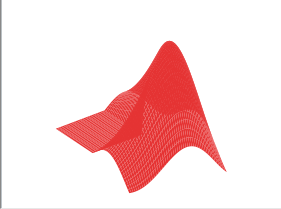
Fortunately someone called malte has created a much nicer .svg file (using inkscape) that looks just like the MATLAB logo and made it available via his blog.
Once you have the svg file you can start creating the shortcut as follows:
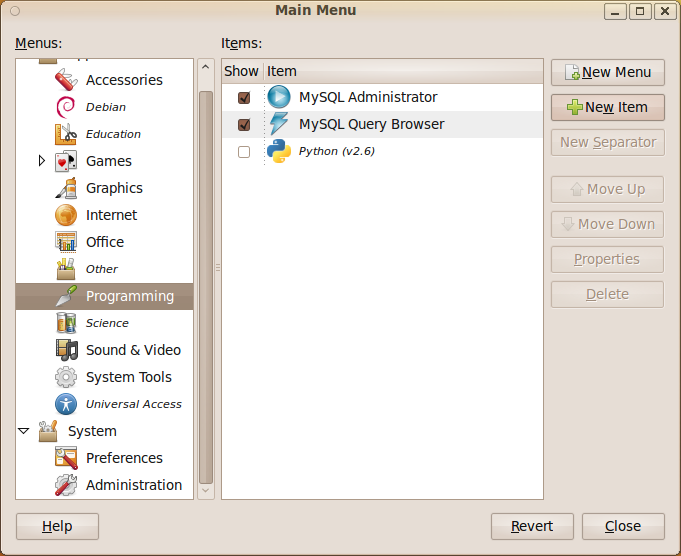
- On the GNOME Desktop click on System->Preferences->Main Menu
- Once the Main Menu program has started choose where you want your MATLAB icon to go and click on New Item. In the screenshot below I have started to put it in the Programming submenu.
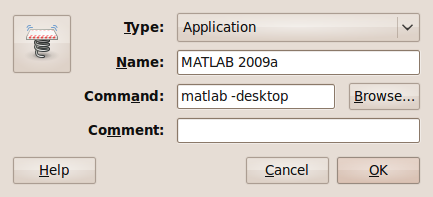
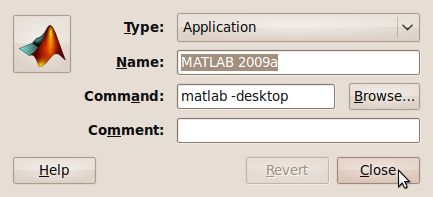
- Give your shortcut a name and put matlab -desktop in the command field. If you didn’t create a shortcut to the matlab executable when you installed the program then you may need to put the full path in instead (i.e. something like /opt/MATLAB/2009b/bin/matlab )
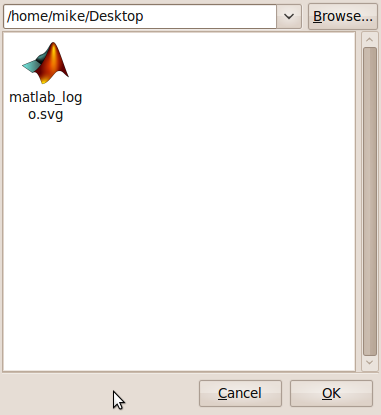
- Now let’s sort out the icon. Click on the spring on the left hand side of the above window to get the window below.
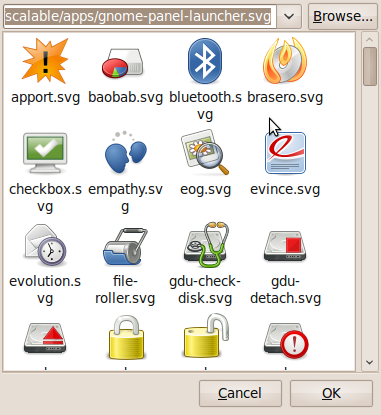
- Click on Browse and then select the folder that contains the .svg file you downloaded from malte’s blog. I put it in my Desktop folder for the screenshot below. Note that the svg file doesn’t appear in the preview pane. Click on Open.
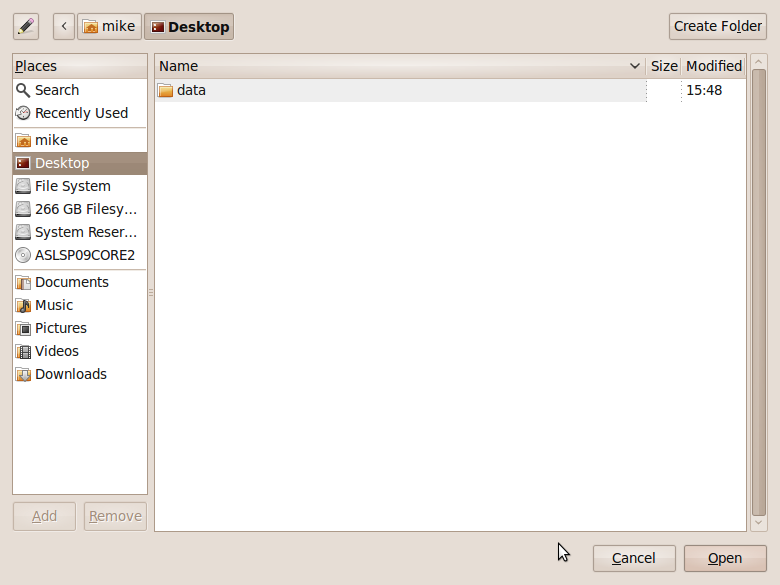
- Choose your icon.
- Click on Close and you are done
If you are using the Student version of MATLAB then the process is slightly different and has been covered by my friend Paul Brabban over at CrossedStreams.com.
In order to write fully parallel programs in MATLAB you have a few choices but they are either hard work, expensive or both. For example you could
- Write parallel mex files using C and OpenMP
- Drop a load of cash on the parallel computing toolbox from the Mathworks
- Use the free parallel toolbox, pMATLAB
Wouldn’t it be nice if you could do no work at all and yet STILL get a speedup on a multicore machine? Well, you can….sometimes.
Slowly but surely, The Mathworks are parallelising some of the built in MATLAB functions to make use of modern multicore processors. So, for certain functions you will see a speed increase in your code when you move to a dual or quad core machine. But which functions?
On a recent train journey I trawled through all of the release notes in MATLAB and did my best to come up with a definitive list and the result is below.
Alongside each function is the version of MATLAB where it first became parallelised (if known). If there is any extra detail then I have included it in brackets (typically things like – ‘this function is only run in parallel for input arrays of more than 20,000 elements’). I am almost certainly missing some functions and details so if you know something that I don’t then please drop me a comment and I’ll add it to the list.
Of course when I came to write all of this up I did some googling and discovered that The Mathworks have already answered this question themselves! Oh well….I’ll publish my list anyway.
Update 11th May 2012 While optimising a user’s application, I discovered that the pinv function makes use of multicore processors so I’ve added it to the list. pinv makes use of svd which is probably the bit that’s multithreaded.
Update 18th February 2012: Added a few functions that I had missed earlier: erfcinv, rank,isfinite,lu and schur. Not sure when they became multithreaded so left the version number blank for now
Update 16th June 2011: Added new functions that became multicore aware in version 2011a plus a couple that have been multicore for a while but I just didn’t know about them!
Update 8th March 2010: Added new functions that became multicore aware in version 2010a. Also added multicore aware functions from the image processing toolbox.
abs (for double arrays > 200k elements),2007a
acos (for double arrays > 20k elements),2007a
acosh (for double arrays > 20k elements),2007a
applylut,2009b (Image processing toolbox)
asin (for double arrays > 20k elements),2007a
asinh(for double arrays > 20k elements),2007a
atan (for double arrays > 20k elements),2007a
atand (for double arrays > 20k elements),2007a
atanh (for double arrays > 20k elements),2007a
backslash operator (A\b for double arrays > 40k elements),2007a
bsxfun,2009b
bwmorph,2010a (Image processing toolbox)
bwpack,2009b (Image processing toolbox)
bwunpack,2009b (Image processing toolbox)
ceil (for double arrays > 200k elements),2007a
conv,2011a
conv2,(two input form),2010a
cos (for double arrays > 20k elements),2007a
cosh (for double arrays > 20k elements),2007a
det (for double arrays > 40k elements),2007a
edge,2010a (Image processing toolbox)
eig
erf,2009b
erfc,2009b
erfcinv
erfcx,2009b
erfinv,2009b
exp (for double arrays > 20k elements),2007a
expm (for double arrays > 40k elements),2007a
fft,2009a
fft2,2009a
fftn,2009a
filter,2009b
fix (for double arrays > 200k elements),2007a
floor (for double arrays > 200k elements),2007a
gamma,2009b
gammaln,2009b
hess (for double arrays > 40k elements),2007a
hypot (for double arrays > 200k elements),2007a
ifft,2009a
ifft2,2009a
ifftn,2009a
imabsdiff,2010a (Image processing toolbox)
imadd,2010a (Image processing toolbox)
imclose,2010a (Image processing toolbox)
imdilate,2009b (Image processing toolbox)
imdivide,2010a (Image processing toolbox)
imerode,2009b (Image processing toolbox)
immultiply,2010a (Image processing toolbox)
imopen,2010a (Image processing toolbox)
imreconstruct,2009b (Image processing toolbox)
int16 (for double arrays > 200k elements),2007a
int32 (for double arrays > 200k elements),2007a
int8 (for double arrays > 200k elements),2007a
inv (for double arrays > 40k elements),2007a
iradon,2010a (Image processing toolbox)
isfinite
isinf (for double arrays > 200k elements),2007a
isnan (for double arrays > 200k elements),2007a
ldivide,2008a
linsolve (for double arrays > 40k elements),2007a
log,2008a
log2,2008a
logical (for double arrays > 200k elements),2007a
lscov (for double arrays > 40k elements),2007a
lu
Matrix Multiply (X*Y - for double arrays > 40k elements),2007a
Matrix Power (X^N - for double arrays > 40k elements),2007a
max (for double arrays > 40k elements),2009a
medfilt2,2010a (Image processing toolbox)
min (for double arrays > 40k elements),2009a
mldivide (for sparse matrix input),2009b
mod (for double arrays > 200k elements),2007a
pinv
pow2 (for double arrays > 20k elements),2007a
prod (for double arrays > 40k elements),2009a
qr (for sparse matrix input),2009b
qz,2011a
rank
rcond (for double arrays > 40k elements),2007a
rdivide,2008a
rem,2008a
round (for double arrays > 200k elements),2007a
schur
sin (for double arrays > 20k elements),2007a
sinh (for double arrays > 20k elements),2007a
sort (for long matrices),2009b
sqrt (for double arrays > 20k elements),2007a
sum (for double arrays > 40k elements),2009a
svd,
tan (for double arrays > 20k elements),2007a
tand (for double arrays > 200k elements),2007a
tanh (for double arrays > 20k elements),2007a
unwrap (for double arrays > 200k elements),2007a
various operators such as x.^y (for double arrays > 20k elements),2007a
Integer conversion and arithmetic,2010a