October 6th, 2010 | Categories: mathematica, physics, Wolfram Demonstrations | Tags:

I work at The University of Manchester in the UK and, as some of you may have heard, two of our Professors recently won the Nobel Prize in physics for their discovery of graphene.  Naturally, I wanted to learn more about graphene and, as a fan of Mathematica, I turned to the Wolfram Demonstrations Project to see what I could see.  Click on the images to go to the relevant demonstration.

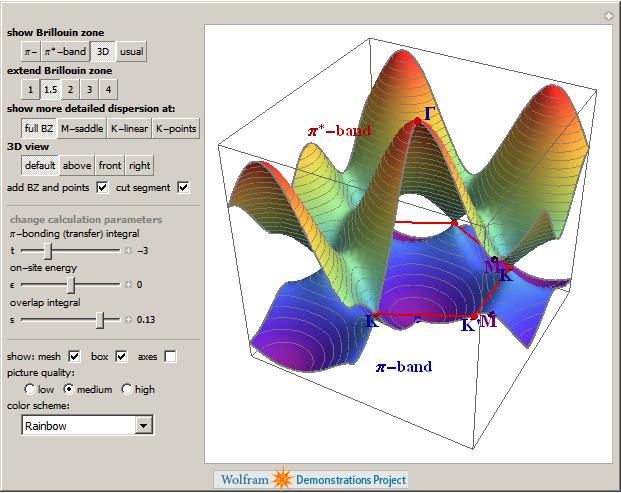
Back when I used to do physics research myself, I was interested in band structure and it turns out that there is a great demonstration from Vladimir Gavryushin that will help you learn all about the band structure of graphene using the tight binding approximation.

Graphene bandstructure

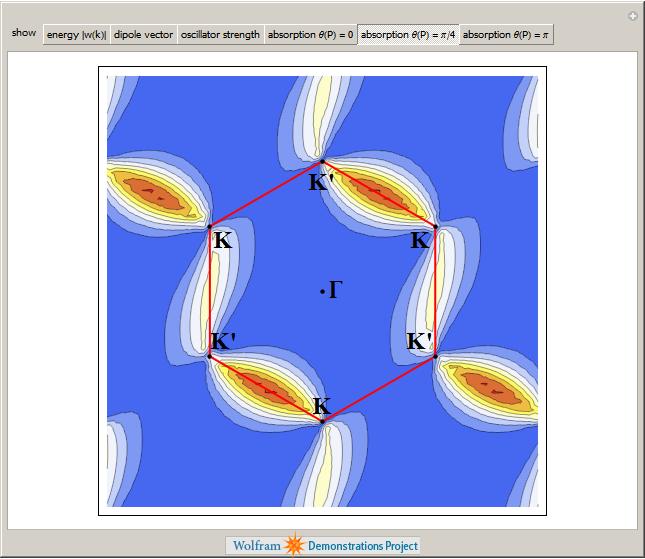
The electronic band structure of a material is important because it helps us to understand (and maybe even engineer) its electronic and optical properties and if you want to know more about its optical properties then the next demonstration from Jessica Alfonsi is for you.

Optical properties of Graphene

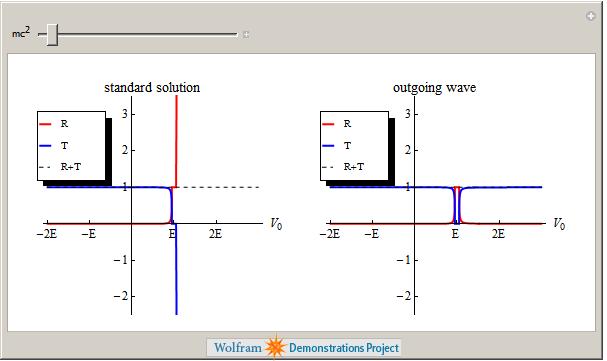
Another professor at Manchester, Niels Walet, produced the next demonstration which asks “Is there a Klein Paradox in Graphene?”

Graphene Klein Paradox?

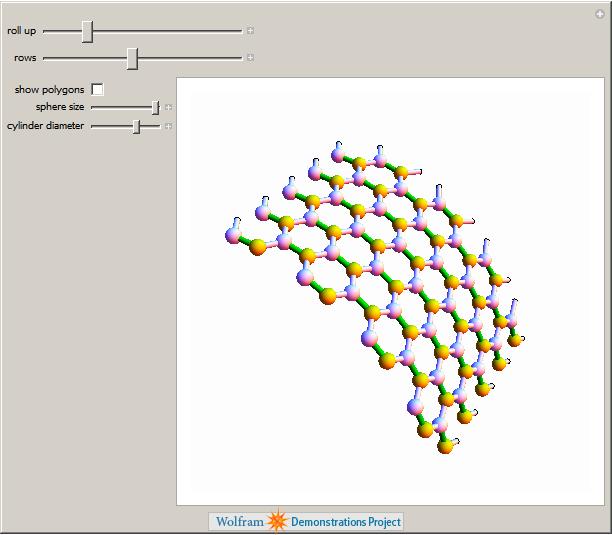
Finally, Graphene can be rolled up to make Carbon Nanotubes as demonstrated by Sándor Kabai.

Graphene Klein Paradox?

This is just a taster of the Graphene related demonstrations available at The Wolfram Demonstrations project (There are 11 at the time of writing) and I have no doubt that there will be more in the future. Many of them are exceptionally well written and they include lists of references, full source code and, best of all, they can be run for free using the Mathematica Player.

Don’t just read about cutting-edge research, get in there and interact with it!

October 5th, 2010 | Categories: matlab, NAG Library, programming | Tags:

Not long after publishing my article, A faster version of MATLAB’s fsolve using the NAG Toolbox for MATLAB, I was contacted by Biao Guo of Quantitative Finance Collector who asked me what I could do with the following piece of code.

function MarkowitzWeight = fsolve_markowitz_MATLAB()

RandStream.setDefaultStream (RandStream('mt19937ar','seed',1));
% simulate 500 stocks return
SimR = randn(1000,500);
r = mean(SimR); % use mean return as expected return
targetR = 0.02;
rCOV = cov(SimR); % covariance matrix
NumAsset = length(r);

options=optimset('Display','off');
startX = [1/NumAsset*ones(1, NumAsset), 1, 1];
x = fsolve(@fsolve_markowitz,startX,options, r, targetR, rCOV);
MarkowitzWeight = x(1:NumAsset);
end

function F = fsolve_markowitz(x, r, targetR, rCOV)
NumAsset = length(r);
F = zeros(1,NumAsset+2);
weight = x(1:NumAsset); % for asset weights
lambda = x(NumAsset+1);
mu = x(NumAsset+2);
for i = 1:NumAsset
    F(i) = weight(i)*sum(rCOV(i,:))-lambda*r(i)-mu;
end
F(NumAsset+1) = sum(weight.*r)-targetR;
F(NumAsset+2) = sum(weight)-1;
end

This is an example from financial mathematics and Biao explains it in more detail in a post over at his blog, mathfinance.cn. Now, it isn’t particularly computationally challenging since it only takes 6.5 seconds to run on my 2Ghz dual core laptop. It is, however, significantly more challenging than the toy problem I discussed in my original fsolve post. So, let’s see how much we can optimise it using NAG and any other techniques that come to mind.

Before going on, I’d just like to point out that we intentionally set the seed of the random number generator with

RandStream.setDefaultStream (RandStream('mt19937ar','seed',1));

to ensure we are always operating with the same data set. This is purely for benchmarking purposes.

Optimisation trick 1 – replacing fsolve with NAG’s c05nb

The first thing I had to do to Biao’s code in order to apply the NAG toolbox was to split it into two files. We have the main program, fsolve_markowitz_NAG.m

function MarkowitzWeight = fsolve_markowitz_NAG()
global r targetR rCOV;
%seed random generator to ensure same results every time for benchmark purposes
RandStream.setDefaultStream (RandStream('mt19937ar','seed',1));

% simulate 500 stocks return
SimR = randn(1000,500);
r = mean(SimR)'; % use mean return as expected return
targetR = 0.02;
rCOV = cov(SimR); % covariance matrix
NumAsset = length(r);

startX = [1/NumAsset*ones(1,NumAsset), 1, 1];
tic
x = c05nb('fsolve_obj_NAG',startX);
toc
MarkowitzWeight = x(1:NumAsset);
end

and the objective function, fsolve_obj_NAG.m

function [F,iflag] = fsolve_obj_NAG(n,x,iflag)
global r targetR rCOV;
NumAsset = length(r);
F = zeros(1,NumAsset+2);
weight = x(1:NumAsset); % for asset weights
lambda = x(NumAsset+1);
mu = x(NumAsset+2);
for i = 1:NumAsset
    F(i) = weight(i)*sum(rCOV(i,:))-lambda*r(i)-mu;
end
F(NumAsset+1) = sum(weight.*r)-targetR;
F(NumAsset+2) = sum(weight)-1;
end

I had to put the objective function into its own .m file because because the NAG toolbox currently doesn’t accept function handles (This may change in a future release I am reliably told). This is a pain but not a show stopper.

Note also that the function header for the NAG version of the objective function is different from the pure MATLAB version as
per my original article.

Transposition problems
The next thing to notice is that I have done the following in the main program, fsolve_markowitz_NAG.m

r = mean(SimR)';

compared to the original

r = mean(SimR);

This is because the NAG routine, c05nb, does something rather bizarre. I discovered that if you pass a 1xN matrix to NAGs c05nb then it gets transposed in the objective function to Nx1. Since Biao relies on this being 1xN when he does

F(NumAsset+1) = sum(weight.*r)-targetR;

we get an error unless you take the transpose of r in the main program. I consider this to be a bug in the NAG Toolbox and it is currently with NAG technical support.

Global variables
Sadly, there is no easy way to pass extra variables to the objective function when using NAG’s c05nb. In MATLAB Biao could do this

x = fsolve(@fsolve_markowitz,startX,options, r, targetR, rCOV);

No such luck with c05nb. The only way to get around it is to use global variables (Well, a small lie, there is another way, you can use reverse communication in a different NAG function, c05nd, but that’s a bit more complicated and I’ll leave it for another time I think)

So, It’s pretty clear that the NAG function isn’t as easy to use as MATLAB’s fsolve function but is it any faster? The following is typical.

>> tic;fsolve_markowitz_NAG;toc
Elapsed time is 2.324291 seconds.

So, we have sped up our overall computation time by a factor of 3. Not bad, but nowhere near the 18 times speed-up that I demonstrated in my original post.

Optimisation trick 2 – Don’t sum so much

In his recent blog post, Biao challenged me to make his code almost 20 times faster and after applying my NAG Toolbox trick I had ‘only’ managed to make it 3 times faster. So, in order to see what else I might be able to do for him I ran his code through the MATLAB profiler and discovered that it spent the vast majority of its time in the following section of the objective function

for i = 1:NumAsset
    F(i) = weight(i)*sum(rCOV(i,:))-lambda*r(i)-mu;
end

It seemed to me that the original code was calculating the sum of rCOV too many times. On a small number of assets (50 say) you’ll probably not notice it but with 500 assets, as we have here, it’s very wasteful.

So, I changed the above to

for i = 1:NumAsset
    F(i) = weight(i)*sumrCOV(i)-lambda*r(i)-mu;
end

So,instead of rCOV, the objective function needs to be passed the following in the main program

sumrCOV=sum(rCOV)

We do this summation once and once only and make a big time saving.  This is done in the files fsolve_markowitz_NAGnew.m and fsolve_obj_NAGnew.m

With this optimisation, along with using NAG’s c05nb we now get the calculation time down to

>> tic;fsolve_markowitz_NAGnew;toc
Elapsed time is 0.203243 seconds.

Compared to the 6.5 seconds of the original code, this represents a speed-up of over 32 times. More than enough to satisfy Biao’s challenge.

Checking the answers

Let’s make sure that the results agree with each other. I don’t expect them to be exactly equal due to round off errors etc but they should be extremely close. I check that the difference between each result is less than 1e-7:

original_results = fsolve_markowitz_MATLAB;
nagver1_results = fsolve_markowitz_NAGnew;
>> all(abs(original_results - nagver1_results)<1e8)
ans =
     1

That’ll do for me!

Summary

The current iteration of the NAG Toolbox for MATLAB (Mark 22) may not be as easy to use as native MATLAB toolbox functions (for this example at least) but it can often provide useful speed-ups and in this example, NAG gave us a factor of 3 improvement compared to using fsolve.

For this particular example, however, the more impressive speed-up came from pushing the code through the MATLAB profiler, identifying the hotspot and then doing something about it.  There are almost certainly more optimisations to make but with the code running at less than a quarter of a second on my modest little laptop I think we will leave it there for now.

September 24th, 2010 | Categories: just for fun, programming | Tags:

One of my friends on facebook posted the following source code comment which I am sorely tempted to use in some future projects.

//
// Dear maintainer:
//
// Once you are done trying to 'optimize' this routine,
// and have realized what a terrible mistake that was,
// please increment the following counter as a warning
// to the next guy:
//
// total_hours_wasted_here = 32
//

It turns out that this is one of many examples in a superb thread on StackOverflow.com

September 21st, 2010 | Categories: math software, matlab, NAG Library, programming | Tags:

Part of my job at the University of Manchester is to help researchers improve their code in systems such as Mathematica, MATLAB, NAG and so on.  One of the most common questions I get asked is ‘Can you make this go any faster please?’ and it always makes my day if I manage to do something significant such as a speed up of a factor of 10 or more.  The users, however, are often happy with a lot less and I once got bought a bottle of (rather good) wine for a mere 25% speed-up (Note:  Gifts of wine aren’t mandatory)

I employ numerous tricks to get these speed-ups including applying vectorisation, using mex files, modifying the algorithm to something more efficient,picking the brains of colleagues and so on.  Over the last year or so, I have managed to help several researchers get significant speed-ups in their MATLAB programs by doing one simple thing – swapping the fsolve function for an equivalent from the NAG Toolbox for MATLAB.

The fsolve function is part of MATLAB’s optimisation toolbox and, according to the documentation, it does the following:

“fsolve Solves a system of nonlinear equation of the form F(X) = 0 where F and X may be vectors or matrices.”

The NAG Toolbox for MATLAB contains a total of 6 different routines that can perform similar calculations to fsolve.  These 6 routines are split into 2 sets of 3 as follows

For when you have function values only:
c05nb – Solution of system of nonlinear equations using function values only (easy-to-use)
c05nc – Solution of system of nonlinear equations using function values only (comprehensive)
c05nd – Solution of system of nonlinear equations using function values only (reverse communication)

For when you have both function values and first derivatives
c05pb – Solution of system of nonlinear equations using first derivatives (easy-to-use)
c05pc – Solution of system of nonlinear equations using first derivatives (comprehensive)
c05pd – Solution of system of nonlinear equations using first derivatives (reverse communication)

So, the NAG routine you choose depends on whether or not you can supply first derivatives and exactly which options you’d like to exercise.  For many problems it will come down to a choice between the two ‘easy to use’ routines – c05nb and c05pb (at least, they are the ones I’ve used most of the time)

Let’s look at a simple example.  You’d like to find a root of the following system of non-linear equations.

F(1)=exp(-x(1)) + sinh(2*x(2)) + tanh(2*x(3)) – 5.01;
F(2)=exp(2*x(1)) + sinh(-x(2) ) + tanh(2*x(3) ) – 5.85;
F(3)=exp(2*x(1)) + sinh(2*x(2) ) + tanh(-x(3) ) – 8.88;

i.e. you want to find a vector X containing three values for which F(X)=0.

To solve this using MATLAB and the optimisation toolbox you could proceed as follows, first create a .m file called fsolve_obj_MATLAB.m (henceforth referred to as the objective function) that contains the following

function  F=fsolve_obj_MATLAB(x)
F=zeros(1,3);
F(1)=exp(-x(1))  + sinh(2*x(2)) + tanh(2*x(3)) - 5.01;
F(2)=exp(2*x(1)) +  sinh(-x(2) ) + tanh(2*x(3) ) - 5.85;
F(3)=exp(2*x(1)) +  sinh(2*x(2) ) + tanh(-x(3) ) - 8.88;
end

Now type the following at the MATLAB command prompt to actually solve the problem:

options=optimset('Display','off'); %Prevents fsolve from  displaying too much information
startX=[0 0 0]; %Our  starting guess for the solution vector
X=fsolve(@fsolve_obj_MATLAB,startX,options)

MATLAB finds the following solution (Note that it’s only found one of the solutions, not all of them, which is typical of the type of algorithm used in fsolve)

X =
0.9001     1.0002    1.0945

Since we are not supplying the derivatives of our objective function and we are not using any special options, it turns out to be very easy to switch from using the optimisation toolbox to the NAG toolbox for this particular problem by making use of the routine c05nb.

First, we need to change the header of our objective function’s .m file from

function F=fsolve_obj_MATLAB(x)

to

function  [F,iflag]=fsolve_obj_NAG(n,x,iflag)

so our new .m file, fsolve_obj_NAG.m, will contain the following

function  [F,iflag]=fsolve_obj_NAG(n,x,iflag)
F=zeros(1,3);
F(1)=exp(-x(1)) + sinh(2*x(2)) + tanh(2*x(3)) - 5.01;
F(2)=exp(2*x(1)) + sinh(-x(2) ) + tanh(2*x(3) ) - 5.85;
F(3)=exp(2*x(1)) + sinh(2*x(2) ) + tanh(-x(3) ) - 8.88;
end

Note that the ONLY change we made to the objective function was the very first line.  The NAG routine c05nb expects to see some extra arguments in the objective function (iflag and n in this example) and it expects to see them in a very particular order but we are not obliged to use them.  Using this modified objective function we can proceed as follows.

startX=[0 0 0]; %Our starting guess
X=c05nb('fsolve_obj_NAG',startX)

NAG gives the same result as the optimisation toolbox:

X =
0.9001    1.0002    1.0945

Let’s look at timings.  I performed the calculations above on an 800Mhz laptop running Ubuntu Linux 10.04, MATLAB 2009 and Mark 22 of the NAG toolbox and got the following timings (averaged over 10 runs):

Optimisation toolbox: 0.0414 seconds
NAG toolbox: 0.0021 seconds

So, for this particular problem NAG was faster than MATLAB by a factor of 19.7 times on my machine.

That’s all well and good, but this is a simple problem. Does this scale to more realistic problems I hear you ask? Well, the answer is ‘yes’. I’ve used this technique several times now on production code and it almost always results in some kind of speed-up. Not always 19.7 times faster, I’ll grant you, but usually enough to make the modifications worthwhile.

I can’t actually post any of the more complicated examples here because the code in question belongs to other people but I was recently sent a piece of code from a researcher that made heavy use of fsolve and a typical run took 18.19 seconds (that’s for everything, not just the fsolve bit).  Simply by swapping a couple of lines of code to make it use the NAG toolbox rather than the optimisation toolbox I reduced the runtime to 1.08 seconds – a speed-up of almost 17 times.

Sadly, this technique doesn’t always result in a speed-up and I’m working on figuring out exactly when the benefits disappear. I guess that the main reason for NAG’s good performance is that it uses highly optimised, compiled Fortran code compared to MATLAB’s interpreted .m code. One case where NAG didn’t help was for a massively complicated objective function and the majority of the run-time of the code was spent evaluating this function. In this situation, NAG and MATLAB came out roughly neck and neck.

In the meantime, if you have some code that you’d like me to try it on then drop me a line.

If you enjoyed this post then you may also like:

September 15th, 2010 | Categories: math software, matlab | Tags:

A very welcome change in MATLAB 2010b is the merging of the splines and curve-fitting toolboxes to form one super-toolbox that does both splines AND curve-fitting in a product that’s simply called The Curve Fitting Toolbox.  The separate curve-fitting and splines toolboxes were always a bugbear for me and many of my equivalents in other UK universities so now we have one less thing to moan about. Thanks to the HUGE number of MATLAB toolboxes, however, we’ll still have plenty of things to moan about at our quarterly academic maths and stats meetings.

I took a trawl through some of Mathworks standard toolboxes to see what other toolboxes I thought should be merged together or done away with completely.  Here are a couple of pleas to The Mathworks that would make MY life (and the lives of the community I support) a whole lot easier.

The Parallel Toolbox for MATLAB

My laptop has a dual core processor so, unless I am lucky enough to be using functions that are implicitly parallel, MATLAB will only make use of half of my available processing power. It gets worse when I get into work since it will only use a quarter of the power of my quad-core desktop and as for those lucky fellows who have just bought themselves dual hex-core MONSTERS (12 cores total)….well, MATLAB won’t exactly be using them to their full capacity will it? Less than 10% in fact, unless they shell out extra for the parallel computing toolbox (PCT).

The vast majority of computers sold today have more than one processing core and yet the vast majority of MATLAB installations out there only use one of them (unless you use these functions). MATLAB’s competitors such as Mathematica, Maple and Labview all have explicit multi-core support built in as standard. Maybe it’s time that MATLAB did that too!

What I’d like Mathworks to do:Merge the Parallel Computing Toolbox with core MATLAB.

Optimisation and Global Optimisation

You’ve got a function and you want to know when it gets as big or as small as it can be so you turn to optimisation routines. MATLAB has some basic optimisation functions built into its core (fminsearch for example) but many people find that they need the extra power and versatility offered by the functions in either the optimisation toolbox or the global optimisation toolbox.

People who have never used optimisation routines before sometimes ask me what the difference between these toolboxes is. When I was first faced with this question I discussed the different classes of algorithms involved and used phrases like ‘genetic algorithms’, ‘multistart’, ‘simulated annealing’, ‘global and local minima’ and so on. These days I start off somewhat more simply:

Me: “The optimisation toolbox finds A minimum near to your starting guess. It may or may not be THE minimum of your function. The global optimisation toolbox, on the other hand, attempts to find THE minimum.”

User: “Well, I want THE minimum obviously. So, I guess I’ll take the global optimisation toolbox please.”

Me: THE minimum costs more money than just A minimum. Twice as much in fact, since you need to buy the standard optimisation toolbox AND the global optimisation toolbox if you want THE minimum.

User: <Deep in thought while they consider how far their grant is going to stretch>

Me: The standard optimisation toolbox won’t cost you anything here since we have a set of licenses for it on our network license server.

User: OK OK.  I’ll make do with that.  I suppose I could just make LOTS of starting guesses and run the standard optimisation toolbox routines in parallel on my 12-core monster?  Then I can take the best result and there will be a better chance that it will be THE minimum, right?

Me: That’ll need the Parallel computing toolbox…which costs extra!

What I’d like Mathworks to do: Merge the standard and global optimisation toolboxes.

So, that’s a couple of things that I would like.  Do you agree with them?  Are there other toolbox merges you’d like to see?  Comments welcome.

September 13th, 2010 | Categories: CUDA, matlab | Tags:

One of the new features in MATLAB 2010b that’s getting me very excited is the CUDA based GP-GPU (General Purpose computation on Graphical Processing Units) integration that’s become available in the Parallel Computing Toolbox. As soon as I had MATLAB 2010b installed on my CUDA capable laptop (Dell XPS M1330 with a GeForce 8400M GS) running Ubuntu I wanted to try out as much of this new functionality as my low-end hardware would allow me. I’ve installed and played with CUDA on this machine in the past and so I fired up MATLAB 2010b and issued the following command to ask MATLAB how many CUDA enabled devices it thought I had on my system

gpuDeviceCount

??? Error using ==> feval
The CUDA driver was found, but it is too old. The CUDA driver on your system is version: 3.
The required CUDA version is: 3.1 or greater.

The practical upshot of the above error message is that I needed to upgrade my NVidia graphics driver which was at version 195.36.24.  I went for the latest version which, at the time of writing, is version 256.53.  I did this from the NVIDIA-Linux-x86-256.53.run file which I got direct from NVidia and all I’ll say about the process is that it ruined an otherwise perfectly good Sunday morning.  I did get there in the end though!

So, I had the shiniest version of the graphics driver up and running.  Time to fire up MATLAB again:

>> gpuDeviceCount
Warning: The device selected (device 1, "GeForce 8400M
GS") does not have sufficient compute capability to be
used. Compute capability 1.3 (or greater) is required,
the selected device has compute capability 1.1.
> In deviceCount at 7
  In GPUDevice.GPUDevice>GPUDevice.count at 27
  In gpuDeviceCount at 10

Or, to put it another way, “Please insert new laptop to continue.” With that, my MATLAB/CUDA experiments are brought to an end.

Can anyone recommend a reasonably priced laptop that contains a CUDA capable graphics card at compute level 1.3 or above?

Update (16th September 2010): Several people have emailed me to defend The Mathwork’s design decision so I’d like to make something very clear: I completely agree with The Matworks in their insistence on CUDA compute level 1.3 or above.  As one correspondent pointed out, this ensures that not only does the hardware support double precision but it is also IEEE-compliant and IEEE-compliance is a good thing!  This blog post was never meant to criticize The Mathworks over this, I wrote it partly to ensure that more people are aware of the requirements and partly because I needed to vent over the sudden obsolescence of my relatively new laptop.

September 2nd, 2010 | Categories: Linux, programming | Tags:

I recently had a set of files that were named as follows

frame1.png
frame2.png
frame3.png
frame4.png
frame5.png
frame6.png
frame7.png
frame8.png
frame9.png
frame10.png

and so on, right up to frame750.png. The plan was to turn these .png files into an uncompressed movie using mencoder via the following command (original source)

mencoder mf://*.png -mf w=720:h=720:fps=25:type=png -ovc raw -oac copy -o output.avi

but I ended up with a movie that jumped all over the place since the frames were in an odd order. In the following order in fact

frame0.csv
frame100.csv
frame101.csv
frame102.csv
frame103.csv
frame104.csv
frame105.csv
frame106.csv
frame107.csv
frame108.csv
frame109.csv
frame10.csv
frame110.csv

This is because globbing expansion (the *.png bit) is alphabetical in bash rather than numerical.

One way to get the frames in the order that I want is to zero-pad them. In other words I replace file1.png with file001.png and file20.png with file020.png and so on. Here’s how to do that in bash

#!/bin/bash
num=`expr match "$1" '[^0-9]*\([0-9]\+\).*'`
paddednum=`printf "%03d" $num`
echo ${1/$num/$paddednum}

Save the above to a file called zeropad.sh and then do the following command to make it executable

chmod +x ./zeropad.sh

You can then use the zeropad.sh script as follows

./zeropad.sh frame1.png

which will return the result

frame001.png

All that remains is to use this script to rename all of the .png files in the current directory such that they are zeropadded.

for i in *.png;do mv $i `./zeropad.sh $i`; done

You may want to change the number of digits used in each filename from 3 to 5 (say). To do this just change %03d in zeropad.sh to %05d

Let me know if you find this useful or have an alternative solution you’d like to share (in another language maybe?)

August 11th, 2010 | Categories: general math | Tags:

Back when I was doing my own research (my field was photonic crystals), I read a lot of research articles in journals such as Physical Review B, Applied Optics and The Journal of the Optical Society of America B.  These journals represent the state of the art in their respective fields and if you are not a full time researcher then you will probably find many of their articles difficult to really get into.  When I say ‘really get into’ I mean ‘understand well enough that you could reproduce or develop their results if you wanted to’.

These days I am not a full-time researcher (although I do assist many of them on a regular basis) but I still like to read journal articles.  The type of journal I read, however, has changed rather a lot since I’m doing it for fun and personal interest rather than for my salary.  I sometimes take what I read in these articles and turn them into blog posts and/or Wolfram Demonstrations.

Here’s a list of some of my favourites

  • European Journal of Physics: According to their website “The primary mission of European Journal of Physics is to assist in maintaining and improving the standard of taught physics in universities and other institutes of higher education.”  There’s lots of cool stuff to be found with past articles including The Kaye effect, Mean Free Path in Soccer and Gases and Cooling and warming laws: an exact analytical solution
  • The College Mathematics Journal: According to their website “The College Mathematics Journal is designed to enhance classroom learning and stimulate thinking regarding undergraduate mathematics.”
  • The Mathematical Gazette: I could spend all day browsing through the archives of this one – it’s a math nerds dream.  For example, when you read an article written in 1894 with the title ‘Some old Text-Books‘ you know that they are going to be really old! It’s also fun to compare the ‘problems and solutions’ from 1900 to those from 2000.  From the website “The Mathematical Gazette is the original journal of the Mathematical Association and it is now over a century old”
  • Mathematics Magazine: I’ve had one or two ideas for Wolfram Demonstrations from this magazine.  From the website “Mathematics Magazine presents articles and notes on undergraduate mathematical topics”

What journals do you recommend for fun and/or teaching purposes in areas such as physics, mathematics and statistics?

Update The following are recommendations from readers in the comments section. Thanks to everyone who responded.  Feel free to let me know if your favourite isn’t on this list.

July 29th, 2010 | Categories: matlab, NAG Library, parallel programming | Tags:

The MATLAB function ranksum is part of MATLAB’s Statistics Toolbox. Like many organizations who use network licensing for MATLAB and its toolboxes, my employer, The University of Manchester, sometimes runs out of licenses for this toolbox which leads to following error message when you attempt to evaluate ranksum.

??? License checkout failed.
License Manager Error -4
Maximum number of users for Statistics_Toolbox reached.
Try again later.
To see a list of current users use the lmstat utility or contact your License Administrator.

An alternative to the Statistics Toolbox is the NAG Toolbox for MATLAB for which we have an unlimited number of licenses. Here’s how to replace ranksum with the NAG routine g08ah.

Original MATLAB / Statistics Toolbox code

x = [0.8147;0.9058;0.1270;0.9134;0.6324;0.0975;0.2785;0.5469;0.9575;0.9649];
y=  [0.4076;1.220;1.207;0.735;1.0502;0.3918;0.671;1.165;1.0422;1.2094;0.9057;0.285;1.099;1.18;0.928];
p = ranksum(x,y)

The result is p = 0.0375

Code using the NAG Toolbox for MATLAB

x = [0.8147;0.9058;0.1270;0.9134;0.6324;0.0975;0.2785;0.5469;0.9575;0.9649];
y =  [0.4076;1.220;1.207;0.735;1.0502;0.3918;0.671;1.165;1.0422;1.2094;0.9057;0.285;1.099;1.18;0.928];
tail = 'T';
[u, unor, p, ties, ranks, ifail] = g08ah(x, y, tail);

The value for p is the same as that calculated by ranksum: p = 0.0375

NAG’s g08ah routine returns a lot more than just the value p but, for this particular example, we can just ignore it all. In fact, if you have MATLAB 2009b or above then you could call g08ah like this

tail = 'T';
[~, ~, p, ~, ~, ~] = g08ah(x, y, tail);

Which explicitly indicates that you are not going to use any of the outputs other than p.

People at Manchester are using the NAG toolbox for MATLAB more and more; not only because we have a full site license for it but because it can sometimes be very fast.  Here’s some more articles on the NAG toolbox you may find useful.

July 13th, 2010 | Categories: Condor, matlab, parallel programming, programming, random numbers | Tags:

A bit of background to this post

I work in the IT department of the University of Manchester and we are currently developing a Condor Pool which is basically a method of linking together hundreds of desktop machines to produce a high-throughput computing resource.  A MATLAB user recently submitted some jobs to our pool and complained that all of them gave identical results which is stupid because his code used MATLAB’s rand command to mix things up a bit.

I was asked if I knew why this should happen to which I replied ‘yes.’  I was then asked to advise the user how to fix the problem and I did so.  The next request was for me to write some recommendations and tutorials on how users should use random numbers in MATLAB (and Mathematica and possibly Python while I was at it) along with our Condor Pool and I went uncharacteristically quiet for a while.

It turned out that I had a lot to learn about random numbers.  This is the first of a series of (probably 2) posts that will start off by telling you what I knew and move on to what I have learned.  It’s as much a vehicle for getting the concepts straight in my head as it is a tutorial.

Ask MATLAB for 10 Random Numbers

Before we go on, I’d like you to try something for me. You have to start on a system that doesn’t have MATLAB running at all so if MATLAB is running then close it before proceeding. Now, open up MATLAB and before you do anything else issue the following command

rand(10,1)

As many of you will know, the rand command produces random numbers from the uniform distribution between 0 and 1 and the command above is asking for 10 such numbers. You may reasonably expect that the 10 random numbers that you get will be different from the 10 random numbers that I get; after all, they are random right? Well, I got the following numbers when running the above command on MATLAB 2009b running on Linux.

ans =
0.8147
0.9058
0.1270
0.9134
0.6324
0.0975
0.2785
0.5469
0.9575
0.9649

Look familiar?

Now I’ve done this experiment with a number of people over the last few weeks and the responses can be roughly split into two different camps as follows:

1. Oh yeah, I know all about that – nothing to worry about. It’s pretty obvious why it happens isn’t it?
2. It’s a bug. How can the numbers be random if MATLAB always returns the same set?

What does random mean anyway?

If you are new to the computer generation of random numbers then there is something that you need to understand and that is that, strictly speaking, these numbers (like all software generated ‘random’ numbers) are not ‘truly’ random.  Instead they are pseudorandom – my personal working definition of which is “A sequence of numbers generated by some deterministic algorithm in such a way that they have the same statistical properties of ‘true’ random numbers”.  In other words, they are not random they just appear to be but the appearance is good enough most of the time.

Pseudorandom numbers are generated from deterministic algorithms with names like Mersenne Twister, L’Ecuyer’s mrg32k3a [1]  and Blum Blum Schub whereas ‘true’ random numbers come from physical processes such as radioactive decay or atmospheric noise (the website www.random.org uses atmospheric noise for example).

For many applications, the distinction between ‘truly random’ and ‘pseudorandom’ doesn’t really matter since pseudorandom numbers are ‘random enough’ for most purposes.  What does ‘random enough’ mean you might ask?  Well as far as I am concerned it means that the random number generator in question has passed a set of well defined tests for randomness – something like Marsaglia’s Diehard tests or, better still, L’Ecuyer and Simard’s TestU01 suite will do nicely for example.

The generation of random numbers is a complicated topic and I don’t know enough about it to do it real justice but I know a man who does.  So, if you want to know more about the theory behind random numbers then I suggest that you read Pierre L’Ecuyer’s paper simply called ‘Random Numbers’ (pdf file).

Back to MATLAB…

Always the same seed

So, which of my two groups are correct?  Is there a bug in MATLAB’s random number generator or not?

There is nothing wrong with MATLAB’s random number generator at all. The reason why the command rand(10,1) will always return the same 10 numbers if executed on startup is because MATLAB always uses the same seed for its pseudorandom number generator (which at the time of writing is a Mersenne Twister) unless you tell it to do otherwise.

Without going into details, a seed is (usually) an integer that determines the internal state of a random number generator.  So, if you initialize a random number generator with the same seed then you’ll always get the same sequence of numbers and that’s what we are seeing in the example above.

Sometimes, this behaviour isn’t what we want.  For example, say I am doing a Monte Carlo simulation and I want to run it several times to verify my results.  I’m going to want a different sequence of random numbers each time or the whole exercise is going to be pointless.

One way to do this is to initialize the random number generator with a different seed at startup and a common way of achieving this is via the system clock.  The following comes straight out of the current MATLAB documentation for example

RandStream.setDefaultStream(RandStream('mt19937ar','seed',sum(100*clock)));

If you are using MATLAB 2011a or above then you can use the following, much simpler syntax to do the same thing

rng shuffle

Do this once per MATLAB session and you should be good to go (there is usually no point in doing it more than once per session by the way….your numbers won’t be any ‘more random’ if you so.  In fact, there is a chance that they will become less so!).

Condor and ‘random’ random seeds

Sometimes the system clock approach isn’t good enough either.  For example, at my workplace, Manchester University, we have a Condor Pool of hundreds of desktop machines which is perfect for people doing Monte Carlo simulations.  Say a single simulation takes 5 hours and it needs to be run 100 times in order to get good results.  On one machine that’s going to take about 3 weeks but on our Condor Pool it can take just 5 hours since all 100 simulations run at the same time but on different machines.

If you don’t think about random seeding at all then you end up with 100 identical sets of results using MATLAB on Condor for the reasons I’ve explained above.  Of course you know all about this so you switch to using the clock seeding method, try again and….get 100 identical sets of results[2].

The reason for this is that the time on all 100 machines is synchronized using internet time servers.  So, when you start up 100 simultaneous jobs they’ll all have the same timestamp and, therefore, have the same random seed.

It seems that what we need to do is to guarantee (as far as possible) that every single one of our condor jobs gets a unique seed in order to provide a unique random number stream and one way to do this would be to incorporate the condor process ID into the seed generation in some way and there are many ways one could do this.  Here, however, I’m going to take a different route.

On Linux machines it is possible to obtain small numbers of random numbers using the special files /dev/random and /dev/urandom which are interfaces to the kernel’s random number generator.  According to the documentation ‘The random number generator gathers environmental noise from device drivers and other sources into an entropy pool. The generator also keeps an estimate of the number of bit of the noise in the entropy pool.  From this entropy pool random numbers are created.’

This kernel generator isn’t suitable for simulation purposes but it will do just fine for generating an initial seed for MATLAB’s pseudorandom number generator.  Here’re the MATLAB commands

[status seed] = system('od /dev/urandom --read-bytes=4 -tu | awk ''{print $2}''');
seed=str2double(seed);
RandStream.setDefaultStream(RandStream('mt19937ar','seed',seed));

In MATLAB 2011a or above you can change this to

[status seed] = system('od /dev/urandom --read-bytes=4 -tu | awk ''{print $2}''');
seed=str2double(seed);
rng(seed);

Put this at the beginning of the MATLAB script that defines your condor job and you should be good to go.  Don’t do it more than once per MATLAB session though – you won’t gain anything!

The end or the end of the beginning?

If you asked me the question ‘How do I generate a random seed for a pseudorandom number generator?’ then I think that the above solution answers it quite well.  If, however, you asked me ‘What is the best way to generate multiple independent random number streams that would be good for thousands of monte-carlo simulations?‘ then we need to rethink somewhat for the following reasons.

Seed collisions: The Mersenne twister algorithm currently used as the default random number generator for MATLAB uses a 32bit integer seed which means that it can take on 2^32 or 4,294,967,296 different values – which seems a lot!  However, by considering a generalisation of the birthday problem it can be seen that if you select such a seed at random then you have a 50% chance choosing two identical seeds after only 65,536 runs.  In other words, if you perform 65,536 simulations then there is a 50% chance that two such simulations will produce identical results.

Bad seeds: I have read about (but never experienced) the possibility of ‘bad seeds’; that is some seeds that produce some very strange, non-random results – for the first few thousand iterates at least.  This has led to some people advising that you should ‘warm-up’ your random number generator by asking for, and throwing away, a few thousand random numbers before you start using them. Does anyone know of any such bad seeds?

Overlapping or correlated sequences: All pseudorandom number generators are periodic (at least, all the ones that I know about are) – which means that after N iterations the sequence repeats itself.  If your generator is good then N is usually large enough that you don’t need to worry about this.  The Mersenne Twister used in MATLAB, for instance, has a huge period of (2^19937 – 1)/2 (half of the standard 32bit implementation).

The point I want to make is that you don’t get several different streams of random numbers, you get just one, albeit a very big one.  Now, when you choose a seed you are essentially choosing a random point in this stream and there is no guarantee how far apart these two points are.  They could be separated by a distance of trillions of points or they could be right next to each other – we simply do not know – and this leads to the possibility of overlapping sequences.

Now, one could argue that the possibility of overlap is very small in a generator such as the Mersenne Twister and I do not know of any situation where it has occurred in practice but that doesn’t mean that we shouldn’t worry about it.  If your work is based on the assumption that all of your simulations have used independent, uncorrelated random number streams then there is a possibility that your assumptions could be wrong which means that your conclusions could be wrong.  Unlikely maybe, but still no way to do science.

Next Time

Next time I’ll be looking at methods for generating guaranteed independent random number streams using MATLAB’s in-built functions as well as methods taken from the NAG Toolbox for MATLAB.  I’ll also be including explicit examples that use this stuff in Condor.

Ask the audience

I assume that some of you will be in the business of performing Monte-Carlo simulations and so you’ll probably know much more about all of this than me.  I have some questions

  • Has anyone come across any ‘bad seeds’ when dealing with MATLAB’s Mersenne Twister implementation?
  • Has anyone come across overlapping sequences when using MATLAB’s Mersenne Twister implementation?
  • How do YOU set up your random number generator(s).

I’m going to change my comment policy for this particular post in that I am not going to allow (most) anonymous comments.  This means that you will have to give me your email address (which, of course, I will not publish) which I will use once to verify that it really was you that sent the comment.

Notes and References

[1] L’Ecuyer P (1999) Good parameter sets for combined multiple recursive random number generators Operations Research 47:1 159–164

[2] More usually you’ll get several different groups of results.  For example you might get 3 sets of results, A B C, and get 30 sets of A, 50 sets of B and 20 sets of C.  This is due to the fact that all 100 jobs won’t hit the pool at precisely the same instant.

[3] Much of this stuff has already been discussed by The Mathworks and there is an excellent set of articles over at Loren Shure’s blog – Loren onThe Art of MATLAB.