March 21st, 2011 | Categories: Condor, Guest posts, Linux, Mac OS X, parallel programming, programming, Science | Tags:

In my previous blog post I mentioned that I am a member of a team that supports High Throughput Computing (HTC) at The University of Manchester via a 1600+ core ‘condor pool’.  In order to make it as easy as possible for our researchers to make use of this resource one of my colleagues, Ian Cottam, created a system called DropAndCompute.  In this guest blog post, Ian describes DropAndCompute and how it evolved into the system we use at Manchester today.

The Evolution of “DropAndCompute” by Ian Cottam

DropAndCompute, as used at The University of Manchester’s Faculty of Engineering and Physical Sciences, is an approach to using network (or grid or cloud based) computational resources without having to know the operating system of the resource’s gateway or any command line tools of either the resource itself —Condor in our case — or in general. Most such gateways run a flavour of Unix, often Linux. Many of our users are either unfamiliar with Linux or just prefer a drag-and-drop interface, as I do myself despite using various flavours of Unix since Version 6 in the late 70s.

Why did I invent it? On its original web site description page wiki.myexperiment.org/index.php/DropAndCompute the following reasons are given:

  • A simple and uniform drag-and-drop graphical user interface, potentially, to many resource pools.
  • No use of terminal windows or command lines.
  • No need to login to remote hosts or install complicated grid-enabling software locally.
  • No need for the user to have an account on the remote resources (instead they are accounted by having a shared folder allocated).  Of course, nothing stops the users from having accounts should that be preferred.
  • No need for complicated Virtual Private Networks, IP Tunnelling, connection brokers, or similar, in order to access grid resources on private subnets (provided at least one node is on the public Internet, which is the norm).
  • Pop-ups notify users of important events (basically, log and output files being created when a job has been accepted, and when the generated result files arrive).
  • Somewhat increased security as the user only has (indirect) access to a small subset of the computational resource’s commands.

Version One
The first version was used on a Condor Pool within our interdisciplinary biocentre (MIB).  A video of it in use is shown below

Please do take the time to look at this video as it shows clearly how, for example, Condor can be used via this type of interface.

This version was notable for using the commercial service: Dropbox and, in fact, my being a Dropbox user inspired the approach and its name. Dropbox is trivial to install on any of the main platforms, on any number of computers owned by a user, and has a free version giving 2GB of synchronised and shared storage. In theory, only the computational resource supplier need pay for a 100GB account with Dropbox, have a local Condor submitting account, and share folders out with users of the free Dropbox-based service.

David De Roure, then at the University of Southampton and now Oxford, reviewed this approach here at blog.openwetware.org/deroure/?p=97, and offers his view as to why it is important in helping scientists start on the ‘ramp’ to using what can be daunting, if powerful, computational facilities.

Version Two

Quickly the approach migrated to our full, faculty-wide Condor Pool and the first modification was made. Now we used separate accounts for each user of the service on our submitting nodes; Dropbox still made this sharing scheme trivial to set up and manage, whilst giving us much better usage accounting information. The first minor problem came when some users needed more –much more in fact– than 2GB of space.  This was solved by them purchasing their own 50GB or 100GB accounts from Dropbox.

Problems and objections

However, two more serious problems impacted our Dropbox based approach. First, the large volume of network traffic across the world to Dropbox’s USA based servers and then back down to local machines here in Manchester resulted in severe bottlenecks once our Condor Pool had reached the dizzy heights of over a thousand processor cores. We could have ameliorated this by extra resources, such as multiple submit nodes, but the second problem proved to be more of a showstopper.

Since the introduction of DropAndCompute several people –at Manchester and beyond– have been concerned about research data passing through commercial, USA-based servers. In fact, the UK’s National Grid Service (NGS) who have implemented their own flavour of DropAndCompute did not use Dropbox for this very reason. The US Patriot Act means that US companies must surrender any data they hold if officially requested to do so by Federal Government agencies. Now one approach to this is to do user-level encryption of the data before it enters the user’s dropbox. I have demonstrated this approach, but it complicates the model and it is not so straightforward to use exactly the same method on all of the popular platforms (Windows, Mac, Linux).

Version Three

To tackle the above issues we implemented a ‘local version’ of DropAndCompute that is not Dropbox based. It is similar to the NGS approach, but, in my opinion, much simpler to setup. The user merely has to mount a folder on the submit node on their local computer(s), and then use the same drag-and-drop approach to get the job initiated, debugged and run (or even killed, when necessary). This solves the above issues, but could be regarded as inferior to the Dropbox based approach in five ways:

1. The convenience and transparency of ‘offline’ use. That is, Dropbox jobs can be prepared on, say, a laptop with or without net access, and when the laptop next connects the job submissions just happens. Ditto for the results coming back.

2. When online and submitting or waiting for results with the local version, the folder windows do not update to give the user an indication of progress.

3. Users must remember to use an email notification that a job has finished, or poll to check its status.

4. The initial setup is a little harder for the local version compared with using Dropbox.

5. The computation’s result files are not copied back automatically.

So far, only item 5 has been remarked on by some of our users, and it, and the others, could be improved with some programming effort.

A movie of this version is shown below; it doesn’t have any commentary, but essentially follows the same steps as the Dropbox based video. You will see the network folder’s window having to be refreshed manually –this is necessary on a Mac (but could be scripted); other platforms may be better– and results having to be dragged back from the mounted folder.

I welcome comments on any aspect of this –still evolving– approach to easing the entry ‘cost’ to using distributed computing resources.

Acknowledgments
Our Condor Pool is supported by three colleagues besides myself: Mark Whidby, Mike Croucher and Chris Paul. Mark, inter alia, maintains the current version of DropAndCompute that can operate locally or via Dropbox. Thanks also to Mike for letting me be a guest on Walking Randomly.
March 17th, 2011 | Categories: Condor, walking randomly | Tags:

Part of my job at the University of Manchester is to help support the use of High Throughput Computing (HTC) services.  I am part of a team that works within Manchester’s Faculty of Engineering and Physical Sciences (Physics,Chemistry,Maths,Engineering,Computer Science,Earth Sciences) but we don’t just work with ‘our’ schools; we also collaborate with teams from all over the University along with the central Research Support team.

For example, say you are a University of Manchester researcher and have written a monte-carlo simulation in MATLAB where a typical run takes 5 hours to complete. In order to get good results you might want to run this simulation 1000 times which is going to take your desktop machine quite a while; about 7 months in fact! You can either wait for 7 months or you can contact us for assistance. We’ll then do the following for you:

  • Attempt to optimise your MATLAB code. Recent speed-ups range from 10% to 20,000%
  • Give you access to our Condor pool (currently peaking at 1600 processor cores, more expected in the near future)
  • Assist you in modifying your code and writing script wrappers to make best use of those 1600 cores.
  • If appropriate, put you in touch with colleagues who support traditional HPC (High Performance Computing) supercomputers, GPUs (Graphics Processing Units) and similar technology.

Once we’ve done our bit, you throw your code at our Condor pool and get your results in less than an evening! Obviously we are not confined to MATLAB; we’ve also assisted users of Python, Mathematica, C, FORTRAN, Amber, Morphy and many more.  Our job is to help researchers do research more quickly!

For a mathy science geek with a penchant for mathematical software it really doesn’t get much better than this!  I get to play with high end hardware and the latest software, I get to learn new areas of science and mathematics and I get to work with world-leading experts in a multitude of fields.  More importantly, I get to make a real difference.

Yep, this is one part of my job that I really love.  Expect to see more articles on High Throughput Computing and technologies such as Condor on WalkingRandomly in the very near future.

March 9th, 2011 | Categories: math software, mathematica, Wolfram Demonstrations | Tags:

I have been a huge fan of the Wolfram Demonstrations project ever since it was launched and have even contributed a few simple demonstrations myself. The project contains thousands of fully interactive mathematical demonstrations that anyone can play with using Wolfram’s free player software and it’s just got a whole lot better.

Now, you can interact with these demonstrations right from the web-browser!

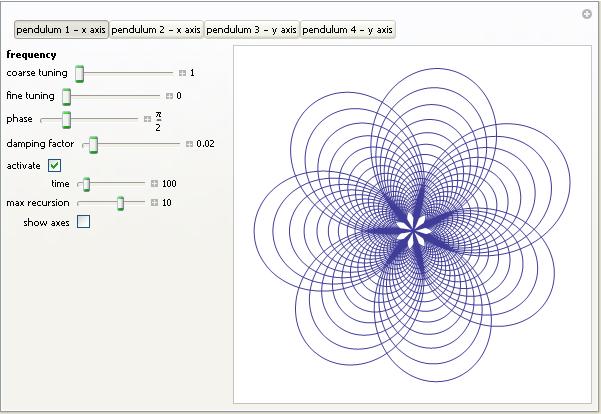
Take the image below, for example. If you don’t have a copy of Wolfram’s new cdf (computable document format) player installed then you’ll just see a static image. Install the player (or Mathematica 8 and the browser-plug in), however, and this image will turn into a fully interactive example.

Harmonograph demo

At the moment the browser plug-in only works on Windows and Macintosh but hopefully a Linux version will be on the way soon. Stay tuned to WalkingRandomly for in-depth tutorials on how to go from Mathematica code to fully interactive mathematics in your browser.  The results can be incorporated into the Wolfram Demonstrations project or embedded in your own website like I’ve done here.

Links

March 2nd, 2011 | Categories: Free software, iPad, iPhone, Open Source | Tags:

Apple make a big deal out of the fact that their app stores for iPhone and iPad contain thousands upon thousands of apps (or applications for relative oldies such as myself).  Some of them are free of change, many of them cost money but I got to wondering how many of them were open source.

When I say ‘open source’ here I mean ‘The source code is available’.  If there is a recognised license attached to the source code (such as GPL or BSD) then all the better.  So, what do we have?

Possibly the the best list of iOS open source software I have found is available at maniacdev.com which, at the time of writing, includes 42 different applications complete with iTunes links and the all important links to source code.  Another useful resource is open.iphonedev.com which is a regularly updated directory of open source apps and libraries for iOS. There’s some great stuff available including Battle for Wesnorth, SCI-15C Scientific calculator and TuxRider (based on Tux Racer).

Free as in Speech but not always Free as in Beer

One of the things you’ll notice about iOS open source apps is that they often cost money and sometimes quite a lot which is in stark contrast to what you may be used to.  For example, Battle for Wesnorth can be had for no money at all on platforms such as Linux and Windows but the iPad version costs $5.99 at the time of writing. The more serious, SCI-15C Scientific calculator costs $19.99 right now which is rather steep for any iPhone app let alone an open source one.

Charging money for open source software may upset some people but doing so is usually not against the terms and conditions of the underlying license.  The Free Software Foundation (inventors of the GPL, one of the most popular forms of open source license) has the following to say on the matter (original source)

“Free software” is a matter of liberty, not price. To understand the concept, you should think of “free” as in “free speech,” not as in “free beer.

Personally, I am happy to pay a few dollars for the iPad version of an open-source app if the developer has done a good job of the port.  What does surprise me, however, is that it seems like no one has taken the source-code of these apps, recompiled them and then released  free-of-charge versions on the app store.  This wouldn’t be against the license conditions of licenses such as the GPL so why hasn’t it been done?  I wouldn’t do it because I feel that it would be unfair to the developer of the iOS version but I would be surprised if  everyone felt this way.

What’s next?

There are many open source applications that I’d love to see ported to iPad.  Here’s my top three wants:

Over to you….What do you think of the state of open source software on iPhone and iPad?  Which applications would you most like to see ported?  What are your favourite open source apps?


Update: 9th March 2011.
Apparently, many of the open source applications currently available on the App store today violate the terms of licenses such as the GPL. The Inquirer has more details.

February 28th, 2011 | Categories: math software, Month of Math Software | Tags:

Last month I started a new feature called a Month of Math Software and since it turned out to be quite popular I thought I’d do it again. If you have any math software news or reviews that you’d like included in next month’s edition then feel free to contact me.

Releases – Commercial
Magma V2.17-5 has been released and the list of changes is here. Magma is a large software package designed for computations in algebra, number theory, algebraic geometry and algebraic combinatorics.

Releases – Open Source
A major new version of Octave, a high quality, open-source alternative to MATLAB, has been released. Version 3.4.0 has been available from February 8th and the changelog is available at www.gnu.org/software/octave/NEWS-3.4.html

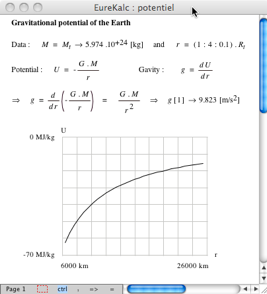
A new mathematics package for Mac OS X has been produced – EureKalc 3.  Screenshot below.  Currently at version 3.ß.02

EureKalc3.png

Version 11 beta of Euler Math Toolbox has been released with some new symbolic functionality.  There is a blog post on the new functionality at http://sourceforge.net/apps/wordpress/eumat/2011/02/07/version-11/

A new stable release of Gnumeric (The spreadsheet component of GNOME Office) has been released.  The new version is 1.10.3 and recent changes can be found at http://projects.gnome.org/gnumeric/announcements/1.10/gnumeric-1.10.13.shtml

Optimization
Professor Stan Uryasev from the University of Florida has produced a website containing a suite of optimization test problems.

Version 2 of Sergey Moiseev’s free DirectSearch optimization package for Maple has been released. The DirectSearch package is a collection of commands to numerically compute local and global minimums (maximums) of nonlinear multivariate function with (without) constraints.

Blog articles about math software
Mona Zeftel has written an article on PTC’s Mathcad Engineering blog about Mathcad’s new box plots including How-Tos for both Mathcad 15 and Mathcad Prime 1.0.

The Numerical Algorithms Group (NAG) discusses the double-edged sword of SSE instructions in Wandering Precision.  SSE instructions can make your numerical algorithms significantly faster but this comes at a price.

Non Deterministic Floating Point conversions in Java.  More SSE weirdness; a very detailed article that explains an odd bug in Java on certain architectures.

February 22nd, 2011 | Categories: mathematica, programming | Tags:

A Mathematica user contacted me recently and asked why

(1/16 Cos[a] (Cos[b] + 15 Cos[3 b])) === (1/8 Cos[b] (-7 + 15 Cos[2b])Cos[a])

returned False when he expected True. Let’s take a look at what is going on here.

The SameQ command (===) and the Equal command (==) are subtly different.  Equal (==) tests to see if two expressions are mathematically equivalent whereas SameQ tests to see if they are structurally equivalent.  In general, SameQ is the stricter of the two tests and is often too strict for our needs.

A very simple example

The simplest example might be to compare 2 and 2. (That is 2 with a period at the end)

Mathematically these are the same since they both represent the number two. However, from a Mathematica structural point of view, they are different since one has infinite precision whereas the other has double precision. So, we have

2==2. gives True
2===2. gives False

A more complicated example

Sqrt[2] + Sqrt[3] == Sqrt[5 + 2 Sqrt[6]] which gives True
Sqrt[2] + Sqrt[3] === Sqrt[5 + 2 Sqrt[6]] which gives False

Mathematically the above is always true but the structure of the expressions on the LHS and RHS are different under normal evaluation rules.

So, what do I mean by ‘structurally equivalent?’.  To be honest, I am slightly woolly on this myself but in my head I consider two expressions to be structurally equivalent if their TreeForms are the same

TreeForm[Sqrt[2] + Sqrt[3] ]

TreeForm[Sqrt[2] + Sqrt[3] ]

TreeForm[Sqrt[5 + 2 Sqrt[6]] ]

TreeForm[Sqrt[5 + 2 Sqrt[6]] ]]

The important thing to remember here is that the argument to TreeForm is evaluated by Mathematica before it gets passed to TreeForm. So, the above images show us that under normal evaluation rules, these two expressions have different structural forms.  In the next example we’ll see how this detail can matter

Exp[I Pi] and all that

Let’s look at

Exp[I Pi] === -1

Would that be True or False based on what we have seen so far?  It is certainly mathematically true but remember that a triple equals requires both sides to be structurally equivalent and at first sight it appears that this isn’t the case here. You might expect Exp[I Pi] to have a very different TreeForm from -1 and so you’d expect the above to evaluate to False. However if you do

TreeForm[Exp[I Pi]]

then you get a single box containing -1. This occurs because Mathematica evaluates Exp[I Pi] to -1 before passing to TreeForm. This evaluation also occurs when you do Exp[I Pi] === -1 so what you are really testing is -1===-1 which is obviously True.

Back to the original example

(1/16 Cos[a] (Cos[b] + 15 Cos[3 b])) === (1/8 Cos[b] (-7 + 15 Cos[2b])Cos[a])

If you use === then it returns False and this is ‘obviously’ the case because if you evaluate the TreeForms of both expressions then you’ll see that they get stored with different structural forms after being evaluated.

TreeForm[(1/16 Cos[a] (Cos[b] + 15 Cos[3 b]))]

TreeForm[(1/16 Cos[a] (Cos[b] + 15 Cos[3 b]))]

TreeForm[(1/8 Cos[b] (-7 + 15 Cos[2 b]) Cos[a])]

TreeForm[(1/8 Cos[b] (-7 + 15 Cos[2 b]) Cos[a])]]

Since we are interested in mathematical equivalence, however, we use ==

(1/16 Cos[a] (Cos[b] + 15 Cos[3 b])) == (1/8 Cos[b] (-7 + 15 Cos[2 b]) Cos[a])

What happens this time, however, is that Mathematica returns the original expression unevaluated. This is because, under the standard set of transformations that Mathematica applies when it evaluates ==, it can’t be sure one way or the other and so it gives up.

To proceed we wrap the whole thing in FullSimplify which essentially says to Mathematica ‘Use everything you’ve got to try and figure this out – no matter how long it takes’  I.e. you allow it to use more transforms.

FullSimplify[(1/16 Cos[a] (Cos[b] + 15 Cos[3 b])) == (1/8 Cos[b] (-7 + 15 Cos[2 b]) Cos[a])]

True

Finally, we have the result that the user expected.

February 8th, 2011 | Categories: Carnival of Math, general math | Tags:

Welcome to the slightly delayed Carnival of Mathematics #74 – Tungsten Edition.  In a departure from COM tradition, this edition is on the same blog as the last edition due to a lack of hosting volunteers.  Fortunately, however, the volunteers are starting to turn up and so this is the last month that you’ll have to put up with me for a while.  Next month will see the carnival hosted by Daniel over at General Musings and April will be taken care of by AcmeScience (thanks peeps!).  The rest of the year is up for grabs so if you’d like to host a future carnival then contact me and we’ll work something out.

One tradition that I’m not about to give up on, however, is the number trivia section.  So, let’s see what 74 has for us.  In stark contrast to 73, the Chuck Norris of Numbers, 74 doesn’t seem to have much going for it.  It’s probably overweight for a start since it is the 3rd hungry number (hungry because it tries to eat as much Pi as possible).  Other than that it is odious, semiprime and altogether rather dull!

Enough of the trivia and on with the show.

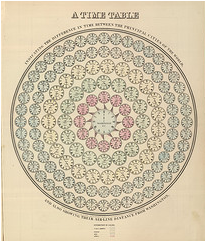
First up we have a post from Datavisualization.ch which shows a set of infographics from around 150 years ago.  Much of this work is rather beautiful and demonstrates that the field of infographics is much older than you might think.

Time TableFor a rather more modern take on statistics and infographics I highly recommend the UK BBC Four TV documentary, The Joy of Stats.  This was a one off show broadcast in late 2010 and hosted by Hans Rosling (Also the star of a brilliant TED talk).  Several clips of the show are available over at The Open University and it was recently mentioned by The Royal Statistical Society.

From statistics and onto the theory of numbers with a post by Matt Springer called ‘Sunday Function’.  In this post, Matt demonstrates a wonderfully simple proof concerning fractions which have terminating decimal expansions.  It turns out that it just happened to be a Sunday morning when I read this delightful little post over coffee and it set me up for the day.

Number theory has been big news in the mathematical world recently thanks to some work by Ken Ono and colleagues who have found a finite, algebraic formula for partition numbers.  The original papers can be found at http://www.aimath.org/news/partition/ (thanks to everyone on twitter who sent me that) and there has been discussion all over the web including at Wired.com and The Language of Bad Physics.  Emory University (where Ken works) have a press-release but the best resource I’ve found so far is an informal talk by the man himself at YouTube (see below).

One of my biggest personal interests is mathematical software and so my contribution to this month’s carnival is a round-up of mathematical software news for January.  January also saw a post from Wolfram Research on how to use some of Mathematica’s new control theory functions to stabilize an inverted pendulum which also serves as a nice introduction to some standard control theory techniques.

Another mathematical software article that was brought to my attention last month was a post from the Mathcad team concerning a very simple looking integral.  Computers often do symbolic calculus using different techniques to human beings and this is occasionally reflected in the results.  Check out the article for the details.

On a lighter note, we have Music is Math: Ten Songs about Mathematics from Dave Richeson of ‘Division by Zero’ fame.  My favourite of the bunch is ‘A finite simple Group of Order 2’ (below) which I’ve some across before.  The rest of them, however, are new to me and a lot of fun (and in a couple of cases, quite nice to listen to).

My boss used to be a research mathematician and is something of a pedant (In a good way Chris…in a good way).  It seems that this is a trait he has in common with Peter Rowlett, author of Travels in a mathematical world, who has written a piece called Pedantry on Euler and Masts where he investigates the facts behind an old Euler story.  There’s also some interesting discussion of the difficulty of presenting maths for the masses.

Whereas I do Random Walking, Sander Huisman does Random Hopping and in the process he comes up with some great looking pictures and interesting mathematics.

Random Hopping

John D. Cook compares the iPhone to the method of least squares in When it works, it works really well, Ed4All shows us a mental arithmetic short cut for squares ending in five and Math-Frolic presents A Seemingly Impossible Task, That Isn’t.

Last but by no means least, Guillermo Bautista, organiser of the Math and Multimedia blog carnival, gives us an introduction to similarity while Alasdair’s Musings brings us A cute result relating to sums of cubes.


January 27th, 2011 | Categories: math software, Month of Math Software | Tags:

I tend to keep an eye out for news relating to mathematical software and thought that I’d start sharing my monthly notebook with the world in case it proved to be useful to anyone else.  If you have any math-software news that you’d like to share then feel free to contact me.

Releases – Commercial

Mathcad Prime 1.0 has been released by PTC who have almost completely rewrote it from scratch.  Interestingly, you get a version of Mathcad 15.0 thrown in for free when you buy a copy.  See my discussion of this new version here.

MAGMA v2.17-3 has been released and the changelog is here.  Magma is a large software package designed for computations in algebra, number theory, algebraic geometry and algebraic combinatorics.

Version 12 of the popular plotting package, Sigmaplot, has been released.  The press release is at www.sigmaplot.com/aboutus/pressroom_details.php?link=jan-2010

Releases – Open Source

A bug-fix version of Matplotlib has been released – version 1.0.1 – and the changelog is available on sourceforge.  Matplotlib is a 2D plotting library for Python.

SAGE 4.6.1 has been released.  The detailed changelog is here.  SAGE’s mission is “Creating a viable free open source alternative to Magma, Maple, Mathematica and Matlab.”

deal.II version 7 has been released. deal.II is a C++ program library targeted at the computational solution of partial differential equations using adaptive finite elements.

JQuantlibLib version 0.2.4 released.  Details here.  JQuantLib is a BSD Licensed, open-source, comprehensive framework for quantitative finance, written in Java.

Mobile Math Software

Wolfram Research have released a trio of iPhone apps called Course Assistants.  Essentially these are nice user interfaces to Wolfram Alpha that make it easier to use in specific subject domains.  The initial offering consists of Algebra, Calculus and Music Theory.  Stephen Wolfram has blogged about the new apps.

MATLAB software community

The Mathworks have launched a MATLAB-specific question and answer site called MATLAB Answers.  In conjunction with the venerable comp.soft-sys.matlab newsgroup and the more recent Stack Overflow, MATLABers now have more question and answer resources than ever.  The Matworks have a blog article about the new service.

New Books

Introduction to Scientific Computing by Victor Eijkhout.  You can download it for free or get a printed copy for under 12 pounds.

January 18th, 2011 | Categories: general math, just for fun | Tags:

So here’s a fun (and potentially useful) probability puzzle for you all to ponder.  Here in the UK we have an investment option called Premium Bonds.  From the premium bonds website:

“Premium Bonds are an investment where, instead of interest payments, investors have the chance to win tax-free prizes. When someone invests in Premium Bonds they are allocated a series of numbers, one for each £1 invested.”

There’s a prize draw every month and a range of prizes from 25 pounds right up to 1 million pounds.  You can get your money back at any time with no penalty.  So, if you invest 1000 pounds then you get 1000 shots at winning a prize every month for as long as you leave the investment alone.  More detailed information such as odds etc is available here.

The way I like to think of premium bonds is that they are a bit like the National Lottery (click here for discussion of odds) except that you get your money back after you’ve played.  So I was thinking that, instead of buying premium bonds, an alternative investment strategy would be to put all of your money into a high interest cash account (paying N% per year) and use the resulting interest to buy lottery tickets.

Both strategies offer similar security (you can get your principle investment back at any time) and both of them are a bit of fun since they are based on games of chance.  Assuming I am to choose one of these strategies, which one is going to offer me the best rate of return over the long term?

January 17th, 2011 | Categories: mathematica, matlab | Tags:

MATLAB’s control system toolbox has functions for converting transfer functions to either state space representations or zero-pole-gain models as follows

%Create a simple transfer function in MATLAB
num=[2 3];
den = [1 4 0 5];
mytf=tf(num,den);

%convert this to State Space form
tf2ss(num,den)
ans =

0   1   0
0   0   1
-5  -0  -4

%Convert to zero-pole-gain form
[z,p,k]=tf2zp(num,den)
z = -1.5000
p =

-4.27375 + 0.00000i
0.13687 + 1.07294i
0.13687 - 1.07294i

k =  2

Now that Mathematica 8 is available I wondered what the Mathematica equivalent to the above would look like. The conversion to a StateSpace model is easy:

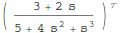
mytf=TransferFunctionModel[(2 s + 3)/(s^3 + 4 s^2 + 5), s]
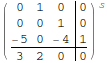
StateSpaceModel[mytf]

Transfer Function

State Space

but I couldn’t find an equivalent to MATLAB’s tf2zp function.

I can get the poles and zeros easily enough (as an aside it’s nice that Mathematica can do this exactly)

TransferFunctionPoles[mytf]
TransferFunctionZeros[mytf]

State Space
but what about gain?  There is no TransferFunctionGain[] function as you might expect. There is a TransferFunctionFactor[] function but that doesn’t do what I want either.

It turns out that there is a function that will do what I want but it is hidden from the user a little in an internal function

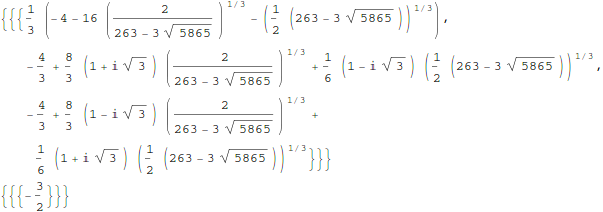
Control`ZeroPoleGainModel[mytf]

Control`ZeroPoleGainModel[{{{{-(3/2)}}}, {1/
     3 (-4 - 16 (2/(263 - 3 Sqrt[5865]))^(
        1/3) - (1/2 (263 - 3 Sqrt[5865]))^(1/3)), -(4/3) +
     8/3 (1 + I Sqrt[3]) (2/(263 - 3 Sqrt[5865]))^(1/3) +
     1/6 (1 - I Sqrt[3]) (1/2 (263 - 3 Sqrt[5865]))^(1/3), -(4/3) +
     8/3 (1 - I Sqrt[3]) (2/(263 - 3 Sqrt[5865]))^(1/3) +
     1/6 (1 + I Sqrt[3]) (1/2 (263 - 3 Sqrt[5865]))^(1/3)}, {{2}}}, s]

That’s not as user friendly as it could be though. How about this?

tf2zpk[x_] := Module[{z, p, k,zpkmodel},
  zpkmodel = Control`ZeroPoleGainModel[x];
  z = zpkmodel[[1, 1, 1, 1]];
  p = zpkmodel[[1, 2]];
  k = zpkmodel[[1, 3, 1]];
  {z, p, k}
  ]

Now we can get very similar behavior to MATLAB:

In[10]:= tf2zpk[mytf] // N

Out[10]= {{-1.5}, {-4.27375, 0.136874 + 1.07294 I,
  0.136874 - 1.07294 I}, {2.}}

Hope this helps someone out there.  Thanks to my contact at Wolfram who told me about the Control`ZeroPoleGainModel function.

Other posts you may be interested in