October 24th, 2011 | Categories: Making MATLAB faster, matlab, NAG Library, parallel programming, programming, tutorials | Tags:

The NAG C Library is one of the largest commercial collections of numerical software currently available and I often find it very useful when writing MATLAB mex files.  “Why is that?” I hear you ask.

One of the main reasons for writing a mex file is to gain more speed over native MATLAB.  However, one of the main problems with writing mex files is that you have to do it in a low level language such as Fortran or C and so you lose much of the ease of use of MATLAB.

In particular, you lose straightforward access to most of the massive collections of MATLAB routines that you take for granted.  Technically speaking that’s a lie because you could use the mex function mexCallMATLAB to call a MATLAB routine from within your mex file but then you’ll be paying a time overhead every time you go in and out of the mex interface.  Since you are going down the mex route in order to gain speed, this doesn’t seem like the best idea in the world.  This is also the reason why you’d use the NAG C Library and not the NAG Toolbox for MATLAB when writing mex functions.

One way out that I use often is to take advantage of the NAG C library and it turns out that it is extremely easy to add the NAG C library to your mex projects on Windows.  Let’s look at a trivial example.  The following code, nag_normcdf.c, uses the NAG function nag_cumul_normal to produce a simplified version of MATLAB’s normcdf function (laziness is all that prevented me from implementing a full replacement).

/* A simplified version of normcdf that uses the NAG C library
 * Written to demonstrate how to compile MATLAB mex files that use the NAG C Library
 * Only returns a normcdf where mu=0 and sigma=1
 * October 2011 Michael Croucher
 * www.walkingrandomly.com
 */

#include <math.h>
#include "mex.h"
#include "nag.h"
#include "nags.h"

void mexFunction( int nlhs, mxArray *plhs[], int nrhs, const mxArray *prhs[] )
{
    double *in,*out;
    int rows,cols,num_elements,i;

    if(nrhs>1)
    {
        mexErrMsgIdAndTxt("NAG:BadArgs","This simplified version of normcdf only takes 1 input argument");
    } 

    /*Get pointers to input matrix*/
    in = mxGetPr(prhs[0]);
    /*Get rows and columns of input matrix*/
    rows = mxGetM(prhs[0]);
    cols = mxGetN(prhs[0]);
    num_elements = rows*cols;

    /* Create output matrix */
    plhs[0] = mxCreateDoubleMatrix(rows, cols, mxREAL);
    /* Assign pointer to the output */
    out = mxGetPr(plhs[0]);

    for(i=0; i<num_elements; i++){
          out[i] = nag_cumul_normal(in[i]);
         }
}

To compile this in MATLAB, just use the following command

 mex nag_normcdf.c CLW6I09DA_nag.lib

If your system is set up the same as mine then the above should ‘just work’ (see System Information at the bottom of this post).  The new function works just as you would expect it to

>> format long
>> format compact
>> nag_normcdf(1)
ans =
   0.841344746068543

Compare the result to normcdf from the statistics toolbox

>> normcdf(1)
ans =
   0.841344746068543

So far so good. I could stop the post here since all I really wanted to do was say ‘The NAG C library is useful for MATLAB mex functions and it’s a doddle to use – here’s a toy example and here’s the mex command to compile it’

However, out of curiosity, I looked to see if my toy version of normcdf was any faster than The Mathworks’ version.  Let there be 10 million numbers:

>> x=rand(1,10000000);

Let’s time how long it takes MATLAB to take the normcdf of those numbers

>> tic;y=normcdf(x);toc
Elapsed time is 0.445883 seconds.
>> tic;y=normcdf(x);toc
Elapsed time is 0.405764 seconds.
>> tic;y=normcdf(x);toc
Elapsed time is 0.366708 seconds.
>> tic;y=normcdf(x);toc
Elapsed time is 0.409375 seconds.

Now let’s look at my toy-version that uses NAG.

>> tic;y=nag_normcdf(x);toc
Elapsed time is 0.544642 seconds.
>> tic;y=nag_normcdf(x);toc
Elapsed time is 0.556883 seconds.
>> tic;y=nag_normcdf(x);toc
Elapsed time is 0.553920 seconds.
>> tic;y=nag_normcdf(x);toc
Elapsed time is 0.540510 seconds.

So my version is slower!  Never mind, I’ll just make my version parallel using OpenMP – Here is the code: nag_normcdf_openmp.c

/* A simplified version of normcdf that uses the NAG C library
 * Written to demonstrate how to compile MATLAB mex files that use the NAG C Library
 * Only returns a normcdf where mu=0 and sigma=1
 * October 2011 Michael Croucher
 * www.walkingrandomly.com
 */

#include <math.h>
#include "mex.h"
#include "nag.h"
#include "nags.h"
#include <omp.h>

void do_calculation(double in[],double out[],int num_elements)
{
    int i,tid;

#pragma omp parallel for shared(in,out,num_elements) private(i,tid)
    for(i=0; i<num_elements; i++){
          out[i] = nag_cumul_normal(in[i]);
         }
}

void mexFunction( int nlhs, mxArray *plhs[], int nrhs, const mxArray *prhs[] )
{
    double *in,*out;
    int rows,cols,num_elements;

    if(nrhs>1)
    {
        mexErrMsgIdAndTxt("NAG_NORMCDF:BadArgs","This simplified version of normcdf only takes 1 input argument");
    } 

    /*Get pointers to input matrix*/
    in = mxGetPr(prhs[0]);
    /*Get rows and columns of input matrix*/
    rows = mxGetM(prhs[0]);
    cols = mxGetN(prhs[0]);
    num_elements = rows*cols;

    /* Create output matrix */
    plhs[0] = mxCreateDoubleMatrix(rows, cols, mxREAL);
    /* Assign pointer to the output */
    out = mxGetPr(plhs[0]);

    do_calculation(in,out,num_elements);
}

Compile that with

 mex  COMPFLAGS="$COMPFLAGS /openmp"  nag_normcdf_openmp.c CLW6I09DA_nag.lib

and on my quad-core machine I get the following timings

>> tic;y=nag_normcdf_openmp(x);toc
Elapsed time is 0.237925 seconds.
>> tic;y=nag_normcdf_openmp(x);toc
Elapsed time is 0.197531 seconds.
>> tic;y=nag_normcdf_openmp(x);toc
Elapsed time is 0.206511 seconds.
>> tic;y=nag_normcdf_openmp(x);toc
Elapsed time is 0.211416 seconds.

This is faster than MATLAB and so normal service is resumed :)

System Information

  • 64bit Windows 7
  • MATLAB 2011b
  • NAG C Library Mark 9 – CLW6I09DAL
  • Visual Studio 2008
  • Intel Core i7-2630QM processor
October 8th, 2011 | Categories: general math, probability, Problem of the week | Tags:

Consider a periodic sequence, seqp, with period p

seqp = a1, a2, …, ap,  a1, a2, …, ap,  a1, a2, …, ap, …

Two sub-sequences, each of length N where 2< N< p, are produced by choosing two random start points in seqp and using the next N-1 numbers. What is the probability that these two sub-sequences will overlap?

If you take M>2 such length N sub-sequences then what is the probability that any two will overlap?

For a more concrete example, assume that p = 2^19937 – 1 (yes, a very big number) and consider 10,000 sub-sequences each of length 10^9.

Disclaimer: I don’t have the solution to this and haven’t yet tried to find it

October 4th, 2011 | Categories: math software, Month of Math Software | Tags:

Welcome to September’s A Month of Math Software.  Last month’s can be found here and the archive is here.  If you’ve got news for next month’s edition then contact me.

General mathematics and statistics

  • The commercial computer algebra package, MAGMA, has been upgraded to version 2.17-11.  The change log is at magma.maths.usyd.edu.au/magma/releasenotes/2/17/11/
  • Version 2011b of MATLAB has been released.  I’m all excited about the improved GPU functionality in the parallel computing toolbox along with the that fact that the MATLAB compiler now supports GPU-enabled code.  This little combination means that we’ll be able to include a small amount of MATLAB/GPU support on Manchester University’s Condor pool.  If GPU support isn’t your thing then maybe you’d like to hear about updates to the MATLAB comparison tool from Mike on the MATLAB Desktop.
  • Version 2.13.2 of the extremely popular free, open source statistics pacakge, R, has been released.  This is intended to be the last of the 2.13 series and you can find out what’s new by going to https://stat.ethz.ch/pipermail/r-announce/2011/000543.html

Freely available linear algebra software

Math software in the blogs

September 13th, 2011 | Categories: general math, just for fun, mathematica, matlab | Tags:

Consider this indefinite integral

\light \large \int \frac{1}{\sqrt{x(2-x)}}

Feed it to MATLAB’s symbolic toolbox:

int(1/sqrt(x*(2 - x)))

ans =
asin(x - 1)

Feed it to Mathematica 8.0.1:

Integrate[1/Sqrt[x (2 - x)], x] // InputForm

(2*Sqrt[-2 + x]*Sqrt[x]*Log[Sqrt[-2 + x] + Sqrt[x]])/Sqrt[-((-2 + x)*x)]

Let x=1.2 in both results:

MATLAB's answer evaluates to 0.2014
Mathematica's answer evaluates to -1.36944 + 0.693147 I

Discuss!

September 11th, 2011 | Categories: Making MATLAB faster, matlab, parallel programming, programming | Tags:

So, you’re the proud owner of a new license for MATLAB’s parallel computing toolbox (PCT) and you are wondering how to get some bang for your buck as quickly as possible.  Sure, you are going to learn about constructs such as parfor and spmd but that takes time and effort.  Wouldn’t it be nice if you could speed up some of your MATLAB code simply by saying ‘Turn parallelisation on’?

It turns out that The Mathworks have been adding support for their parallel computing toolbox all over the place and all you have to do is switch it on (Assuming that you actually have the parallel computing toolbox of course).  For example say you had the following call to fmincon (part of the optimisation toolbox) in your code

[x, fval] = fmincon(@objfun, x0, [], [], [], [], [], [], @confun,opts)

To turn on parallelisation across 2 cores just do

matlabpool 2;
opts = optimset('fmincon');
opts = optimset('UseParallel','always');
[x, fval] = fmincon(@objfun, x0, [], [], [], [], [], [], @confun,opts);

That wasn’t so hard was it?  The speedup (if any) completely depends upon your particular optimization problem.

Why isn’t parallelisation turned on by default?
The next question that might occur to you is ‘Why doesn’t The Mathworks just turn parallelisation on by default?’ After all, although the above modification is straightforward, it does require you to know that this particular function supports parallel execution via the PCT. If you didn’t think to check then your code would be doomed to serial execution forever.

The simple answer to this question is ‘Sometimes the parallel version is slower‘. Take this serial code for example.

objfun = @(x)exp(x(1))*(4*x(1)^2+2*x(2)^2+4*x(1)*x(2)+2*x(2)+1);
confun = @(x) deal( [1.5+x(1)*x(2)-x(1)-x(2); -x(1)*x(2)-10], [] );
tic;
[x, fval] = fmincon(objfun, x0, [], [], [], [], [], [], confun);
toc

On the machine I am currently sat at (quad core running MATLAB 2011a on Linux) this typically takes around 0.032 seconds to solve. With a problem that trivial my gut feeling is that we are not going to get much out of switching to parallel mode.

objfun = @(x)exp(x(1))*(4*x(1)^2+2*x(2)^2+4*x(1)*x(2)+2*x(2)+1);
confun = @(x) deal( [1.5+x(1)*x(2)-x(1)-x(2); -x(1)*x(2)-10],[] );

%only do this next line once.  It opens two MATLAB workers
matlabpool 2;

opts = optimset('fmincon');
opts = optimset('UseParallel','always');

tic;
[x, fval] = fmincon(objfun, x0, [], [], [], [], [], [], confun,opts);
toc

Sure enough, this increases execution time dramatically to an average of 0.23 seconds on my machine.  There is always a computational overhead that needs paying when you go parallel and if your problem is too trivial then this overhead costs more than the calculation itself.

So which functions support the Parallel Computing Toolbox?

I wanted a web-page that listed all functions that gain benefit from the Parallel Computing Toolbox but couldn’t find one.  I found some documentation on specific toolboxes such as Parallel Statistics but nothing that covered all of MATLAB in one place.  Here is my attempt at producing such a document.  Feel free to contact me if I have missed anything out.

This covers MATLAB 2011b and is almost certainly incomplete. I’ve only covered toolboxes that I have access to and so some are missing.  Please contact me if you have any extra information.

Bioinformatics Toolbox

Global Optimisation

Image Processing

Optimisation Toolbox

Simulink

  • Running parallel simulations
  • You can increase the speed of diagram updates for models containing large model reference hierarchies by building referenced models that are configured in Accelerator mode in parallel whenever conditions allow.  This is covered in the documentation.

Statistics Toolbox

Other articles about parallel computing in MATLAB from WalkingRandomly

September 6th, 2011 | Categories: general math, just for fun, matlab | Tags:

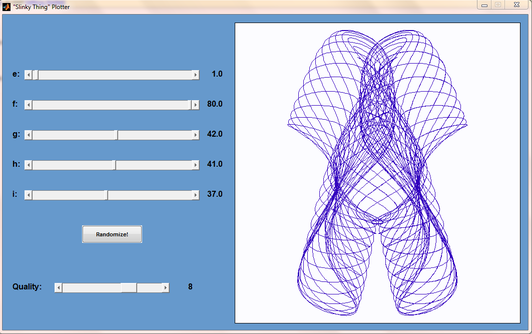
Matt Tearle has produced a MATLAB version of my Interactive Slinky Thing which, in turn, was originally inspired by a post by Sol over at Playing with Mathematica.  Matt adatped the code from some earlier work he did and you can click on the image below to get it.  Thanks Matt!
MATLAB slinky thing

September 2nd, 2011 | Categories: Month of Math Software | Tags:

Welcome to August’s ‘A Month of Math Software’ where I look at everything from blog posts about math libraries through to the latest releases.  Click here for earlier articles in the series.

Mathematical software packages

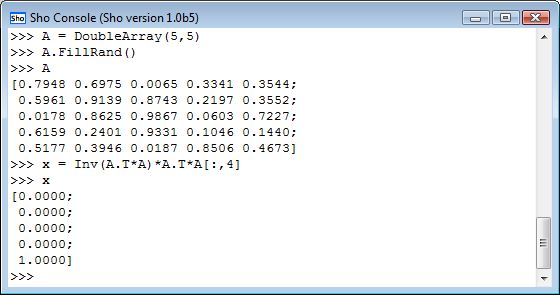
“Sho is an interactive environment for data analysis and scientific computing that lets you seamlessly connect scripts (in IronPython) with compiled code (in .NET) to enable fast and flexible prototyping.”

Sho console

It certainly looks very interesting with features such as direct integration with Azure (Microsoft’s cloud computing product), Optimization and loads more.  Let me know what you think of it if you try it out.

Mathematical Software Libraries

  • The AMD Core Math Library was upgraded to version 5.0 this month.  I think the following is the complete change-log
    • DGEMM and SGEMM have been tuned for AMD Family 15h processors.  These take advantage of AVX and FMA-4 instructions to achieve high efficiency using either one or both threads of a compute unit.
    • The Fortran code base for the library is compiled with AVX and FMA-4 flags to support the AMD Family 15h processors.  This library will not run on processors that do not support AVX and FMA-4.  The package includes legacy libraries with SSE/SSE2 instructions suitable for use on AMD Family 10h and AMD Family 0fh processors.
    • New 2D and 3D real-to-complex FFT functions have been introduced.  Included are samples demonstrating how to use the new functions.
    • The L’Ecuyer, Whichmann-Hill, and Mersenne Twister random number generator have been updated to improve performance on all processor types.
    • The vector math library dependency has been removed from the library, and libacml_mv has been removed from the build.  These AMD math functions are available as a separate download from the AMD web page.
  • While on the subject of the ACML, check out this interview about the library with Chip Freitag, one of its developers, that was recorded earlier this month.
  • AMD have also released version 1.4 of the AMD Accelerated Parallel Processing Math Libraries (APPML).  This is an OpenCL library aimed at GPUs.  As far as I can tell, this is just a bug fix release and so there are no new routines available.
  • Jack Dongarra et al have moved their linear algebra library for heterogeneous/hybrid architectures, MAGMA, from release candidate 5 to a full version 1.0 release.  Roughly speaking, you can think of this project as LAPACK for CUDA GPUs (although this scope will probably widen in the future).  I believe that it is used in products such as MATLAB’s parallel computing toolbox and Accelereyes’ Jacket (Correction: I’ve since learned that Jacket uses CULA and not MAGMA) among others.
  • Odds and Ends
    • Intel have come up with a new hardware-based random number generator.  Read about it at http://spectrum.ieee.org/computing/hardware/behind-intels-new-randomnumber-generator/ I wonder if hardware based generators will ever replace pseudo random number generators for simulation work?
    • Finally, William Hart released a new version of Coopr back in July but I didn’t learn about it in time to get it into July’s edition of Month of Math Software.  So, I’m telling you about it now (more accurately, I’m quoting William).  ‘Coopr is a collection of Python software packages that supports a diverse set of optimization capabilities for formulating and analyzing optimization models’

    That’s it for this month.  Thanks to everyone who contacted me with news items, this series would be a lot more difficult to compile without you.  If you have found something interesting in the world of mathematical software then feel free to let me know and I’ll include it in a future edition.

    August 20th, 2011 | Categories: walking randomly | Tags:

    This little corner of the web that I like to call home has been online for 4 years as of today.  I’d like to thank everyone who reads and comments on the stuff I put up here, I hope you find my wanderings interesting and/or useful.

    I’d also like to thank all of the people and organisations I have collaborated with over the years while writing articles here. I’m not going to mention names out of fear of missing someone out but you know who you are.  The only exception would be Matthew Haworth of Reason Digital who talked me into starting this up during his University of Manchester farewell party.  He also provides me with web hosting (surviving three slashdottings so far), technical support and, on occasion, lunch!  Without Matt, there would be no Walking Randomly.

    Back on WRs first birthday I gave out some stats (143 RSS subscribers and 250 visits per day) and so I’ll so the same today (1645 RSS subscribers and 800 unique visits per day)

    Finally, here is a list of some of my favourite articles from over the last 4 years.  I hope you enjoy reading them as much as I enjoyed writing them

    August 16th, 2011 | Categories: CUDA, GPU, Making MATLAB faster, matlab | Tags:

    This is part 2 of an ongoing series of articles about MATLAB programming for GPUs using the Parallel Computing Toolbox.  The introduction and index to the series is at https://www.walkingrandomly.com/?p=3730.   All timings are performed on my laptop (hardware detailed at the end of this article) unless otherwise indicated.

    Last time

    In the previous article we saw that it is very easy to run MATLAB code on suitable GPUs using the parallel computing toolbox.  We also saw that the GPU has its own area of memory that is completely separate from main memory.  So, if you have a program that runs in main memory on the CPU and you want to accelerate part of it using the GPU then you’ll need to explicitly transfer data to the GPU and this takes time.  If your GPU calculation is particularly simple then the transfer times can completely swamp your performance gains and you may as well not bother.

    So, the moral of the story is either ‘Keep data transfers between GPU and host down to a minimum‘ or ‘If you are going to transfer a load of data to or from the GPU then make sure you’ve got a ton of work for the GPU to do.‘  Today, I’m going to consider the latter case.

    A more complicated elementwise function – CPU version
    Last time we looked at a very simple elementwise calculation– taking the sine of a large array of numbers.  This time we are going to increase the complexity ever so slightly.  Consider trig_series.m which is defined as follows

    function out = myseries(t)
      out = 2*sin(t)-sin(2*t)+2/3*sin(3*t)-1/2*sin(4*t)+2/5*sin(5*t)-1/3*sin(6*t)+2/7*sin(7*t);
    end

    Let’s generate 75 million random numbers and see how long it takes to apply this function to all of them.

    cpu_x = rand(1,75*1e6)*10*pi;
    tic;myseries(cpu_x);toc

    I did the above calculation 20 times using a for loop and took the median of the results to get 4.89 seconds1. Note that this calculation is fully parallelised…all 4 cores of my i7 CPU were working on the problem simultaneously (Many built in MATLAB functions are parallelised these days by the way…No extra toolbox necessary).

    GPU version 1 (Or ‘How not to do it’)

    One way of performing this calculation on the GPU would be to proceed as follows

    cpu_x =rand(1,75*1e6)*10*pi;
    tic
    %Transfer data to GPU
    gpu_x = gpuArray(cpu_x);
    %Do calculation using GPU
    gpu_y = myseries(gpu_x);
    %Transfer results back to main memory
    cpu_y = gather(gpu_y)
    toc

    The mean time of the above calculation on my laptop’s GPU is 3.27 seconds, faster than the CPU version but not by much. If you don’t include data transfer times in the calculation then you end up with 2.74 seconds which isn’t even a factor of 2 speed-up compared to the CPU.

    GPU version 2 (arrayfun to the rescue)

    We can get better performance out of the GPU simply by changing the line that does the calculation from

    gpu_y = myseries(gpu_x);

    to a version that uses MATLAB’s arrayfun command.

    gpu_y = arrayfun(@myseries,gpu_x);

    So, the full version of the code is now

    cpu_x =rand(1,75*1e6)*10*pi;
    tic
    %Transfer data to GPU
    gpu_x = gpuArray(cpu_x);
    %Do calculation using GPU via arrayfun
    gpu_y = arrayfun(@myseries,gpu_x);
    %Transfer results back to main memory
    cpu_y = gather(gpu_y)
    toc

    This improves the timings quite a bit. If we don’t include data transfer times then the arrayfun version completes in 1.42 seconds down from 2.74 seconds for the original GPU code. Including data transfer, the arrayfun version complete in 1.94 seconds compared to for the 3.27 seconds for the original.

    Using arrayfun for the GPU is definitely the way to go! Giving the GPU every disadvantage I can think of (double precision, including transfer times, comparing against multi-thread CPU code etc) we still get a speed-up of just over 2.5 times on my laptop’s hardware. Pretty useful for hardware that was designed for energy-efficient gaming!

    Note: Something that I learned while writing this post is that the first call to arrayfun will be slower than all of the rest.  This is because arrayfun compiles the MATLAB function you pass it down to PTX and this can take a while (seconds).  Subsequent calls will be much faster since arrayfun will use the compiled results.  The compiled PTX functions are not saved between MATLAB sessions.

    arrayfun – Good for your memory too!
    Using the arrayfun function is not only good for performance, it’s also good for memory management. Imagine if I had 100 million elements to operate on instead of only 75 million. On my 3Gb GPU, the following code fails:

    cpu_x = rand(1,100*1e6)*10*pi;
    gpu_x = gpuArray(cpu_x);
    gpu_y = myseries(gpu_x);
    ??? Error using ==> GPUArray.mtimes at 27
    Out of memory on device. You requested: 762.94Mb, device has 724.21Mb free.
    
    Error in ==> myseries at 3
            out =
            2*sin(t)-sin(2*t)+2/3*sin(3*t)-1/2*sin(4*t)+2/5*sin(5*t)-1/3*sin(6*t)+2/7*sin(7*t);

    If we use arrayfun, however, then we are in clover. The following executes without complaint.

    cpu_x = rand(1,100*1e6)*10*pi;
    gpu_x = gpuArray(cpu_x);
    gpu_y = arrayfun(@myseries,gpu_x);

    Some Graphs

    Just like last time, I ran this calculation on a range of input arrays from 1 million to 100 million elements on both my laptop’s GT 555M GPU and a Tesla C2050 I have access to.  Unfortunately, the C2050 is running MATLAB 2010b rather than 2011a so it’s not as fair a test as I’d like.  I could only get up to 84 million elements on the Tesla before it exited due to memory issues.  I’m not sure if this is down to the hardware itself or the fact that it was running an older version of MATLAB.

    GPU trig series timings

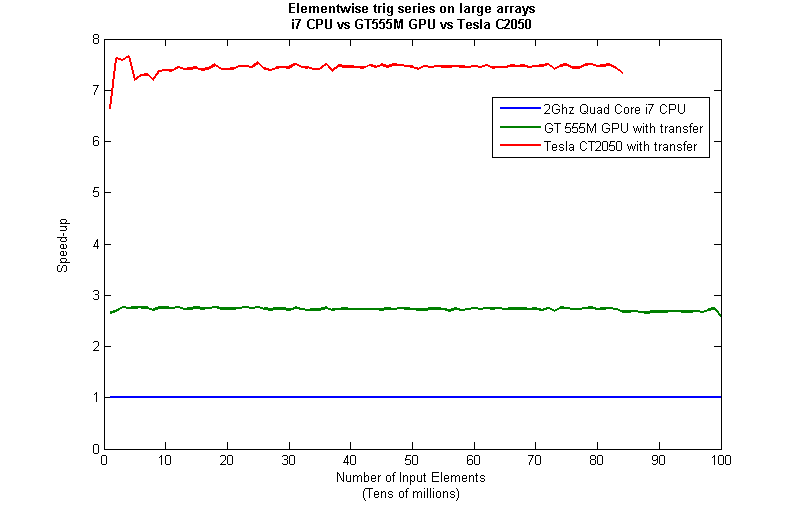
    Next, I looked at the actual speed-up shown by the GPUs compared to my laptop’s i7 CPU.  Again, this includes data transfer times, is in full double precision and the CPU version was multi-threaded (No dodgy ‘GPUs are awesome’ techniques used here).  No matter what array size is used I get almost a factor of 3 speed-up using the laptop GPU and more than a factor of 7 speed-up when using the Tesla.  Not too shabby considering that the programming effort to achieve this speed-up was minimal.
    GPU trig series speed-up

    Conclusions

    • It is VERY easy to modify simple, element-wise functions to take advantage of the GPU in MATLAB using the Parallel Computing Toolbox.
    • arrayfun is the most efficient way of dealing with such functions.
    • My laptop’s GPU demonstrated almost a 3 times speed-up compared to its CPU.

    Hardware / Software used for the majority of this article

    • Laptop model: Dell XPS L702X
    • CPU: Intel Core i7-2630QM @2Ghz software overclockable to 2.9Ghz. 4 physical cores but total 8 virtual cores due to Hyperthreading.
    • GPU: GeForce GT 555M with 144 CUDA Cores.  Graphics clock: 590Mhz.  Processor Clock:1180 Mhz. 3072 Mb DDR3 Memeory
    • RAM: 8 Gb
    • OS: Windows 7 Home Premium 64 bit.  I’m not using Linux because of the lack of official support for Optimus.
    • MATLAB: 2011a with the parallel computing toolbox

    Code and sample timings (Will grow over time)

    You need myseries.m and trigseries_test.m and the Parallel Computing Toolbox.  These are the times given by the following function call for various systems (transfer included and using arrayfun).

    [cpu,~,~,~,gpu] = trigseries_test(10,50*1e6,'mean')

    GPUs

    • Tesla C2050, Linux, 2010b – 0.4751 seconds
    • NVIDIA GT 555M – 144 CUDA Cores, 3Gb RAM, Windows 7, 2011a – 1.2986 seconds

    CPUs

    • Intel Core i7-2630QM, Windows 7, 2011a (My laptop’s CPU) – 3.33 seconds
    • Intel Core 2 Quad Q9650 @ 3.00GHz, Linux, 2011a – 3.9452 seconds

    Footnotes
    1 – This is the method used in all subsequent timings and is similar to that used by the File Exchange function, timeit (timeit takes a median, I took a mean). If you prefer to use timeit then the function call would be timeit(@()myseries(cpu_x)). I stick to tic and toc in the article because it makes it clear exactly where timing starts and stops using syntax well known to most MATLABers.

    Thanks to various people at The Mathworks for some useful discussions, advice and tutorials while creating this series of articles.

    August 15th, 2011 | Categories: just for fun | Tags:

    This lunchtime I stumbled across the following tweet by GrrlScientist

    “mmm, cheese! RT @LookMaNoFans How many Calories would a Moon made of cheese be, you ask? A made-of-manchego Moon = 285 septillion Calories.”

    A septillion is 10^24 so that’s a lot of calories!  Naturally, I wanted to check the facts so I asked Wolfram Alpha which, sadly, didn’t have the specifics on manchego cheese so I substituted monterey cheese to get a result of 8.5*10^25 calories. This disagrees with the tweet but it’s the figure I’m going to go with for now.

    Since I am into running, I wondered how far I’d have to run to burn that many calories.  Using Wolfram Alpha’s running calorie calculator I found out that at a pace of 8 minutes per mile I would need to run 0.675 miles to burn 85 calories (assuming average body weight*) so would need to run 6.75*10^24 miles (almost 115 billion light years) to burn off the calories contained in a moon made of monteray cheese. That’s larger than the diameter of the observable universe!

    *Obviously, if you ate the moon then you would weigh slightly more than average so this is a gross over-simplification.