February 4th, 2012 | Categories: Month of Math Software | Tags:

Welcome to the first MMS of 2012.  This series has been going for a year now and I’m very pleased to say that it’s become quite popular.  In the beginning I had to trawl the web for all of the news I featured here but a sizeable percentage of it gets sent to me these days.  If you’ve got some news about mathematical sofware then contact me and tell me all about it.

General purpose mathematics

  • Sage, the python based open source computational algebra system, has been updated to version 4.8.  View the changelog to see what’s new.  94 people contributed to this release according to the changelog which is very impressive!  I wonder how that compares to the number of developers on commercial systems such as Maple, Mathematica and MATLAB?
  • After a long wait, we get not one but two new versions of the free Mathcad clone, Smath Studio in one month.  Lots of great new features in versions 0.90 and 0.91 of this very nice multiplatform application.
  • Verision 2.18-3 of Magma, the commercial computational algebra system, has been released.

Community

  • The new Mathematica StackExchange site has been launched so head over there for all of your Mathematica question and answer needs.
  • The Mathworks have released an online community programing game for MATLABers called Cody.  Problems start off incredibily easy and as you solve them, more difficult ones get unlocked.  Your attempts are automatically scored by The Mathwork’s servers so feeback is instant and you can view other people’s solutions once you’ve solved a problem yourself.  All in all, a great new way to sharpen your MATLAB programming skills.

Partial Differential Equations

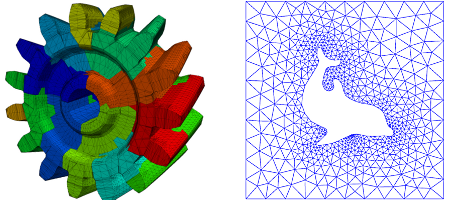
  • A new set of open-source software tools written in C++ for performing Partial Differential Equation (PDE) analysis and solving PDE constrained optimization problems has been released – Stanford University Unstructured (SU2)

Mobile

  • An article on smartphone apps for mathematics, written by Peter Rowlett, Hazel Lewis and I, has been published in the January 2012 edition of Mathematics Teaching.  Ironically, none of the authors of the article have seen the finished product yet since we are not subscribers!
  • Michael Carreno sent me news of the release of his graphical calculator app for iPhone, AbleMath.  I haven’t had chance to try it yet since Mrs WalkingRandomly refuses anything mathematical on her iPhone and I am an Android man myself.  However, the screenshots look very nice and, since it’s free, it’s a lot cheaper than those expensive, underpowered junkers that American schools seem to insist on teaching with.

AbleMath
Linear Algebra

Linear Algebra

  • Version 3.0 of the NLEVP (Nonlinear Eigenvalue Problems) Toolbox for MATLAB was released in December 2011 but I found out about it too late for December’s edition of MMS.  It contains problems from models of real-life applications as well as problems constructed specifically to have particular properties. The collection is fully documented in the Technical Report and user’s guide.  This release contains 52 problems (up from 46 in version 2.0) and new functionality; it is also now compatible with GNU Octave.
  • ViennaCL, a GPU-accelerated C++ open-source linear algebra library, was updated to version 1.2.0 on December 31st (just missing the deadline for December’s Month of Math Software).  Roughly speaking, ViennaCL is a mixture of Boost.ublas (high-level interface) and MAGMA (GPU-support), yet based on OpenCL rather than CUDA.

Statistics

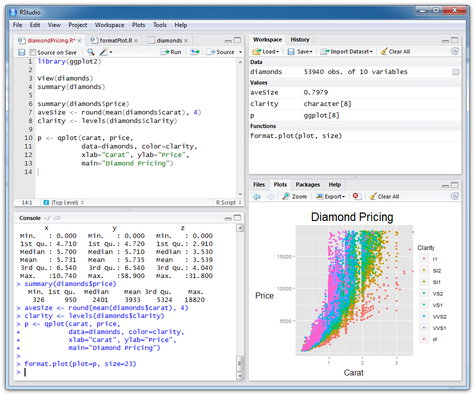
RStudio on Windows

From the blogs

January 10th, 2012 | Categories: GPU, math software, OpenCL | Tags:

From where I sit it seems that the majority of scientific GPU work is being done with NVIDIA’s proprietary CUDA platform.  All the signs point to the possibility of this changing, however, and I wonder if 2012 will be the year when OpenCL comes of age.  Let’s look at some recent and near future events….

Hardware

  • AMD have recently released the AMD Radeon HD 7970, said to be the fastest single- GPU graphics card on the planet.  This new card supports both Microsoft’s DirectCompute along with OpenCL and is much faster than the previous generation of AMD card (see here for compute benchmarks) as well as being faster than NVIDIAs current top of the line GTX 580.
  • Intel will release their next generation of CPUs – Ivy Bridge – which will include an increased number of built in GPU cores which should be OpenCL compatible.  Although the current Sandy Bridge processors also contain GPU cores, it is not currently possible to target them with Intel’s OpenCL implementation (version 1.5 is strictly for the CPU cores).  I would be very surprised if Intel didn’t update their OpenCL implementation to be able to target the GPUs in Ivy Bridge this year.
  • AMDs latest Fusion processors also contain OpenCL compatible GPU cores directly integrated with the CPU which programmers can exploit using AMD’s Accelerated Parallel Processing (APP) SDK.

The practical upshot of the above is that if a software vendor uses OpenCL to accelerate their product then it could potentially benefit more of their customers than if they used CUDA.  Furthermore, if you want your code to run on the fastest GPU around then OpenCL is the way to go right now.

Software

Having the latest, fastest hardware is pointless if the software you run can’t take advantage of it.  Over the last 12 months I have had the opportunity to speak to developers of various commerical scientific and mathematical software products which support GPU acceleration.  With the exception of Wolfram’s Mathematica, all of them only supported CUDA.  When I asked why they don’t support OpenCL, the response of most of these developers could be paraphrased as ‘The mathematical libraries and vendor support for CUDA are far more developed than those of OpenCL so CUDA support is significantly easier to integerate into our product.‘  Despite this, however, OpenCL support is definitely growing in the world of mathematical and scientific software.

OpenCL in Mathematics software and libraries

  • ViennaCL, a GPU-accelerated C++ open-source linear algebra library, was updated to version 1.2.0 on December 31st (just missing the deadline for December’s Month of Math Software).  Roughly speaking, ViennaCL is a mixture of Boost.ublas (high-level interface) and MAGMA (GPU-support), yet based on OpenCL rather than CUDA.
  • AccelerEyes released a new major version of their GPU accelerated MATLAB toolbox, Jacket, in late December 2011.  The big news as far as this article is concerned is that it includes support for OpenCL; something that is currently missing from The Mathworks’ Parallel Computing Toolbox.
  • Not content with bringing OpenCL support to MATLAB, AccelerEyes also realesed ArrayFire— a free (for the basic version at least) library for C, C++, Fortran, and Python that includes support for both CUDA and OpenCL.
  • Although it’s not new news, it’s worth bearing in mind that Mathematica has supported OpenCL for a while now– since the relase of version 8 back in  November 2010.

Finite Element Modelling with Abaqus

  • Back in May 2011, Version 6.11 of the finite element modelling package, Abaqus, was released and it included support for NVIDIA cards (see here for NVIDIA’s page on it).  In September, GPU support in Abaqus was broadened to include AMD Hardware with an OpenCL compliant release (see here).

Other projects

  • In late December 2011, the first alpha version of FortranCL, an OpenCL interface for Fortran 90, was released.

What do you think?  Will OpenCL start to take the lead in scientific and mathematical software applications this year or will CUDA continue to dominate?  Are there any new OpenCL projects that I’ve missed?

December 31st, 2011 | Categories: just for fun, mathematica, matlab | Tags:

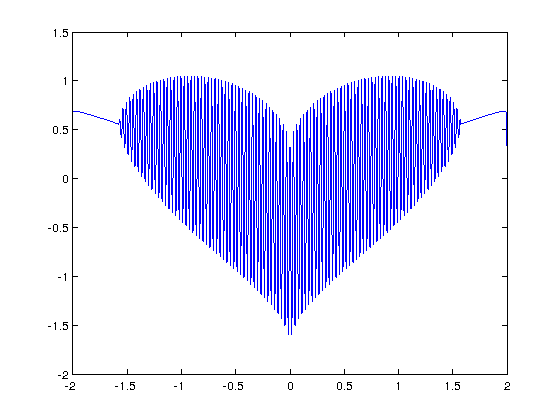
I’ve seen several equations that plot a heart shape over the years but a recent google+ post by Lionel Favre introduced me to a new one.  I liked it so much that I didn’t want to wait until Valentine’s day to share it.  In Mathematica:

Plot[Sqrt[Cos[x]]*Cos[200*x] + Sqrt[Abs[x]] - 0.7*(4 - x*x)^0.01, {x, -2, 2}]

and in MATLAB:

>> x=[-2:.001:2];
>> y=(sqrt(cos(x)).*cos(200*x)+sqrt(abs(x))-0.7).*(4-x.*x).^0.01;
>> plot(x,y)
Warning: Imaginary parts of complex X and/or Y arguments ignored

The result from the MATLAB version is shown below
Heart Plot

Update

Rene Grothmann has looked at this equation in a little more depth and plotted it using Euler.

Similar posts

December 30th, 2011 | Categories: math software, Month of Math Software | Tags:

Welcome to the final Month of Math Software for 2011.  Lots of people sent in news items this month so hopefully there will be something of interest to everyone.  If you have any news items or articles that you think will fit in to next month’s edition then please contact me and tell me all about it.

If you like what you see and want more then check out the archives.

Mathematica StackExchange Proposal

There is a proposal to launch a new Mathematica-specific questions/answers site on StackExchange.  All it needs is enough interested people who will follow or commit to the proposal. There is already a vibrant Mathematica community on StackOverflow, where many of the MathGroup regulars participate.  Unfortunately not all questions are on topic or tolerated there, so many believe that it would be better to launch a new site.  If you are willing to lend support to this proposal then add your name to the list at  http://area51.stackexchange.com/proposals/37304/mathematica?referrer=23yK9sXkBPQIDM_9uBjtlA2

General mathematical software

Making MATLAB faster

More mathematics in CUDA

  • Release candidate 2 of version 4.1 of NVIDIA’s CUDA Toolkit has been released.  There’s lots of interesting new mathmatical functions and enhancements over version 4.0 including Bessel functions, a new cuSPARSE tri-diagonal solver, new random number generators (MRG32k3a and MTGP11213 Mersenne Twister), and one thousand image processing functions!

Differential Equations

  • FEniCS 1.0 has been released.  The FEniCS Project is a collection of free software with an extensive list of features for automated, efficient solution of differential equations.
  • Fenics mesh

Libraries

  • The HSL Mathematical Software Library (http://www.hsl.rl.ac.uk) is a high performance Fortran library that specialises in sparse linear algebra and is widely used by engineering and optimization communities. Since the release of HSL 2011 at the start of Feburary, there have been a number of updates to the library.  Take a look at http://www.hsl.rl.ac.uk/changes.html for the detailed list of changes.  Interestingly, this library is free for academic use!
  • FLINT (Fast Library for Number Theory) version 2.3alpha has been released.  I can’t find any info on what’s new at the moment.
  • Version 5.1 of AMDs linear algebra library, ACML, is now available.
  • Version 1.6 of the AMD Accelerated Parallel Processing Math Libraries (APPML) has been released.  I’m not sure what’s new since the release notes only contain information about Timeout Detection and Recovery rather than info on the new stuff.  AMD Accelerated Parallel Processing Math Libraries are software libraries containing FFT and BLAS functions written in OpenCL and designed to run on AMD GPUs. The libraries also support running on CPU devices to facilitate debugging and multicore programming.
  • Version 2.4.5 of PLASMA (Parallel Linear Algebra for Scalable Multi-core Architectures) was released back in November but I somehow missed it.  Check out the 2.4.5 release notes for details.

Blog posts about Mathematical software

December 28th, 2011 | Categories: Making MATLAB faster, math software, matlab, parallel programming, programming | Tags:

Modern CPUs are capable of parallel processing at multiple levels with the most obvious being the fact that a typical CPU contains multiple processor cores.  My laptop, for example, contains a quad-core Intel Sandy Bridge i7 processor and so has 4 processor cores. You may be forgiven for thinking that, with 4 cores, my laptop can do up to 4 things simultaneously but life isn’t quite that simple.

The first complication is hyper-threading where each physical core appears to the operating system as two or more virtual cores.  For example, the processor in my laptop is capable of using hyper-threading and so I have access to up to 8 virtual cores!  I have heard stories where unscrupulous sales people have passed off a 4 core CPU with hyperthreading as being as good as an 8 core CPU…. after all, if you fire up the Windows Task Manager you can see 8 cores and so there you have it!  However, this is very far from the truth since what you really have is 4 real cores with 4 brain damaged cousins.  Sometimes the brain damaged cousins can do something useful but they are no substitute for physical cores.  There is a great explanation of this technology at makeuseof.com.

The second complication is the fact that each physical processor core contains a SIMD (Single Instruction Multiple Data) lane of a certain width. SIMD lanes, aka  SIMD units or vector units, can process several numbers simultaneously with a single instruction rather than only one a time.  The 256-bit wide SIMD lanes on my laptop’s processor, for example, can operate on up to 8 single (or 4 double) precision numbers per instruction.  Since each physical core has its own SIMD lane this means that a 4 core processor could theoretically operate on up to 32 single precision (or 16 double precision) numbers per clock cycle!

So, all we need now is a way of programming for these SIMD lanes!

Intel’s SPMD Program Compiler, ispc, is a free product that allows programmers to take direct advantage of the SIMD lanes in modern CPUS using a C-like syntax.  The speed-ups compared to single-threaded code can be impressive with Intel reporting up to 32 times speed-up (on an i7 quad-core) for a single precision Black-Scholes option pricing routine for example.

Using ispc on MATLAB

Since ispc routines are callable from C, it stands to reason that we’ll be able to call them from MATLAB using mex.  To demonstrate this, I thought that I’d write a sqrt function that works faster than MATLAB’s built-in version.  This is a tall order since the sqrt function is pretty fast and is already multi-threaded.  Taking the square root of 200 million random numbers doesn’t take very long in MATLAB:

>> x=rand(1,200000000)*10;
>> tic;y=sqrt(x);toc
Elapsed time is 0.666847 seconds.

This might not be the most useful example in the world but I wanted to focus on how to get ispc to work from within MATLAB rather than worrying about the details of a more interesting example.

Step 1 – A reference single-threaded mex file

Before getting all fancy, let’s write a nice, straightforward single-threaded mex file in C and see how fast that goes.

#include <math.h>
#include "mex.h"

void mexFunction( int nlhs, mxArray *plhs[], int nrhs, const mxArray *prhs[] )
{
    double *in,*out;
    int rows,cols,num_elements,i; 

    /*Get pointers to input matrix*/
    in = mxGetPr(prhs[0]);
    /*Get rows and columns of input matrix*/
    rows = mxGetM(prhs[0]);
    cols = mxGetN(prhs[0]);
    num_elements = rows*cols;

    /* Create output matrix */
    plhs[0] = mxCreateDoubleMatrix(rows, cols, mxREAL);
    /* Assign pointer to the output */
    out = mxGetPr(plhs[0]);

    for(i=0; i<num_elements; i++)
    {
        out[i] = sqrt(in[i]);
    }
}

Save the above to a text file called sqrt_mex.c and compile using the following command in MATLAB

 mex sqrt_mex.c

Let’s check out its speed:

>> x=rand(1,200000000)*10;
>> tic;y=sqrt_mex(x);toc
Elapsed time is 1.993684 seconds.

Well, it works but it’s quite a but slower than the built-in MATLAB function so we still have some work to do.

Step 2 – Using the SIMD lane on one core via ispc

Using ispc is a two step process.  First of all you need the .ispc program

export void ispc_sqrt(uniform double vin[], uniform double vout[],
                   uniform int count) {
    foreach (index = 0 ... count) {
        vout[index] = sqrt(vin[index]);
    }
}

Save this to a file called ispc_sqrt.ispc and compile it at the Bash prompt using

ispc -O2 ispc_sqrt.ispc -o ispc_sqrt.o -h ispc_sqrt.h --pic

This creates an object file, ispc_sqrt.o, and a header file, ispc_sqrt.h. Now create the mex file in MATLAB

#include <math.h>
#include "mex.h"
#include "ispc_sqrt.h"

void mexFunction( int nlhs, mxArray *plhs[], int nrhs, const mxArray *prhs[] )
{
    double *in,*out;
    int rows,cols,num_elements,i; 

    /*Get pointers to input matrix*/
    in = mxGetPr(prhs[0]);
    /*Get rows and columns of input matrix*/
    rows = mxGetM(prhs[0]);
    cols = mxGetN(prhs[0]);
    num_elements = rows*cols;

    /* Create output matrix */
    plhs[0] = mxCreateDoubleMatrix(rows, cols, mxREAL);
    /* Assign pointer to the output */
    out = mxGetPr(plhs[0]);

    ispc::ispc_sqrt(in,out,num_elements);
}

Call this ispc_sqrt_mex.cpp and compile in MATLAB with the command

 mex ispc_sqrt_mex.cpp ispc_sqrt.o

Let’s see how that does for speed:

>> tic;y=ispc_sqrt_mex(x);toc
Elapsed time is 1.379214 seconds.

So, we’ve improved on the single-threaded mex file a bit (1.37 instead of 2 seconds) but it’s still not enough to beat the MATLAB built-in.  To do that, we are going to have to use the SIMD lanes on all 4 cores simultaneously.

Step 3 – A reference multi-threaded mex file using OpenMP

Let’s step away from ispc for a while and see how we do with something we’ve seen before– a mex file using OpenMP (see here and here for previous articles on this topic).

#include <math.h>
#include "mex.h"
#include <omp.h>

void do_calculation(double in[],double out[],int num_elements)
{
    int i;

#pragma omp parallel for shared(in,out,num_elements)
    for(i=0; i<num_elements; i++){
          out[i] = sqrt(in[i]);
         }
}

void mexFunction( int nlhs, mxArray *plhs[], int nrhs, const mxArray *prhs[] )
{
    double *in,*out;
    int rows,cols,num_elements,i; 

    /*Get pointers to input matrix*/
    in = mxGetPr(prhs[0]);
    /*Get rows and columns of input matrix*/
    rows = mxGetM(prhs[0]);
    cols = mxGetN(prhs[0]);
    num_elements = rows*cols;

    /* Create output matrix */
    plhs[0] = mxCreateDoubleMatrix(rows, cols, mxREAL);
    /* Assign pointer to the output */
    out = mxGetPr(plhs[0]);

    do_calculation(in,out,num_elements);
}

Save this to a text file called openmp_sqrt_mex.c and compile in MATLAB by doing

 mex openmp_sqrt_mex.c CFLAGS="\$CFLAGS -fopenmp" LDFLAGS="\$LDFLAGS -fopenmp"

Let’s see how that does (OMP_NUM_THREADS has been set to 4):

>> tic;y=openmp_sqrt_mex(x);toc
Elapsed time is 0.641203 seconds.

That’s very similar to the MATLAB built-in and I suspect that The Mathworks have implemented their sqrt function in a very similar manner. Theirs will have error checking, complex number handling and what-not but it probably comes down to a for-loop that’s been parallelized using Open-MP.

Step 4 – Using the SIMD lanes on all cores via ispc

To get a ispc program to run on all of my processors cores simultaneously, I need to break the calculation down into a series of tasks. The .ispc file is as follows

task void
ispc_sqrt_block(uniform double vin[], uniform double vout[],
                   uniform int block_size,uniform int num_elems){
    uniform int index_start = taskIndex * block_size;
    uniform int index_end = min((taskIndex+1) * block_size, (unsigned int)num_elems);

    foreach (yi = index_start ... index_end) {
        vout[yi] = sqrt(vin[yi]);
    }
}

export void
ispc_sqrt_task(uniform double vin[], uniform double vout[],
                   uniform int block_size,uniform int num_elems,uniform int num_tasks)
{

    launch[num_tasks] < ispc_sqrt_block(vin, vout, block_size, num_elems) >;
}

Compile this by doing the following at the Bash prompt

ispc -O2 ispc_sqrt_task.ispc -o ispc_sqrt_task.o -h ispc_sqrt_task.h --pic

We’ll need to make use of a task scheduling system. The ispc documentation suggests that you could use the scheduler in Intel’s Threading Building Blocks or Microsoft’s Concurrency Runtime but a basic scheduler is provided with ispc in the form of tasksys.cpp (I’ve also included it in the .tar.gz file in the downloads section at the end of this post), We’ll need to compile this too so do the following at the Bash prompt

g++ tasksys.cpp -O3 -Wall -m64 -c -o tasksys.o -fPIC

Finally, we write the mex file

#include <math.h>
#include "mex.h"
#include "ispc_sqrt_task.h"

void mexFunction( int nlhs, mxArray *plhs[], int nrhs, const mxArray *prhs[] )
{
    double *in,*out;
    int rows,cols,i;

    unsigned int num_elements;
    unsigned int block_size;
    unsigned int num_tasks; 

    /*Get pointers to input matrix*/
    in = mxGetPr(prhs[0]);
    /*Get rows and columns of input matrix*/
    rows = mxGetM(prhs[0]);
    cols = mxGetN(prhs[0]);
    num_elements = rows*cols;

    /* Create output matrix */
    plhs[0] = mxCreateDoubleMatrix(rows, cols, mxREAL);
    /* Assign pointer to the output */
    out = mxGetPr(plhs[0]);

    block_size = 1000000;
    num_tasks = num_elements/block_size;

    ispc::ispc_sqrt_task(in,out,block_size,num_elements,num_tasks);

}

In the above, the input array is divided into tasks where each task takes care of 1 million elements. Our 200 million element test array will, therefore, be split into 200 tasks– many more than I have processor cores. I’ll let the task scheduler worry about how to schedule these tasks efficiently across the cores in my machine. Compile this in MATLAB by doing

mex ispc_sqrt_task_mex.cpp ispc_sqrt_task.o tasksys.o

Now for crunch time:

>> x=rand(1,200000000)*10;
>> tic;ys=sqrt(x);toc   %MATLAB's built-in
Elapsed time is 0.670766 seconds.
>> tic;y=ispc_sqrt_task_mex(x);toc  %my version using ispc
Elapsed time is 0.393870 seconds.

There we have it! A version of the sqrt function that works faster than MATLAB’s own by virtue of the fact that I am now making full use of the SIMD lanes in my laptop’s Sandy Bridge i7 processor thanks to ispc.

Although this example isn’t very useful as it stands, I hope that it shows that using the ispc compiler from within MATLAB isn’t as hard as you might think and is yet another tool in the arsenal of weaponry that can be used to make MATLAB faster.

Final Timings, downloads and links

  • Single threaded: 2.01 seconds
  • Single threaded with ispc: 1.37 seconds
  • MATLAB built-in: 0.67 seconds
  • Multi-threaded with OpenMP (OMP_NUM_THREADS=4): 0.64 seconds
  • Multi-threaded with OpenMP and hyper-threading (OMP_NUM_THREADS=8): 0.55 seconds
  • Task-based multicore with ispc: 0.39 seconds

Finally, here’s some links and downloads

System Specs

  • MATLAB 2011b running on 64 bit linux
  • gcc 4.6.1
  • ispc version 1.1.1
  • Intel Core i7-2630QM with 8Gb RAM
December 3rd, 2011 | Categories: math software, Month of Math Software | Tags:

Welcome to Walking Randomly’s monthly look at what’s new in the world of mathematical software.  Click here for last month’s edition and check out the archive for all previous editions.  If you have some news about mathematical software and want to get it out to over 2,500 subscribers then contact me and tell me all about it.

General mathematical software

  • Python(x,y) has been updated to version 2.7.2.1.  Python(x,y) is a free scientific and engineering development software for numerical computations, data analysis and data visualization
  • Version 2.17-13 of the number theoretic package, Magma, has been released.  Click here to see what’s new.
  • Freemat, a a free environment for rapid engineering,scientific prototyping and data processing similar to MATLAB, has seen its first major update in 2 years!  The big news in version 4.1 is a Just In Time (JIT) compiler which should speed up code execution a great deal.  There is also a significant improvement in Freemat’s ability to render multidimensional datasets thanks to integration of the Visualisation Toolkit (VTK).
  • The Euler Math Toolbox has been updated to version 13.1.  See the list of changes for details of what’s new.
  • Gnumeric saw a new major release in November with 1.11.0 (click here for changes) closely followed by some bug fixes in 1.11.1 (changes here).  Gnumeric is a free spreadsheet program for Linux and Windows.

Linear Algebra

  • LAPACK, The Fortran based linear algebra library that forms the bedrock of functionality in countless software applications,  has been updated to version 3.4.0.  Click here for the release notes.
  • MAGMA, A linear algebra library that is “similar to LAPACK but for heterogeneous/hybrid architectures, starting with current “Multicore+GPU” systems.” has been updated to version 1.1
  • PLASMA, The Parallel Linear Algebra for Scalable Multi-core Architectures, has been updated to version 2.4.5.  Click here for what’s new.

New Products

  • AccelerEyes have released a new product called ArrayFire – a free CUDA and OpenCL library for C, C++, Fortran, and Python
  • CULA Tools released a new product called CULA Sparse which is a GPU-accelerated library for linear algebra that provides iterative solvers for sparse systems.  They’ve also released a demo application to allow you to try the product out for free.

Vital Statistics

  • R version 2.14.0 has been released with a host of new features.  If you do any kind of statistical computing then R is the free, open source solution for you!

Pretty plots

  • Originlabs have updated their commercial windows plotting packages, Origin and OriginPro to version 8.6.  Here’s the press release.
  • A new incremental update of GNUPlot, a free multiplatform plotting package, has been released.  The release announcement tells us what new goodies we get in version 4.4.4.

Mobile

  • One of the best mobile mathematical applications that money can buy, SpaceTime, has released a new version for iOS and Mac OS X and changed its name to Math Studio.  Not to be confused with SMathStudio, another mobile mathematical application that is a clone of MathCad.
  • The guys behind the excellent Android based Python/Sympy app – MathScript – have released a beta of a new product called ScriptBlocks.

Odds and ends

  • RougeWave Software have released version 8.0 of the commercial IMSL C library.  Improvements include CUDA BLAS integration and a few new functions.  The full list is available on the what’s new page.
  • Bernard Liengme has written a Primer for SmathStudio (a free Mathcad clone)
  • Eureqa, a software tool for detecting equations and hidden mathematical relationships in your data, has seen a major new update: Eureqa II (Code Name Formulize).  Get it from http://creativemachines.cornell.edu/eureqa_download
  • The Numerical Algorithms Group (NAG) have put together a set of examples where various versions of their numerical library product (for Fortran, C and .NET) are used in Labview programs.
  • Scipy version 0.10.0 has been released.  Check out the release notes for the new stuff.
December 2nd, 2011 | Categories: Making MATLAB faster, matlab, programming | Tags:

I recently spent a lot of time optimizing a MATLAB user’s code and made extensive use of mex files written in C.  Now, one of the habits I have gotten into is to mix C and C++ style comments in my C source code like so:

/* This is a C style comment */

// This is a C++ style comment

For this particular project I did all of the development on Windows 7 using MATLAB 2011b and Visual Studio 2008 which had no problem with my mixing of comments. Move over to Linux, however, and it’s a very different story. When I try to compile my mex file

mex block1.c -largeArrayDims 

I get the error message

block1.c:48: error: expected expression before ‘/’ token

The fix is to call mex as follows:

mex block1.c -largeArrayDims CFLAGS="\$CFLAGS -std=c99"

Hope this helps someone out there. For the record, I was using gcc and MATLAB 2011a on 64bit Scientific Linux.

October 30th, 2011 | Categories: math software, Month of Math Software | Tags:

Welcome to this month’s ‘A month of Math software.’  If you missed the September edition then why not take a look at https://www.walkingrandomly.com/?p=3534. All previous editions can be found at the Month of Math Software Archives.  If you have some mathematical software news for the November 2011 edition then feel free to contact me.

General Mathematics and Statistics

  • After being in beta for a while, version 4 of GeoGebra has been released.  I confess that I’ve never used it but it looks great and it’s free!
  • Wolfram’s Mathematica has seen a minor update with version 8.0.4.  The previous version was 8.0.1 and the list of changes between the two is given here.
  • The free MATLAB clone, Octave, has seen a bug-fix upgrade with version 3.4.3.
  • Version 2.17.12 of the computational algebra package, Magma, has been released.  The change log is at http://magma.maths.usyd.edu.au/magma/releasenotes/2/17/12/
  • Rene Grothmann has updated his Euler Math Toolbox, a numerical package that has some similarities to MATLAB, to version 12.9. This new release includes the LSODA algorithm for stiff equations.  He gives examples of the new functionality at http://euler.rene-grothmann.de/Programs/Examples/Stiff%20Equation.html

Mathematics on GPUs

Scientific Plotting

  • Matplotlib is a very capable plotting library for the Python programming language and it has just been updated.  Version 1.1 has lots of nice new features and you can read about them all at http://matplotlib.sourceforge.net/users/whats_new.html
  • DISLIN is a plotting library that can be called from many languages including C and Fortran.  October saw it updated to version 10.1.5 and you can see what’s new from DISLIN’s news page.

Mobile Mathematics

  • I discovered a couple of free MATLAB clones for Android this month – Addi and Mathmatiz.  My favourite of the two is Addi, partly because Mathmatiz insists on serving me adverts while using it.  I’d happily pay for a version of Mathmatiz that didn’t include adverts though!
  • One mobile application that I’ve been meaning to mention for months is MathScript.  This Android based application allows you to write and run python programs directly on your device.  It also comes with some basic plotting functionality and a full version of SymPy which turns it into a very capable mathematical compute engine.
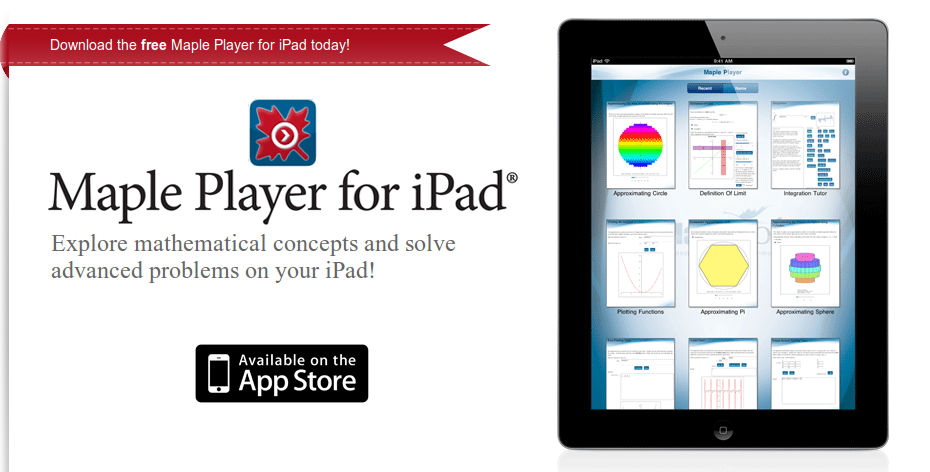
  • Maplesoft have released The Maple Player for iPad which allows interactive Maple documents to be used on Apple’s tablet devices.  This first release comes with a few pre-installed documents that shows the sort of thing that the software is capable of.  The initial set of topics includes Laplace Transforms, a function plotter, integration tutor and more.  At the moment we can’t publish our own Maple documents to iPad but it looks like this is what Maplesoft are planning for the future.
October 26th, 2011 | Categories: Free software, iPad, Maple, Mobile Mathematics | Tags:

Typical…I leave my iPad at home and this happens

Maple on iPad

I can’t WAIT to try this out.  Blog post from Maplesoft about it at http://www.mapleprimes.com/maplesoftblog/127071-Maple-And-The-IPad?sp=127071

May I be the first to ask “When is an Android version coming out?”

October 25th, 2011 | Categories: Android, math software, matlab, Mobile Mathematics | Tags:

Back in May 2010, The Mathworks released MATLAB Mobile which allows you to connect to a remote MATLAB session via an iPhone.  I took a quick look and was less than impressed since what I REALLY wanted was the ability to run MATLAB code natively on my phone.  Many other people, however, liked what The Mathworks had done but what THEY really wanted was an Android version.  There is so much demand for an Android version of MATLAB Mobile that there is even a Facebook page campaigning for it.  Will there ever be anything MATLABy that fully satisfies Android toting geeks such as me?

Enter Addi, an Android based MATLAB/Octave clone that has the potential to please a lot of people, including me.  Based on the Java MATLAB library, JMathLib, Addi already has a lot going for it including the ability to execute .m file scripts and functions natively on your device, basic plotting (via an add-on package called AddiPlot) and the rudimentary beginnings of a toolbox system (See AddiMappingPackage).  All of this is completely free and brought to us by just one man, Corbin Champion.

Addi - MATLAB Clone for Android

It works pretty well on my Samsung Galaxy S apart from the occasional glitch where I can’t see what I’m typing for short periods of time.  Writing MATLAB code using the standard Android keyboard is also a bit of a pain but I believe that a custom on-screen keyboard is in the works which will hopefully improve things.  As you might expect, there is only a limited subset of MATLAB commands available (essentially everything listed at http://www.jmathlib.de/docs/handbook/index.php sans the plotting functions) but there is enough to be fun and useful…just don’t expect to be able to run advanced, toolbox heavy codes straight out of the box.

Where Addi really shines, however, is on an ASUS EEE Transformer.  Sadly, I don’t have one but a friend of mine let me install Addi on his and after five minutes of playing around I was in love (It even includes command history!).  Some have pointed out to me that life would probably be easier with a netbook running Linux and Octave but where’s the fun in that :)  To be honest, I actually find it much more fun using a limited version of MATLAB because it makes me do so much more myself rather than providing a function for every conceivable calculation…great for learning and fiddling around.

Addi is a fantastic free MATLAB clone for Android based devices that I would heartily recommend to all MATLAB fans.  Get it, try it and let me know what you think :)