March 26th, 2012 | Categories: Android, just for fun, Mobile Mathematics, programming | Tags:

These days almost all of us are carrying around seriously capable little computers in the form of our mobile phones.  Although these devices have a similar amount of horsepower to supercomputers of old, most of us only use a fraction of their potential– after all, you don’t need a supercompter to send text messages, look at pictures of cats or throw birds at pigs.  I believe that the only way to fully unlock the true potential of these devices is to program them yourself.

From fully fledged applications to little snippets of code, I think that there’s something enormously satisfying about writing your own computer programs and it doesn’t have to be difficult to do so.  The following 9 apps will allow you to write programs for your Android mobile phone in a variety of languages including C, BASIC, Lisp and MATLAB m-code using only your Android phone. Although you’ll not be able to use them to write the next 3D blockbuster game, you will be able to solve some interesting problems, learn a trick or two and have a lot of fun.

C4droid – £0.95

With c4droid you get the ability to write, compile and run C and C++ programs using only your Android device.  That’s a lot of functionality for only 95p!

Out of the box C4droid only handles C programs, making use of a modified version of the Tiny C Compiler to do the compilation work.  The standard C library is provided by uClibc which is specially designed for use on embedded systems.

In order to run C++ programs you need to additionally install the free GCC plugin for C4droid — something that I personally haven’t done yet due to its large size.  One of the most common user-complaints appears to be ‘this app doens’t allow me to use iostream.h’ which essentially demonstrates that the installation instructions were not followed.  Since iostream.h is a C++ library, you’ll need to install and configure the GCC plugin to get access to it and full instructions on how to do this are given on c4droid’s Google Play page.

You only get access to the standard C library with C4droid which means that you can’t generate graphical output or interact with the phone’s hardware in any way (bluetooth, accelerometers, that sort of thing) but that doesn’t stop this from being an impressive piece of work.  Also, for an extra 95p you can run pascal programs using the Pascal plugin for C4droid.

C4droid is a superb app that will be invaluable for anyone learning C,C++ or Pascal or for those of us that simply like to fiddle about with these languages on the go.

Mintoris Basic – £3.77

At the risk of showing my age, I’ll tell you that I first learned how to program in BASIC (Beginners All-Purpose Symbolic Instruction Code) on the Sinclair ZX Spectrum and so I will always have a fondness for the language.  Mintoris Basic is a very fully featured implementation of the BASIC programming language and is significantly more powerful than the implementation I cut my teeth on back in the day.

As well as having all of the stuff you’d expect in a BASIC implementation (loops, strings, variables, functions, decisions, graphics etc), Mintoris also allows you to interact with some of your phone’s hardware including Bluetooth, battery level, GPS, and various sensors.  Furthermore, you can attach your programs to shortcuts and launch them from your home screens.  The level of functionality is so high that you can write some rather nifty apps with relatively little effort.

Frink – Free

Frink is a great language developed by Alan Eliasen that has been around since 2001.  Named after Professor Frink from The Simpsons, Frink runs on almost every device you can possibly imagine and has some very interesting features including interval arithmetic, tracking of units of measure throughout calculations, arbitrary precision numbers, regular expressions and graphics.

RFO BASIC! + SQL – Free

This implementation of BASIC is completely free and is described as a labour of love by the author, Paul Laughton.  Paul is my kind of geek since he is the curator of The Dr. Richard Feynman Observatory and author of Atari Basic and Apple DOS 3.1 among other things.

The feature list of RFO BASIC is impressive and includes Graphics (with Multi-touch), SQL, GPS, Device Sensors, Camera and loads more.  There’s a great forum with lots of very engaged developers who are writing some very nice programs.

There are two ways to deploy your programs–either as scripts that require RFO BASIC to be installed or as compiled,standalone programs that can even be added to Google Play (formerly known as the Android Market’).

Addi and Mathmatiz – Free

These are two MATLAB clones for Android.  I’ve mentioned Addi before and they have both been covered over at Alasdair’s Musings so I won’t go into detail here other than to say that they are very cool!  Linear algebra, scripting and plotting on your phone!

tiny Lisp ISLisproid

Lisp is a very old programming language which first saw the light of day in 1958!  According to wikipedia, the only langauge older than Lisp that is still in common use is Fortran! With this app you can play with the language of the ancients on your super-modern smartphone.  This is a no-frills app..essentially little more than a command line shell and list interpreter but that is perhaps as it should be.

MathStudio – £12.99

I’ve been using MathStudio (formerly SpaceTime Mathematics) for quite a few years now on various operating systems and it’s great to finally have it on Android.  MathStudio is a fully featured computer algebra system for your mobile phone– think mini Mathematica or Maple and you are thinking along the right lines.  With this app you can write scripts that make use of advanced mathematical features,  2D and 3D graphics, animations and interactive demonstrations.

SigmaScript – Free

SigmaScript is a free implementatuion of the Lua scripting language for Android devices developed by Logimath.  You get an editor, scripting engine, small console output and a few simple code examples.  No graphics or anything fancy but a very nice way to play with an interesting language.
March 20th, 2012 | Categories: Carnival of Math | Tags:

For the last two years or so I have been doing the administration for The Carnival of Mathematics (CoM) and have had a lot of fun doing so.  I first took over for carnival 59 (written by Jason Dyer and hosted over at NumberWarrior) and did the admin right up until number 84 which was published back in December 2011 by Guillermo Bautista (see here and here for some history).

Recently, however, I have struggled to find the time to give the CoM the attention it deserves and so it is time to hand over the baton.  Thankfully, some very able hands have taken it from me and I am happy to announce that Peter Rowlett, Katie Steckles and Christian Perfect will be taking care of business from now on.  Submissions for Carnival 85 are already open.

I’ll still be around, blogging as usual here at WalkingRandomly and hosting the occasional Carnival myself but the carnival is now being cared for by the next generation.  Submit something and give them a great welcome.

March 14th, 2012 | Categories: CUDA, GPU, mathematica | Tags:

After writing my recent article on GPU accelerated Matrix-Matrix multiplication using Maple, I thought that I’d try the same thing in Mathematica.  However, I instantly hit a problem on my 64bit Windows 7 machine running version 8.0.1 of Mathematica.

In[1]:= a = RandomReal[1, {2, 2}]
Out[1]= {{0.363441, 0.528656}, {0.208881, 0.510232}}

In[2]:= b = RandomReal[1, {2, 2}]
Out[2]= {{0.33536, 0.77615}, {0.537533, 0.788522}}

In[3]:= Dot[a, b]
Out[3]= {{0.406054, 0.698942}, {0.344317, 0.564452}}

In[4]:= Needs["CUDALink`"]
CUDADot[a, b]
Out[5]= {{0.741414, 1.47509}, {0.881849, 1.35297}}

In short, CUDADot gives the wrong result for floating point numbers (on my machine at least).  An upgrade to version 8.0.4 fixed the problem

March 2nd, 2012 | Categories: math software, Month of Math Software | Tags:

Welcome to the latest edition of A Month of Math Software which includes information on a new language for scientific computing, statistics software education in New Zealand as well as the usual mix of mathematical and scientific software releases from the worlds of commercial and free software.

If you’d like something added to next month’s edition then contact me (it’s free).  If you want to see old editions then take a look at the MMS archive.

A new language for scientific computing

Learn statistics with the free GenStat for teaching and Learning (GTL)

Mathcad Prime

  • Mathcad Prime 2.0 has been released and has lots of new improvements.  I’ve never been a fan of Mathcad and Prime 1.0 was a big disappointment for me but many people seem to like it.  Let me know if you are one of them.

Attack of the clones

  • A major new release of the free MATLAB clone, Octave, has is now available.  Version 3.6.1 has lots of new goodies and you can read all about them in the 3.6.1 NEWS file.
  • Version 13.7 of the MATLAB-like Euler Math Toolbox is now available.  See the change log for the improvements.
  • Version 0.92 of the popular Mathcad clone, Smath studio, was released in February.

Number theory

  • A new version of PARI/GP is now available for download.  From the software’s website: “PARI/GP is a widely used computer algebra system designed for fast computations in number theory (factorizations, algebraic number theory, elliptic curves…), but also contains a large number of other useful functions to compute with mathematical entities such as matrices, polynomials, power series, algebraic numbers etc., and a lot of transcendental functions.”  Head over to the changelog to see what’s new.

Perl and Python

  • If you like to work with the Perl programming language then you should take a look at the Perl Data Language (PDL).  A new version was released in February– version 2.4.10— which includes automatic multi-thread support among other things.
  • If you prefer Python, you’ll probably like to know that version 0.10.1 of scipy, the scientific library for python, has been released.

Math software on tablets

  • The Mathematica kernel is now running on iPad!
  • GeoGebra is a superb piece of free software for mathematics learning and teaching.  Thanks to the release of the beta version of GeoGebraWeb, you can now experience some of the GeogGebra goodness on Tablets and Chromebooks.  This forum post gives the details.

Finite Elements

  • February saw the release of two new C++ libraries: ViennaMath and ViennaFEM.  The author of the libraries writes “The symbolic math kernel library ViennaMath (http://viennamath.sourceforge.net/) written in C++ allows for both runtime and compiletime evaluation, differentiation, integration, and substitution of simple mathematical expressions. In short, ViennaMath offers some of the advantages of full-fledged computer algebra systems such as Mathematica or Maple directly within C++. The symbolic math kernel is intended to be used for numerical applications and is included in the new finite element library ViennaFEM (http://viennafem.sourceforge.net/), which allows for the specification of either the strong or the weak formulation of the underlying PDE directly in code. Even though ViennaFEM is still in alpha-state, the first release already supports grids in 1d, 2d (triangular,quadrilateral) and 3d (tetrahedral, hexahedral).”

From the blogs

February 17th, 2012 | Categories: iPad, mathematica, Mobile Mathematics | Tags:

The Wolfram blog has just published an article previewing the .cdf player on iPad.  I’ve discussed .cdf technology several times before (see Interactive Slinky Thing and Interactive Mathematics in the Web Browser for example) and it forms the basis of the superb Wolfram Demonstrations Project.

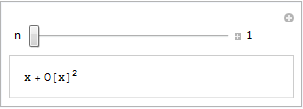
In a nutshell, it is trivially easy to write interactive mathematical applets using Mathematica and publish them to .cdf format.  The magic happens via the Manipulate command which has been around since version 6.  For example, here is the full source code for a simple interactive applet that calculates and displays the power series for sin(x)

Manipulate[
 Series[Sin[x], {x, 0, n}]
 , {n, 1, 10, 1, Appearance -> "Labeled"}
 ]

Here is the result

Series demo

If you have Mathematica 8 or the free .cdf player installed with browser plug-in enabled then you’ll see a fully interactive applet above. Otherwise, you just get a simple image.

Bear in mind that this isn’t showing you a set of pre-computed solutions, it’s actually performing the calculations in real time using the full Mathematica kernel.  With this new player you’ll be able to do that on iPad as well as on your PC. That’s right…Wolfram have taken the full Mathematica kernel and got it running on iPad! It’s not shipping yet but it looks like it’s going to be awesome.

Just imagine…all 7000+ Wolfram Demonstrations on iPad, not to mention your own bespoke code.

There is a preview of the new technology in the video below.

Other articles on mobile mathematics from WalkingRandomly

February 15th, 2012 | Categories: GPU, Making MATLAB faster, matlab, programming | Tags:

This article is the third part of a series where I look at rewriting a particular piece of MATLAB code using various techniques.  The introduction to the series is here and the introduction to the larger series of GPU articles for MATLAB is here.

Last time I used The Mathwork’s Parallel Computing Toolbox in order to modify a simple correlated asset calculation to run on my laptop’s GPU rather than its CPU.  Performance was not as good as I had hoped and I never managed to get my laptop’s GPU (an NVIDIA GT555M) to beat the CPU using functions from the parallel computing toolbox.  Transferring the code to a much more powerful Tesla GPU card resulted in a four times speed-up compared to the CPU in my laptop.

This time I’ll take a look at AccelerEyes’ Jacket, a third party GPU solution for MATLAB.

Attempt 1 – Make as few modifications as possible

I started off just as I did for the parallel computing toolbox GPU port; by taking the best CPU-only code from part 1 (optimised_corr2.m) and changing a load of data-types from double to gdouble in order to get the calculation to run on my laptop’s GPU using Jacket v1.8.1 and MATLAB 2010b.  I also switched to using the GPU versions of various functions such as grandn instead of randn for example.  Functions such as cumprod needed no  modifications at all since they are nicely overloaded; if the argument to cumprod is of type double then the calculation happens on the CPU whereas if it is gdouble then it happens on the GPU.

Now, one thing that I don’t like about Jacket’s implementation is that many of the functions return single precision numbers by default.  For example, if you do

a=grand(1,10)

then you end up with 10 numbers of type gsingle.  To get double precision numbers you have to do

grandn(1,10,'double')

Now you may be thinking ‘what’s the big deal? – it’s just a bit of syntax so get over it’ and I guess that would be a fair comment.  Supporting single precision also allows users of legacy GPUs to get in on the GPU-accelerated action which is a good thing. The problem as I see it is that almost everything else in MATLAB uses double precision numbers as the default and so it’s easy to get caught out.  I would much rather see functions such as grand return double precision by default with the option to use single precision if required–just like almost every other MATLAB function out there.

The result of my ‘port’ is GPU_jacket_corr1.m

One thing to note in this version, along with all subsequent Jacket versions, is the following command that appears at the very end of the program.

gsync;

This is very important if you want to get meaningful timing results since it ensures that all GPU computations have finished before execution continues. See the Jacket documentation on gysnc and this blog post on timing Jacket code for more details.

The other thing I’ll mention is that, in this version, I do this:

Corr = [1 0.4; 0.4 1];
UpperTriangle=gdouble(chol(Corr));

instead of

Corr = gdouble([1 0.4; 0.4 1]);
UpperTriangle=chol(Corr);

In other words, I do the cholesky decomposition on the CPU and move the results to the GPU rather than doing the calculation on the GPU.  This is mainly because I don’t have access to a Jacket DLA license but it’s probably the best thing to do anyway since such a small decomposition probably won’t happen any faster on the GPU.

So, how does it perform.  I ran it three times with the now usual parameters of 100000 simulations done in blocks of 125 (see the CPU version for how I came to choose 125)

>> tic;GPU_jacket_corr1;toc
Elapsed time is 40.691888 seconds.
>> tic;GPU_jacket_corr1;toc
Elapsed time is 32.096796 seconds.
>> tic;GPU_jacket_corr1;toc
Elapsed time is 32.039982 seconds.

Just like the Parallel Computing Toolbox, the first run is slower because of GPU warmup overheads. Also, just like the PCT, performance stinks! It’s clearly not enough, in this case at least, to blindly throw in a few gdoubles and hope for the best. It is worth noting, however, that this case is nowhere near as bad as the 900+ seconds we saw in the similar parallel computing toolbox version.

Jacket has punished me for being stupid (or optimistic if you want to be polite to me) but not as much as the PCT did.

Attempt 2 – Convert from a script to a function

When working with the Parallel Computing Toolbox I demonstrated that a switch from a script to a function yielded some speed-up.  This wasn’t the case with the Jacket version of the code.  The functional version, GPU_jacket_corr2.m, showed no discernable speed improvement compared to the script.

%Warm up run performed previously
>> tic;GPU_jacket_corr2(100000,125);toc
Elapsed time is 32.230638 seconds.
>> tic;GPU_jacket_corr2(100000,125);toc
Elapsed time is 32.179734 seconds.
>> tic;GPU_jacket_corr2(100000,125);toc
Elapsed time is 32.114864 seconds.

Attempt 3 – One big matrix multiply!

The original version of this calculation performs thousands of very small matrix multiplications and last time we saw that switching to a single, large matrix multiplication brought significant speed improvements on the GPU.  Modifying the code to do this with Jacket is a very similar process to doing it for the PCT so I’ll omit the details and just present the code, GPU_jacket_corr3.m

%Warm up runs performed previously
>> tic;GPU_jacket_corr3(100000,125);toc
Elapsed time is 2.041111 seconds.
>> tic;GPU_jacket_corr3(100000,125);toc
Elapsed time is 2.025450 seconds.
>> tic;GPU_jacket_corr3(100000,125);toc
Elapsed time is 2.032390 seconds.

Now that’s more like it! Finally we have a GPU version that runs faster than the CPU on my laptop. We can do better, however, since the block size of 125 was chosen especially for my CPU. With this Jacket version bigger is better and we get much more speed-up by switching to a block size of 25000 (I run out of memory on the GPU if I try even bigger block sizes).

%Warm up runs performed previously
>> tic;GPU_jacket_corr3(100000,25000);toc
Elapsed time is 0.749945 seconds.
>> tic;GPU_jacket_corr3(100000,25000);toc
Elapsed time is 0.749333 seconds.
>> tic;GPU_jacket_corr3(100000,25000);toc
Elapsed time is 0.749556 seconds.

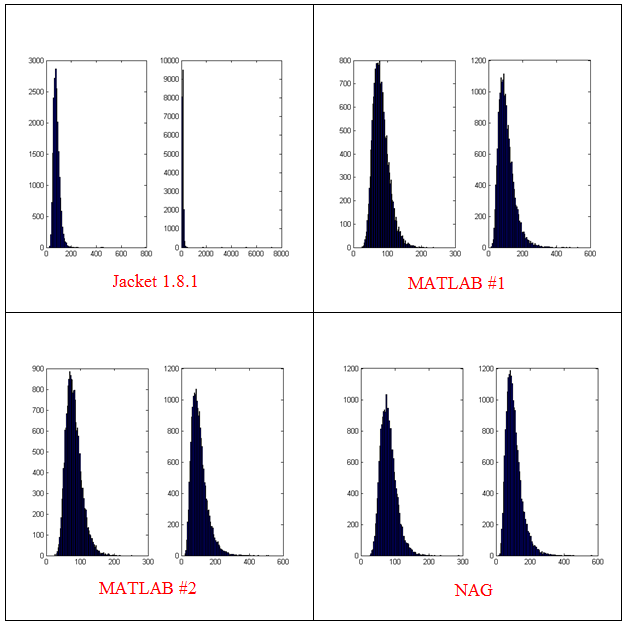
Now this is exciting! My laptop GPU with Jacket 1.8.1 is faster than a high-end Tesla card using the parallel computing toolbox for this calculation. My excitement was short lived, however, when I looked at the resulting distribution. The random number generator in Jacket 1.8.1 gave a completely different distribution when compared to generators from other sources (I tried two CPU generators from The Mathworks and one from The Numerical Algorithms Group).  The only difference in the code that generated the results below is the random number generator used.

Correlated Asset distributions found using various RNGs

  • The results shown in these plots were for only 20,000 simulations rather than the 100,000 I’ve been using elsewhere in this post. I found this bug in the development stage of these posts where I was using a smaller number of simulations.
  • Jacket 1.8.1 is using Jackets old grandn function with the ‘double’ option set
  • MATLAB #1 is using MATLAB’s randn using the Comb Recursive algorithm on the CPU
  • MATLAB #2 is using MATLAB’s randn using the default Mersenne Twister on the CPU
  • NAG is using a Wichman-Hill generator

I sent my code to AccelerEye’s customer support who confirmed that this seemed to be a bug in their random number generator (an in-house Mersenne Twister implementation).  Less than a week later they offered me a new preview of Jacket from their Nightly builds where the old RNG had been replaced with the Mersenne Twister implementation produced by NVidia and I’m happy to confirm that not only does this fix the results for my code but it goes even faster!  Superb customer service!

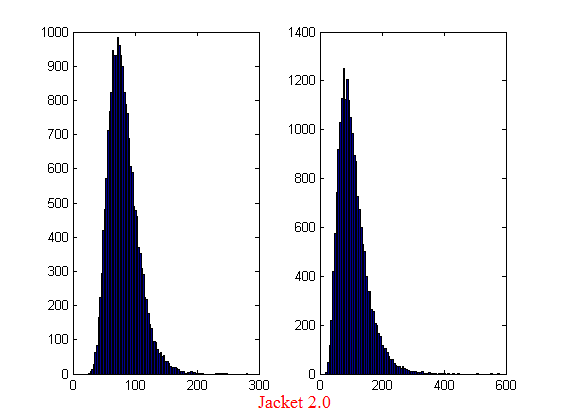
This new RNG is now the default in version 2.0 of Jacket.  Here’s the distribution I get for 20,000 simulations (to stay in line with the plots shown above).

Jacket 2.0 distribution

Switching back to 100,000 simulations to stay in line with all of the other benchmarks in this series gives the following times on my laptop’s GPU

%Warm up runs performed previously
>> tic;prices=GPU_jacket_corr3(100000,25000);toc
Elapsed time is 0.696891 seconds.
>> tic;prices=GPU_jacket_corr3(100000,25000);toc
Elapsed time is 0.697596 seconds.
>> tic;prices=GPU_jacket_corr3(100000,25000);toc
Elapsed time is 0.697312 seconds.

This is almost 5 times faster than the 3.42 seconds managed by the best CPU version from part 1. I sent my code to AccelerEyes and asked them to run it on a more powerful GPU, a Tesla C2075, and these are the results they sent back

Elapsed time is 5.246249 seconds. %warm up run
Elapsed time is 0.158165 seconds.
Elapsed time is 0.156529 seconds.
Elapsed time is 0.156522 seconds.
Elapsed time is 0.156501 seconds.

So, the Tesla is 4.45 times faster than my laptop’s GPU for this application and a very useful 21.85 times faster than my laptop’s CPU.

Results Summary

  • Best CPU Result on laptop (i7-2630GM)with pure MATLAB code – 3.42 seconds
  • Best GPU Result with PCT on laptop (GT555M) – 4.04 seconds
  • Best GPU Result with PCT on Tesla M2070 – 0.85 seconds
  • Best GPU Result with Jacket on laptop (GT555M) – 0.7 seconds
  • Best GPU Result with Jacket on Tesla M2075 – 0.16 seconds

Test System Specification

  • Laptop model: Dell XPS L702X
  • CPU:Intel Core i7-2630QM @2Ghz software overclockable to 2.9Ghz. 4 physical cores but total 8 virtual cores due to Hyperthreading.
  • GPU:GeForce GT 555M with 144 CUDA Cores.  Graphics clock: 590Mhz.  Processor Clock:1180 Mhz. 3072 Mb DDR3 Memeory
  • RAM: 8 Gb
  • OS: Windows 7 Home Premium 64 bit.
  • MATLAB: 2011b

Acknowledgements

Thanks to Yong Woong Lee of the Manchester Business School as well as various employees at AccelerEyes for useful discussions and advice.  Any mistakes that remain are all my own.

February 12th, 2012 | Categories: CUDA, GPU, Maple | Tags:

Maple has had support for NVidia GPUs since version 14 but I’ve not played with it much until recently.  Essentially I was put off by the fact that Maple’s CUDA package seemed to have support for only one function – Matrix-Matrix Multiplication. However, a recent conversation with a Maple developer changed my mind.

It is true that only MatrixMatrixMultiply has been accelerated but when you flip the CUDA switch in Maple, every function in the LinearAlgebra package that calls MatrixMatrixMultiply also gets accelerated.  This leads to the possibility of a lot of speed-ups for very little work.

So, this morning I thought I would take a closer look using my laptop.  Let’s start by timing how long it takes the CPU to multiply two 4000 by 4000 double precision matrices

with(LinearAlgebra):
CUDA:-Enable(false):
CUDA:-IsEnabled();
a := RandomMatrix(4000, datatype = float[8]):
b := RandomMatrix(4000, datatype = float[8]):
t := time[real]():
c := a.b:
time[real]()-t

The exact time varied a little from run to run but 3.76 seconds is a typical result. I’m only feeling my way at this stage so not doing any proper benchmarking.

To do this calculation on the GPU, all I need to do is change the line

CUDA:-Enable(false):

to

CUDA:-Enable(true):

like so

with(LinearAlgebra):
CUDA:-Enable(true):
CUDA:-IsEnabled();
a := RandomMatrix(4000, datatype = float[8]):
b := RandomMatrix(4000, datatype = float[8]):
t := time[real]():
c := a.b:
time[real]()-t

Typical execution time was 8.37 seconds so the GPU version is more than 2 times slower than the CPU version on my machine.

Trying different matrix sizes

Not wanting to admit defeat after just a single trial, I timed the above code using different matrix sizes.  Here are the results

  • 1000 by 1000: CPU=0.07 seconds GPU=0.17 seconds
  • 2000 by 2000: CPU=0.53 seconds GPU=1.07 seconds
  • 4000 by 4000: CPU=3.76 seconds GPU=8.37 seconds
  • 5000 by 5000: CPU=7.44 seconds GPU=19.48 seconds

Switching to single precision

GPUs do much better with single precision numbers so I had a try with those too.  All you need to do is change

datatype = float[8]

to

datatype = float[4]

in the above code. The results are:

  • 1000 by 1000: CPU=0.03 seconds GPU=0.07 seconds
  • 2000 by 2000: CPU=0.35 seconds GPU=0.66 seconds
  • 4000 by 4000: CPU=1.86 seconds GPU=2.37 seconds
  • 5000 by 5000: CPU=3.81 seconds GPU=5.2 seconds

So the GPU loses in single precision mode too on my hardware.  If I can’t get a speedup with MatrixMatrixMultiply on my system then there is no point in exploring all of the other LinearAlgebra routines since all of them will be slower when moving to CUDA acceleration.

I guess that in this case, my CPU is too powerful and my GPU is too wimpy to see the acceleration I was hoping for.

Thanks to Maplesoft for providing me with a review copy of Maple 15.

Test System Specification

  • Laptop model: Dell XPS L702X
  • CPU: Intel Core i7-2630QM @2Ghz software overclockable to 2.9Ghz. 4 physical cores but total 8 virtual cores due to Hyperthreading.
  • GPU: GeForce GT 555M with 144 CUDA Cores.  Graphics clock: 590Mhz.  Processor Clock:1180 Mhz. 3072 Mb DDR3 Memeory
  • RAM: 8 Gb
  • OS: Windows 7 Home Premium 64 bit.
  • Maple 15
February 9th, 2012 | Categories: CUDA, GPU, Making MATLAB faster, math software, matlab, programming | Tags:

This article is the second part of a series where I look at rewriting a particular piece of MATLAB code using various techniques.  The introduction to the series is here and the introduction to the larger series of GPU articles for MATLAB on WalkingRandomly is here.

Attempt 1 – Make as few modifications as possible

I took my best CPU-only code from last time (optimised_corr2.m) and changed a load of data-types from double to gpuArray in order to get the calculation to run on my laptop’s GPU using the parallel computing toolbox in MATLAB 2010b.  I also switched to using the GPU versions of various functions such as parallel.gpu.GPUArray.randn instead of randn for example.  Functions such as cumprod needed no  modifications at all since they are nicely overloaded; if the argument to cumprod is of type double then the calculation happens on the CPU whereas if it is gpuArray then it happens on the GPU.

The above work took about a minute to do which isn’t bad for a CUDA ‘porting’ effort!  The result, which I’ve called GPU_PCT_corr1.m is available for you to download and try out.

How about performance?  Let’s do a quick tic and toc using my laptop’s NVIDIA GT 555M GPU.

>> tic;GPU_PCT_corr1;toc
Elapsed time is 950.573743 seconds.

The CPU version of this code took only 3.42 seconds which means that this GPU version is over 277 times slower! Something has gone horribly, horribly wrong!

Attempt 2 – Switch from script to function

In general functions should be faster than scripts in MATLAB because more automatic optimisations are performed on functions.  I didn’t see any difference in the CPU version of this code (see optimised_corr3.m from part 1 for a CPU function version) and so left it as a script (partly so I had an excuse to discuss it here if I am honest).  This GPU-version, however, benefits noticeably from conversion to a function.  To do this, add the following line to the top of GPU_PCT_corr1.m

function [SimulPrices] = GPU_PTC_corr2( n,sub_size)

Next, you need to delete the following two lines

n=100000;                       %Number of simulations
sub_size = 125;

Finally, add the following to the end of our new function

end

That’s pretty much all I did to get GPU_PCT_corr2.m. Let’s see how that performs using the same parameters as our script (100,000 simulations in blocks of 125).  I used script_vs_func.m to run both twice after a quick warm-up iteration and the results were:

Warm up
Elapsed time is 1.195806 seconds.
Main event
script
Elapsed time is 950.399920 seconds.
function
Elapsed time is 938.238956 seconds.
script
Elapsed time is 959.420186 seconds.
function
Elapsed time is 939.716443 seconds.

So, switching to a function has saved us a few seconds but performance is still very bad!

Attempt 3 – One big matrix multiply!

So far all I have done is take a program that works OK on a CPU, and run it exactly as-is on the GPU in the hope that something magical would happen to make it go faster.  Of course, GPUs and CPUs are very different beasts with differing sets of strengths and weaknesses so it is rather naive to think that this might actually work.  What we need to do is to play to the GPUs strengths more and the way to do this is to focus on this piece of code.

for i=1:sub_size
     CorrWiener(:,:,i)=parallel.gpu.GPUArray.randn(T-1,2)*UpperTriangle;
end

Here, we are performing lots of small matrix multiplications and, as mentioned in part 1, we might hope to get better performance by performing just one large matrix multiplication instead. To do this we can change the above code to

%Generate correlated random numbers
%using one big multiplication
randoms = parallel.gpu.GPUArray.randn(sub_size*(T-1),2);
CorrWiener = randoms*UpperTriangle;
CorrWiener = reshape(CorrWiener,(T-1),sub_size,2);
%CorrWiener = permute(CorrWiener,[1 3 2]); %Can't do this on the GPU in 2011b or below

%poor man's permute since GPU permute if not available in 2011b
CorrWiener_final = parallel.gpu.GPUArray.zeros(T-1,2,sub_size);
for s = 1:2
    CorrWiener_final(:, s, :) = CorrWiener(:, :, s);
end

The reshape and permute are necessary to get the matrix in the form needed later on. Sadly, MATLAB 2011b doesn’t support permute on GPUArrays and so I had to use the ‘poor mans permute’ instead.

The result of the above is contained in GPU_PCT_corr3.m so let’s see how that does in a fresh instance of MATLAB.

>> tic;GPU_PCT_corr3(100000,125);toc
Elapsed time is 16.666352 seconds.
>> tic;GPU_PCT_corr3(100000,125);toc
Elapsed time is 8.725997 seconds.
>> tic;GPU_PCT_corr3(100000,125);toc
Elapsed time is 8.778124 seconds.

The first thing to note is that performance is MUCH better so we appear to be on the right track. The next thing to note is that the first evaluation is much slower than all subsequent ones. This is totally expected and is due to various start-up overheads.

Recall that 125 in the above function calls refers to the block size of our monte-carlo simulation. We are doing 100,000 simulations in blocks of 125– a number chosen because I determined empirically that this was the best choice on my CPU. It turns out we are better off using much larger block sizes on the GPU:

>> tic;GPU_PCT_corr3(100000,250);toc
Elapsed time is 6.052939 seconds.
>> tic;GPU_PCT_corr3(100000,500);toc
Elapsed time is 4.916741 seconds.
>> tic;GPU_PCT_corr3(100000,1000);toc
Elapsed time is 4.404133 seconds.
>> tic;GPU_PCT_corr3(100000,2000);toc
Elapsed time is 4.223403 seconds.
>> tic;GPU_PCT_corr3(100000,5000);toc
Elapsed time is 4.069734 seconds.
>> tic;GPU_PCT_corr3(100000,10000);toc
Elapsed time is 4.039446 seconds.
>> tic;GPU_PCT_corr3(100000,20000);toc
Elapsed time is 4.068248 seconds.
>> tic;GPU_PCT_corr3(100000,25000);toc
Elapsed time is 4.099588 seconds.

The above, rather crude, test suggests that block sizes of 10,000 are the best choice on my laptop’s GPU. Sadly, however, it’s STILL slower than the 3.42 seconds I managed on the i7 CPU and represents the best I’ve managed using pure MATLAB code. The profiler tells me that the vast majority of the GPU execution time is spent in the cumprod line and in random number generation (over 40% each).

Trying a better GPU
Of course now that I have code that runs on a GPU I could just throw it at a better GPU and see how that does. I have access to MATLAB 2011b on a Tesla M2070 hooked up to a Linux machine so I ran the code on that. I tried various block sizes and the best time was 0.8489 seconds with the call GPU_PCT_corr3(100000,20000) which is just over 4 times faster than my laptop’s CPU.

Ask the Audience
Can you do better using just the GPU functionality provided in the Parallel Computing Toolbox (so no bespoke CUDA kernels or Jacket just yet)? I’ll be looking at how AccelerEyes’ Jacket myself in the next post.

Results so far

  • Best CPU Result on laptop (i7-2630GM)with pure MATLAB code – 3.42 seconds
  • Best GPU Result with PCT on laptop (GT555M) – 4.04 seconds
  • Best GPU Result with PCT on Tesla M2070 – 0.85 seconds

Test System Specification

  • Laptop model: Dell XPS L702X
  • CPU: Intel Core i7-2630QM @2Ghz software overclockable to 2.9Ghz. 4 physical cores but total 8 virtual cores due to Hyperthreading.
  • GPU: GeForce GT 555M with 144 CUDA Cores.  Graphics clock: 590Mhz.  Processor Clock:1180 Mhz. 3072 Mb DDR3 Memeory
  • RAM: 8 Gb
  • OS: Windows 7 Home Premium 64 bit.
  • MATLAB: 2011b

Acknowledgements

Thanks to Yong Woong Lee of the Manchester Business School as well as various employees at The Mathworks for useful discussions and advice.  Any mistakes that remain are all my own :)

February 6th, 2012 | Categories: Making MATLAB faster, math software, matlab, programming | Tags:

Recently, I’ve been working with members of The Manchester Business School to help optimise their MATLAB code. We’ve had some great successes using techniques such as vectorisation, mex files and The NAG Toolbox for MATLAB (among others) combined with the raw computational power of Manchester’s Condor Pool (which I help run along with providing applications support).

A couple of months ago, I had the idea of taking a standard calculation in computational finance and seeing how fast I could make it run on MATLAB using various techniques. I’d then write these up and publish here for comment.

So, I asked one of my collaborators, Yong Woong Lee, a doctoral researcher in the Manchester Business School, if he could furnish me with a very simple piece computational finance code. I asked for something that was written to make it easy to see the underlying mathematics rather than for speed and he duly obliged with several great examples. I took one of these examples and stripped it down even further to its very bare bones.  In doing so I may have made his example close to useless from a computational finance point of view but it gave me something nice and simple to play with.

What I ended up with was a simple piece of code that uses monte carlo techniques to find the distribution of two correlated assets: original_corr.m

%ORIGINAL_CORR - The original, unoptimised code that simulates two correlated assets

%% Correlated asset information
CurrentPrice = [78 102];       %Initial Prices of the two stocks
Corr = [1 0.4; 0.4 1];         %Correlation Matrix
T = 500;                       %Number of days to simulate = 2years = 500days
n = 100000;                    %Number of simulations
dt = 1/250;                    %Time step (1year = 250days)
Div=[0.01 0.01];               %Dividend
Vol=[0.2 0.3];                 %Volatility

%%Market Information
r = 0.03;                      %Risk-free rate

%% Define storages
SimulPriceA=zeros(T,n);    %Simulated Price of Asset A
SimulPriceA(1,:)=CurrentPrice(1);
SimulPriceB=zeros(T,n);    %Simulated Price of Asset B
SimulPriceB(1,:)=CurrentPrice(2);

%% Generating the paths of stock prices by Geometric Brownian Motion
UpperTriangle=chol(Corr);    %UpperTriangle Matrix by Cholesky decomposition

for i=1:n
   Wiener=randn(T-1,2);
   CorrWiener=Wiener*UpperTriangle;
   for j=2:T
      SimulPriceA(j,i)=SimulPriceA(j-1,i)*exp((r-Div(1)-Vol(1)^2/2)*dt+Vol(1)*sqrt(dt)*CorrWiener(j-1,1));
      SimulPriceB(j,i)=SimulPriceB(j-1,i)*exp((r-Div(2)-Vol(2)^2/2)*dt+Vol(2)*sqrt(dt)*CorrWiener(j-1,2));
   end
end

%% Plot the distribution of final prices
% Comment this section out if doing timings
% subplot(1,2,1);hist(SimulPriceA(end,:),100);
% subplot(1,2,2);hist(SimulPriceB(end,:),100);

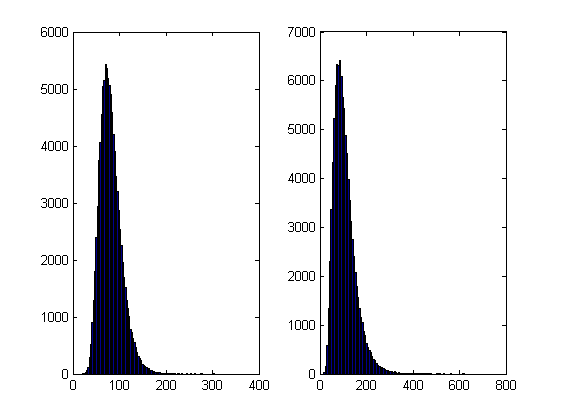
On my laptop, this code takes 10.82 seconds to run on average.  If you comment out the final two lines then it’ll take a little longer and will produce a histogram of the distribution of final prices.

Two correlated assets

I’m going to take this code and modify it in various ways to see how different techniques and technologies can make it run more quickly. Here is a list of everything I have done so far.

Vectorisation – removing loops to make code go faster

Now, the most obvious optimisation that we can do with code like this is to use vectorisation to get rid of that double loop. The cumprod command is the key to doing this and the resulting code looks as follows: optimised_corr1.m

%OPTIMISED_CORR1 - A pure-MATLAB optimised code that simulates two correlated assets

%% Correlated asset information
CurrentPrice = [78 102];       %Initial Prices of the two stocks
Corr = [1 0.4; 0.4 1];         %Correlation Matrix
T = 500;                       %Number of days to simulate = 2years = 500days
Div=[0.01 0.01];               %Dividend
Vol=[0.2 0.3];                 %Volatility

%% Market Information
r = 0.03;                      %Risk-free rate

%% Simulation parameters
n=100000;                       %Number of simulation
dt=1/250;                       %Time step (1year = 250days)

%% Define storages
SimulPrices=repmat(CurrentPrice,n,1);
CorrWiener = zeros(T-1,2,n);

%% Generating the paths of stock prices by Geometric Brownian Motion
UpperTriangle=chol(Corr);    %UpperTriangle Matrix by Cholesky decomposition

for i=1:n
     CorrWiener(:,:,i)=randn(T-1,2)*UpperTriangle;
end
Volr = repmat(Vol,[T-1,1,n]);
Divr = repmat(Div,[T-1,1,n]);

%% do simulation
sim = cumprod(exp((r-Divr-Volr.^2./2).*dt+Volr.*sqrt(dt).*CorrWiener));
%get just the final prices
SimulPrices = SimulPrices.*reshape(sim(end,:,:),2,n)';

%% Plot the distribution of final prices
% Comment this section out if doing timings
%subplot(1,2,1);hist(SimulPrices(:,1),100);
%subplot(1,2,2);hist(SimulPrices(:,2),100);

This code takes an average of 4.19 seconds to run on my laptop giving us a factor of 2.58 times speed up over the original.  This improvement in speed is not without its cost, however, and the price we have to pay is memory.  Let’s take a look at the amount of memory used by MATLAB after running these two versions. First, the original

>> clear all
>> memory
Maximum possible array:              13344 MB (1.399e+010 bytes) *
Memory available for all arrays:     13344 MB (1.399e+010 bytes) *
Memory used by MATLAB:                 553 MB (5.800e+008 bytes)
Physical Memory (RAM):                8106 MB (8.500e+009 bytes)

*  Limited by System Memory (physical + swap file) available.
>> original_corr
>> memory
Maximum possible array:              12579 MB (1.319e+010 bytes) *
Memory available for all arrays:     12579 MB (1.319e+010 bytes) *
Memory used by MATLAB:                1315 MB (1.379e+009 bytes)
Physical Memory (RAM):                8106 MB (8.500e+009 bytes)

*  Limited by System Memory (physical + swap file) available.

Now for the vectorised version

>> %now I clear the workspace and check that all memory has been recovered%
>> clear all
>> memory
Maximum possible array:              13343 MB (1.399e+010 bytes) *
Memory available for all arrays:     13343 MB (1.399e+010 bytes) *
Memory used by MATLAB:                 555 MB (5.818e+008 bytes)
Physical Memory (RAM):                8106 MB (8.500e+009 bytes)

*  Limited by System Memory (physical + swap file) available.
>> optimised_corr1
>> memory
Maximum possible array:              10297 MB (1.080e+010 bytes) *
Memory available for all arrays:     10297 MB (1.080e+010 bytes) *
Memory used by MATLAB:                3596 MB (3.770e+009 bytes)
Physical Memory (RAM):                8106 MB (8.500e+009 bytes)

*  Limited by System Memory (physical + swap file) available.

So, the original version used around 762Mb of RAM whereas the vectorised version used 3041Mb. If you don’t have enough memory then you may find that the vectorised version runs very slowly indeed!

Adding a loop to the vectorised code to make it go even faster!

Simple vectorisation improvements such as the one above are sometimes so effective that it can lead MATLAB programmers to have a pathological fear of loops. This fear is becoming increasingly unjustified thanks to the steady improvements in MATLAB’s Just In Time (JIT) compiler.  Discussing the details of MATLAB’s JIT is beyond the scope of these articles but the practical upshot is that you don’t need to be as frightened of loops as you used to.

In fact, it turns out that once you have finished vectorising your code, you may be able to make it go even faster by putting a loop back in (not necessarily thanks to the JIT though)! The following code takes an average of 3.42 seconds on my laptop bringing the total speed-up to a factor of 3.16 compared to the original.  The only difference is that I have added a loop over the variable ii to split up the cumprod calculation over groups of 125 at a time.

I have a confession: I have no real idea why this modification causes the code to go noticeably faster.  I do know that it uses a lot less memory; using the memory command, as I did above, I determined that it uses around 10Mb compared to 3041Mb of the original vectorised version.  You may be wondering why I set sub_size to be 125 since I could have chosen any divisor of 100000.  Well, I tried them all and it turned out that 125 was slightly faster than any other on my machine.  Maybe we are seeing some sort of CPU cache effect?  I just don’t know: optimised_corr2.m

%OPTIMISED_CORR2 - A pure-MATLAB optimised code that simulates two correlated assets
%% Correlated asset information
CurrentPrice = [78 102];       %Initial Prices of the two stocks
Corr = [1 0.4; 0.4 1];         %Correlation Matrix
T = 500;                       %Number of days to simulate = 2years = 500days
Div=[0.01 0.01];               %Dividend
Vol=[0.2 0.3];                 %Volatility

%% Market Information
r = 0.03;                      %Risk-free rate

%% Simulation parameters
n=100000;                       %Number of simulation
sub_size = 125;
dt=1/250;                       %Time step (1year = 250days)

%% Define storages
SimulPrices=repmat(CurrentPrice,n,1);
CorrWiener = zeros(T-1,2,sub_size);

%% Generating the paths of stock prices by Geometric Brownian Motion
UpperTriangle=chol(Corr);    %UpperTriangle Matrix by Cholesky decomposition
Volr = repmat(Vol,[T-1,1,sub_size]);
Divr = repmat(Div,[T-1,1,sub_size]);

for ii = 1:sub_size:n
   for i=1:sub_size
        CorrWiener(:,:,i)=randn(T-1,2)*UpperTriangle;
   end

   %% do simulation
   sim = cumprod(exp((r-Divr-Volr.^2./2).*dt+Volr.*sqrt(dt).*CorrWiener));
   %get just the final prices
   SimulPrices(ii:ii+sub_size-1,:) = SimulPrices(ii:ii+sub_size-1,:).*reshape(sim(end,:,:),2,sub_size)';
end
%% Plot the distribution of final prices
% Comment this section out if doing timings
%subplot(1,2,1);hist(SimulPrices(:,1),100);
%subplot(1,2,2);hist(SimulPrices(:,2),100);

Some things that might have worked (but didn’t)

  1. In general, functions are faster than scripts in MATLAB because MATLAB employs more aggressive optimisation techniques for functions.  In this case, however, it didn’t make any noticeable difference on my machine.  Try it out for yourself with optimised_corr3.m
  2. When generating the correlated random numbers, the above code performs lots of small matrix multiplications:
       for i=1:sub_size
            CorrWiener(:,:,i)=randn(T-1,2)*UpperTriangle;
       end

    It is often the case that you can get more flops out of a system by doing a single large matrix-matrix multiply than lots of little ones. So, we could do this instead:

    %Generate correlated random numbers
    %using one big multiplication
    randoms = randn(sub_size*(T-1),2);
    CorrWiener = randoms*UpperTriangle;
    CorrWiener = reshape(CorrWiener,(T-1),sub_size,2);
    CorrWiener = permute(CorrWiener,[1 3 2]);

    Sadly, however, any gains that we might have made by doing a single matrix-matrix multiply are lost when the resulting matrix is reshaped and permuted into the form needed for the rest of the code (on my machine at least).  Feel free to try for yourself using optimised_corr4.m – the input argument of which determines the sub_size.

Ask the audience

Can you do better using nothing but pure matlab (i.e. no mex, parallel computing toolbox, GPUs or other such trickery…they are for later articles)?  If so then feel free to contact me and let me know.

Acknowledgements

Thanks to Yong Woong Lee of the Manchester Business School as well as various employees at The Mathworks for useful discussions and advice.  Any mistakes that remain are all my own :)

License

All code listed in this article is licensed under the 3-clause BSD license.

The test laptop

  • Laptop model: Dell XPS L702X
  • CPU: Intel Core i7-2630QM @2Ghz software overclockable to 2.9Ghz. 4 physical cores but total 8 virtual cores due to Hyperthreading.
  • GPU: GeForce GT 555M with 144 CUDA Cores.  Graphics clock: 590Mhz.  Processor Clock:1180 Mhz. 3072 Mb DDR3 Memeory
  • RAM: 8 Gb
  • OS: Windows 7 Home Premium 64 bit.
  • MATLAB: 2011b

Next Time

In the second part of this series I look at how to run this code on the GPU using The Mathworks’ Parallel Computing Toolbox.

February 6th, 2012 | Categories: general math, Maple, math software, mathcad, mathematica, matlab, python, R | Tags:

My attention was recently drawn to a Google+ post by JerWei Zhang where he evaluates 2^3^4 in various packages and notes that they don’t always agree.  For example, in MATLAB 2010a we have 2^3^4 = 4096 which is equivalent to putting (2^3)^4 whereas Mathematica 8 gives 2^3^4 = 2417851639229258349412352 which is the same as putting 2^(3^4).  JerWei’s post gives many more examples including Excel, Python and Google and the result is always one of these two (although to varying degrees of precision).

What surprised me was the fact that they disagreed at all since I thought that the operator precendence rules were an agreed standard across all software packages.  In this case I’d always use brackets since _I_ am not sure what the correct interpretation of 2^3^4 should be but I would have taken it for granted that there is a standard somewhere and that all of the big hitters in the numerical world would adhere to it.

Looks like I was wrong!