June 2nd, 2012 | Categories: Month of Math Software | Tags:

Welcome to the slightly delayed May edition of A Month of Math Software.  The archives can be found at https://www.walkingrandomly.com/?cat=47 and if you have any news for next month then feel free to contact me.

Wolfram SystemModeler

Wolfram Research have released a new product called SystemModeler, a model based design and simulation tool that occupies the same space as products such as The Mathwork’s Simulink, Maplesoft’s Maplesim, and the free Scilab add-on, xcos.

Mathematical libraries

  • The Numerical Algorithms Group (NAG) released a new version of the commercial NAG Library for SMP and multicore.  This is a version of their Fortran library which includes a few hundred routines that have been optimised for multicore processors.  The latest release, Mark 23, adds an extra 116 routines (some of them have been written up in detail) bringing the total number of functions to 1704. A total of 337 have been parallelised to make use of multicore processors.  I played with this library when it was at Mark 22.
  • Version 1.2 of Magma, the linear algebra library for NVIDIA GPUs has been released. The OpenCL version, clMAGMA has also seen an update in version 0.2.

General Purpose Mathematics

  • Version 5.0 of Sage was released on 14th May; go to the changelog to see what’s new.  Sage is a superb free alternative to Mathematica, Maple or MATLAB based on the Python programming language and over 100 other open source projects.  If you’ve never heard of Sage, these Videos serve as a good introduction.
  • Version 5.27 of Maxima has been released.  Maxima is a free computer algebra system that’s available for all major operating systems and it is very capable.  Features include symbolic calculus, linear algebra, plotting and arbitrary precision arithmetic.  There is a post here on Walking Randomly on how to use it to plot direction fields for 1st order ODEs.
  • A new version of SMath Studio, the free Mathcad-like clone, is now available.  Version 0.94.4535 adds a couple of new features to a great program; Linux and Windows versions are available.
  • The Euler Math Toolbox (A free, MATLAB-like language) is now at version 15.6.  See http://euler.rene-grothmann.de/versions/version-15.html for the new stuff

Data Analysis

  • R-Studio, the fantastic free Integrated Development Environment (IDE) for the statistical programming language R has been updated to version 0.96.  New features include code-folding (click here for video), lots of new Sweave features (Sweave is a tool that allows to embed the R code for complete data analyses in latex documents) and more. See this blog post for all of the details.
  • Excelis have updated their commerical Interactive Data Language (IDL).  See what’s new in version 8.2 at http://www.exelisvis.com/ProductsServices/IDL/VersionUpdate.aspx I also recently learned of a free implementation of the IDL language — The GNU Data Language — which last saw a release in February of this year.
  • A new beta of NCL (NCAR Command Language) is now available.  NCL is a free interpreted language designed specifically for scientific data analysis and visualisation.  There is an extensive what’s new page which gives the details of Version 6.1 .0-beta.
  • The Perl Data Language (PDL) has seen a minor update to 2.4.11

Python

  • Numpy 1.6.2 has been released.  Numpy is the fundamental package for scientific computing with Python.  This is a bug-fix release with details available in the README.txt file

Mobile math software

May 13th, 2012 | Categories: Android, math software, matlab, Mobile Mathematics, programming | Tags:

The MATLAB language has become ubiquitous in many fields of applied mathematics such as linear algebra, differential equations, control systems and signal processing among many others.  MATLAB is a great tool but it also costs a lot!  If you are not a student then MATLAB is a very expensive piece of software.  For example, my own academic licensed copy with just 4 toolboxes cost more than the rather high powered laptop I use it on.  If I left academia then there would be no chance of me owning a copy unless I found an employer willing to stump up the cash for a commercial license.  Commercial licenses cost a LOT more than academic licenses.

Octave – The free alternative

The good news is that there is a free alternative to MATLAB in the form of Octave.  Octave attempts to be source compatible with MATLAB which means that, in many cases, your MATLAB code will run as-is on Octave.  Many of the undergraduate courses taught at my university (The University of Manchester) could be taught using Octave with little or no modification and I imagine that this would be the case elsewhere.  One area where Octave falls down is in the provision of toolboxes but this is improving thanks to the Octave-Forge project.

Addi – The beginnings of MATLAB/Octave on Android

As Dylan said The Times They Are a-Changin’ and there is an ever-increasing segment of world-society that are simply skipping over the PC and going straight to mobile devices for their computing needs.  It is possible to get your hands on a functional Android mobile phone or tablet for significantly less than the cost of a PC.   These cheap mobile devices may be a lot less powerful than even the cheapest of PCs but they are powerful enough for many purposes and are perfectly capable of outgunning Cray supercomputers from the past.

There is, however, no MATLAB for Android devices.  The best we have right now is in the form of Addi, a free Android app that makes use of JMathLib to provide a very scaled-back MATLAB-like experience.  Addi is the work of Corbin Champion, an android developer from Portland in the US, and he has much bigger plans for the future.

Full Octave/GNUPlot on Android with no caveats

Corbin is working on a full Octave and GNUPlot* port for Android.  He has already included a proof of concept in the latest release of Addi which includes an experimental Octave interpreter.  To go from this proof of concept to a fully developed Android port, however, is going to take a lot of work.  Corbin is up to the task but he would like our help.

[* – GNUPLot is used as the plotting engine for Octave and includes support for advanced 3D graphics]

Donate as little as $1 to help make this project possible

Corbin has launched a Kickstarter project in order to try to obtain funding for this project.  He freely admits that he’ll do the work whether or not it gets funded but will be able to devote much more of his time to the project if the funding request is successful.  After all, we all need to eat, even great sotware developers.

Although I have never met him, I believe in Corbin and strongly believe that he will deliver on his promise.  So much so that I have pledged $100 to the project out of my own pocket.

If, like me, you want to see a well-developed and supported version of Octave on Android then watch the video below and then head over to Corbin’s kickstarter page to get the full details of his proposal.  The minimum donation is only $1 and your money will only be taken if the full funding requirement is met.

Update (16th May 2012): The project (and this post) made it to Slashdot :)

May 10th, 2012 | Categories: Condor, Guest posts, programming | Tags:

A guest post by Ian Cottam (@iandavidcottam).

I have been a programmer for 40 years this month. I thought I would write a short essay on things I experienced over that time that went into the design of a relatively recent, small program: DropAndCompute. (The purpose and general evolution of that program were described in a blog entry here. Please just watch the video there if you are new to DropAndCompute.)

Once I had the idea for DropAndCompute –inspired equally by the complexity of Condor and the simplicity of Dropbox — I coded and tested it in about two days. (Typically, one bug lasted until it had a real user, but it was no big deal.) My colleague, Mark Whidby, later re-factored/re-coded it to better scale as it grew in popularity here at The University of Manchester. I expect Mark spent about two days on it too. The user interface and basic design did not change. (As the evolution blog discusses, we eventually made the use of Dropbox optional, but that does not detract from this tale.)

Physically dropping programs and their data:
In the early to mid 1970s as well as doing my own programming work I helped scientists in Liverpool to run their code. One approach we used to make them faster was to drop the deck of cards into the input well of a card reader which was remotely connected to the regional supercomputer centre at Manchester. (I never knew what the communication mechanism was – probably a wet string given the technology of the time.) A nearby line printer was similarly connected and our results could be picked up, usually the next day. DropAndCompute is a 21st century version of this activity, without the leg work and humping of large boxes of cards about.

That this approach was worth the effort was made obvious with one of the first card decks I ever submitted. We had been running the code on an ICL 1903A computer in Liverpool; Manchester had a CDC 6600 (hopefully my memory has not let me down – it did become a CDC 7600 at some stage). Running the code locally in Liverpool, with typical data, took around 55 CPU minutes. Dropping it into that card reader so that it automatically ran in Manchester resulted in the jaw dropping time of 4 CPU seconds. (I still had to wait overnight to pick up the results, something that resonates with today’s DropAndCompute users and Manchester’s Condor Pool, which is only large and powerful overnight.)

Capabilities:
Later, but still in the mid 1970s, I worked for Plessey on their System 250 high-reliability, multiprocessor system. It was the first commercial example of a capability architecture. With such there is no supervisor state or privileged code rings or similar. If you held the capability to do something (e.g. read, write or enter another code context) you could do it. If you didn’t hold the appropriate capability, you could not. The only tiny section of code in the System 250 that was special was where capabilities were generated. No one else could make them.

The server side of DropAndCompute generates capabilities to the user client side. They are implemented as zero length files whose information content is just in their names. For job 3159, you get 3159.kill, 3159.vacate and 3159.debug generated*. By dragging and dropping one or more of these zero length files (capabilities) onto the dropbox the remote lower level Condor command code is automatically executed. [* You could try to make your own capability, such as 9513.kill, but it won’t work.]

UNIX and Shell Glue Code:
My initial exposure to the UNIX tools philosophy in the late 1970s profoundly influenced me (and still does). In essence, it says that one should build new software by inventing ‘glue’ to stick existing components together. The UNIX Shell is often the language of choice for this, and was for me. DropAndCompute is a good example of where a little bit of glue produced a hopefully impressive synergy.

The Internet not The Web:
DropAndCompute uses the Internet (clearly). It is not a Web application. I only mention this as some younger programmers, who have grown up with the Web always being there, seem to think the best/only architecture to use for a software system design is one implemented through a web browser using web services. I am grateful to be able to remember pre-Web days, as much as I love what Tim Berners-Lee created for us.

Client-Server:
I’m not sure when I first became aware of client-server architecture. I know a famous computer scientist (the late David Wheeler*) once described it as simply the obvious way to implement software systems. For my part, I’m a believer in the less code the client side (user) needs to install the better (less to go wrong on strange environments one has no control over). In the case of DropAndCompute if the user had Dropbox, it was nothing to install, and just downloading Dropbox if they didn’t.
[* As well as being a co-inventer of the subroutine, David Wheeler led the team that designed  the first operational capability-based computer: the Cambridge University CAP.]

Rosetta – Software as Magic:
Around a decade ago I worked for Transitive, a University of Manchester spin-out, and the company that produced Rosetta for Apple. With apologies to Arthur C Clarke: all great software appears to be magic to the user. The simpler the user interface, often the more complex the underlying system is to implement the magic. This is true, for example, for Apple iOS and OS X and for Dropbox (simpler, and yet I would bet that it is internally more complex, than its many competitors). One small part of OS X I helped with is Rosetta (or was, as Apple dropped it from the Lion 10.7 release of OS X). Rosetta dynamically (i.e. on-the-fly) translates PowerPC applications into Intel x86 code. There is no noticeable user interface: you double click your desired application, like any other, and, if needed, Rosetta is invoked to do its job in the background.

I have read many interesting web based discussions about Rosetta, several say, or imply, that it is a relatively simple piece of software: nothing could be further from the truth. It’s likely still a commercial secret how it works, but if it were simple, Apple’s transition to Intel would likely have been a disaster. It took a lot of smart people a long time to make the magic appear that simple.

I tried to keep DropAndCompute’s interface to the user as simple as possible, even where it added some complexity to its implementation. The National Grid Service in the UK did their own version of DropAndCompute, but, for my taste, added too many bells and whistles.

In Conclusion:
I hope this brief essay has been of interest and given some insight into how many years of software/system design experience come to be applied, even to small software systems, both consciously and subconsciously, and always, hopefully, with good taste. Hide complexity, keep it simple for the user, make them think it is simply magic!

April 30th, 2012 | Categories: math software, Month of Math Software | Tags:

Welcome to the 16th Month of Math Software where I take a tour around the news and new releases in the world of mathematical software.  Thanks so much to this month’s contributors without whom I would really struggle to put this newsletter together.  As always, the archives can be found at https://www.walkingrandomly.com/?cat=47 and if you have any news for next month then there are numerous ways in which to contact me.

Google Summer of Code

The world of Open Source mathematical software stands to gain heavily from this year’s Google Summer of Code.  Projects include an attempt to port Scilab to Android, improvements to symbolic expressions in Sage, aerospace and signal processing blocksets for Xcos, Just In Time compilation for Octave and many many more.  See http://www.google-melange.com/gsoc/projects/list/google/gsoc2012 for the full list of projects.

Mathematics on GP-GPUs (General Purpose – Graphical Processing Units)

Python

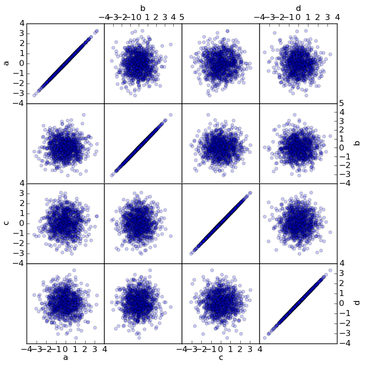
  • Version 0.7.3 of Pandas has been released. According to the website, Pandas aims to become the most powerful and flexible open source data analysis / manipulation tool available in any language  Go to http://pandas.pydata.org/pandas-docs/dev/whatsnew.html to see what’s new.

pandas scatter matrix

  • Version 0.4 of mathics has been released. ‘Mathics is a free, general-purpose online computer algebra system featuring Mathematica-compatible syntax and functions.’ The Mathics project is looking for more developers, contact Jan Pöschko if you’re interested.

Sparse Linear Systems

  • PaStiX (http://pastix.gforge.inria.fr) is a scientific library that provides a high performance parallel solver for very large sparse linear systems based on direct methods and version 5.2 was released this month.

MATLAB add-ons

  • Version 2.1 of LAMG (Lean Algebraic Multigrid) was released this month.  LAMG is a fast graph Laplacian solver. It can solve Ax=b in O(m) time and storage, where A is the graph Laplacian of a weighted undirected graph with m edges.  Free MATLAB code download: http://code.google.com/p/lamg/
  • Version 4.2 of Chebfun is now available from http://www.maths.ox.ac.uk/chebfun/. Chebfun is an open-source system written in Matlab that overloads Matlab’s operations for vectors and matrices to analogous operations for functions and operators.  For an overview of what Chebfun can do, take a look at the collection of more than 100 Chebfun Examples posted at http://www.maths.ox.ac.uk/chebfun/examples/

LAPACK – The standard for Linear Algebra

SPSS In decline?

  • According to this blog, SPSS is in steep decline with the open source language, R, taking up the slack.  This blog, however, isn’t so sure!
April 28th, 2012 | Categories: matlab, Microsoft | Tags:

A MATLAB user at Manchester recently sent me some code and data as part of a Condor support request but Outlook helpfully blocked access to his .mat files deeming them potentially unsafe!  It seems that Microsoft Outlook is afraid of matrices.

I guess that the easiest way to proceed would be to ask him to resend his stuff as a .zip file but that would slow down the support query.  I just wanted to stop Outlook being quite so paranoid and let me have access to those scary matrices.

The fix is a registry edit (very user-friendly of Microsoft right?) so please don’t proceed if you are not comfortable editing the registry.  The registry controls numerous aspects of the Windows operating system along with many of the applications you have installed.  If it had a map then there would be huge areas labelled ‘Here be Dragons.’ Corrupting the registry could lead to an unusable operating system. So, the following is offered without warranty on a ‘it works for me’ basis.

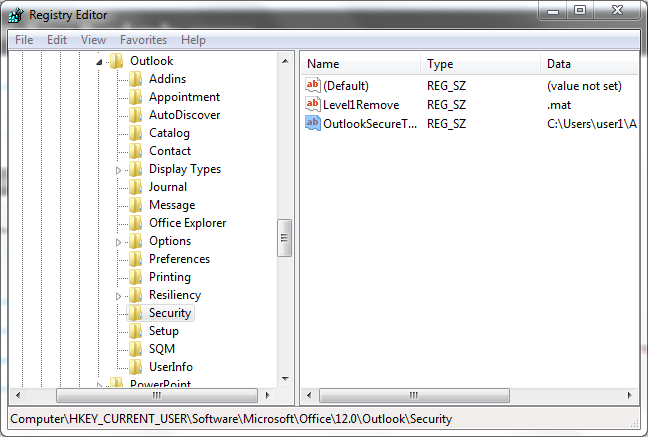
Open up regedit and navigate to the following  (I’m using Windows 7 and Outlook 2007, location and procedure may be different for different environments).

HKEY_CURRENT_USER\Software\Microsoft\Office\12.0\Outlook\Security

Once you have the above highlighted, move your mouse to the right hand pane of regedit, and right click to get a context menu.  Click on New->String Value and create a key-value pair with

  • Name Level1Remove
  • Value Data .mat

If you want to unblock more than just .mat then you can separate them with semicolons so .mat;.exe for example.  When you’ve finished, this part of the registry should look like the screenshot below
allowing .mat files in Outlook

April 26th, 2012 | Categories: GPU, OpenCL, parallel programming, programming | Tags:

Intel have just released their OpenCL Software Development Kit (SDK) for Intel processors.  The good news is that this version targets the on-die GPU as well as the CPU allowing truly heterogeneous programming.  The bad news is that the GPU goodness is for 3rd Generation ‘Ivy Bridge‘ Processors only– us backward Sandy Bridge users have been left in the cold :(

A quick scan through the release notes reveals the following:-

  • OpenCL access to the on-die GPU part is currently for Windows only. Linux users only have CPU support at the moment.
  • No access to the GPU part of Sandy Bridge Processors via this implementation.
  • The GPU part has single precision only (I guess we’ll see many more mixed-precision algorithms from now on)

I don’t have access to an Ivy Bridge processor and so can’t have a play but I’m looking forward to seeing how much performance OpenCL programmers can squeeze out of this new implementation.

Other WalkingRandomly posts on GPU computing

April 25th, 2012 | Categories: math software, matlab | Tags:

MATLAB uses the Intel Math Kernel Library (MKL) behind the scenes to perform many linear algebra operations. I wondered what version of the MKL was being used by MATLAB 2012a on my 64 bit Windows machine. The most straightforward way to determine this is to simply ask MATLAB:

>> version -lapack
ans =
Intel(R) Math Kernel Library Version 10.3.5 Product Build 20110720 for Intel(R) 64 architecture applications
Linear Algebra PACKage Version 3.3.1

>> version -blas
ans =
Intel(R) Math Kernel Library Version 10.3.5 Product Build 20110720 for Intel(R) 64 architecture applications

Thanks to The Mathworks technical support team for this information.

April 13th, 2012 | Categories: general math, just for fun | Tags:

I work in a beautiful old building at The University of Manchester called The Sackville Street Building.  Yesterday, I took part in a very interesting historical tour of the building and was astonished at the amount of beautiful things that I had never noticed before and yet walk past every day.

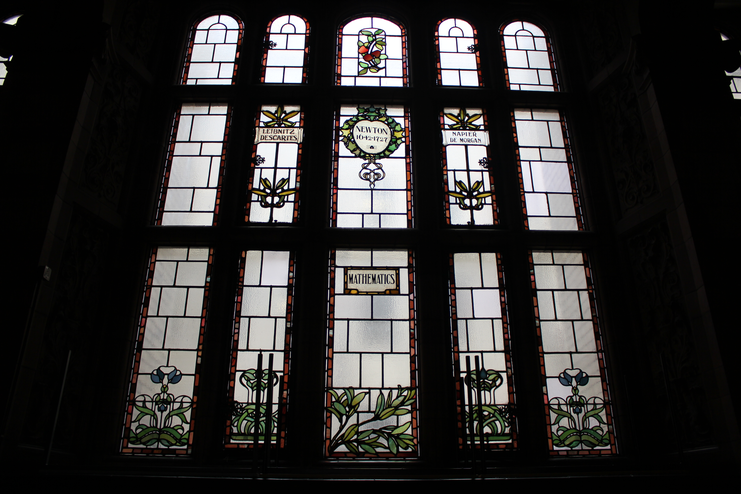
For example, I was delighted to discover that one of the stained glass windows in the great hall was themed around mathematics (thanks to Samantha Bradey for the original image which I’ve heavily compressed for this blog post)

Mathematics stained glass

While on the tour I posted a quick snap of the above window to twitter using my mobile phone and received some nice feedback along with a  few pictures of other mathematical windows.  It turns out that Manchester’s Nick Higham has a close up of the above window for example.  Also, Kit Yates tweeted about several mathematical windows in Caius College, Cambridge, one of which is below (showing images related to Venn and Fisher).

Caius College stained glass

Do you know of any other examples of mathematics in stained glass?  Feel free to contact me and tell me all about it.

April 11th, 2012 | Categories: matlab, NAG Library | Tags:

I recently installed MATLAB 2012a on a Windows machine along with a certain set of standard Mathworks toolboxes.  In addition, I also installed the excellent NAG Toolbox for MATLAB which is standard practice at my University.

I later realised that I had not installed all of the Mathworks toolboxes I needed so I fired up the MATLAB installer again and asked it to add the missing toolboxes.  This extra installation never completed, however, and gave me the error message

The application encountered an unexpected error and needed to close. You may want to try
re-installing your product(s). More infomation can be found at C:\path_to_a_log_file

I took a look at the log file mentioned which revealed a huge java error that began with

 java.util.concurrent.ExecutionException: java.lang.StringIndexOutOfBoundsException:
    String index out of range: -2
 at java.util.concurrent.FutureTask$Sync.innerGet(Unknown Source)
 at java.util.concurrent.FutureTask.get(Unknown Source)
 at javax.swing.SwingWorker.get(Unknown Source)
 at com.mathworks.wizard.worker.WorkerImpl.done(WorkerImpl.java:33)
 at javax.swing.SwingWorker$5.run(Unknown Source)

A little mucking around revealed that the installer was unhappy with the pathdef.m file at C:\Program Files\MATLAB\R2012a\toolbox\local\pathdef.m

The installer for the NAG Toolbox modifies this file by adding the line

'C:\Program Files\MATLAB\R2012a\toolbox\NAG\mex.w64;' ...

near the beginning and the lines

'C:\Program Files\MATLAB\R2012a\help\toolbox\NAG;' ...
'C:\Program Files\MATLAB\R2012a\help\toolbox\NAGToolboxDemos;' ...

Near the end and it seems that the MATLAB installer really doesn’t like this. So, what you do is create a copy of this pathdef.m file (pathdef.m.old for example) and then remove the non-mathworks lines in pathdef.m. Now you can install the extra Mathworks toolboxes you want.  Once the installer has finished its work you can re-add the non-mathworks lines back into pathdef.m using your copy as a guide.

I’ll be informing both NAG and The Mathworks about this particular issue but wanted to get this post out there as soon as possible to provide a workaround since at least one other person has hit this problem at my University and I doubt that he will be the last (It’s also going to make SCCM deployment of MATLAB a pain but that’s another story).

Update

The Mathworks technical support have sent me a better workaround than the one detailed above. What you need to do is to change

'C:\Program Files\MATLAB\R2012a\toolbox\NAG\mex.w64;' ...

to

'C:\Program Files\MATLAB\R2012a\toolbox\NAG\mex.w64;', ...

The Mathworks installer is unhappy about the missing comma.

April 2nd, 2012 | Categories: math software, Month of Math Software | Tags:

Welcome to this month’s MMS which includes the usual mix of commercial and open source software spanning across multiple disciplines.  Last month’s edition is here and the archive of all previous editions is at https://www.walkingrandomly.com/?cat=47.  Thanks so much for all of the contributors this month without whom these articles would be significantly more difficult to write.  As always, if you have some mathematical software news then feel free to contact me.

General purpose commercial packages

  • Maple 16 was released in March and according to Maplesoft it has over 4500 additions and improvements compared to the previous version.  Maple is very strong in polynomial arithmetic and Maplesoft have released benchmarks showing how Maple 16 is hundreds of times faster than Mathematica 8 in this area.  For example, multiplication of two dense polynomials in 3 variables, each of degree 30 takes 110 seconds in Mathematica 8 but only 0.52 seconds in Maple 16 according to these new benchmarks.
  • MATLAB version 2012a was also released in March with the usual batch of improvements and updates.  One of the highlights for me is the fact that The Mathworks now offer the MATLAB Compiler Runtime for free download, significantly simplifying the deployment of compiled applications.
  • Version 2.18-5 of Magma, the commerical computer algebra system specializing in number theory, has been released.  Click here for the v2.18-5 changelog

Mathematical Open Source and Freeware

3D Bar Plot created using Euler Math ToolboxAn interactive shell for the GNU Scientific Library

Python takes on R with pandas

  • The Python Data Analysis library, pandas, is designed to help Python programmers perform in depth data analysis projects without having to resort to R.  Version 0.7.2 was released in March and you can see what’s new at http://pandas.pydata.org/pandas-docs/dev/whatsnew.html.  Thanks to Tom Brander for the heads up on this one.

Vital statistics

Finite Differences and Elements

  • “The Chombo software package provides a set of tools for implementing finite difference methods for the solution of partial differential equations on block-structured adaptively refined rectangular grids with embedded boundaries. Both elliptic and time-dependent modules are included. Support for parallel platforms and standardized self-describing file formats are included.”  Version 3.1 was released in March…get it at https://commons.lbl.gov/display/chombo/Chombo+Download+Page
  • The FEniCS book has been published and is available online and in print. The online version is available at http://dx.doi.org/10.1007/978-3-642-23099-8 and hard copies can be ordered from Springer (http://tinyurl.com/3ueq9hk) or book sellers.  The FEniCS Project is a collection of free software with an extensive list of features for automated, efficient solution of differential equations.

Eigenvalues everywhere

The following two packages were recently announced on the Numerical Analysis Digest.

  • “The FEAST solver package is a free high-performance numerical library for solving the standard or generalized eigenvalue problem, and obtaining all the eigenvalues and eigenvectors within a given search interval.  The FEAST algorithm takes its inspiration from the density-matrix representation and contour integration technique in quantum mechanics.”  Download version 2.0 from http://www.ecs.umass.edu/~polizzi/feast/download.htm
  • “ELPA” is a new direct eigensolver library that addresses scalability and performance, especially for parallel applications. ELPA builds on the ScaLAPACK type interfaces that are often used in existing implementations, but key parts of the eigenvalue solution are then replaced with ELPA’s own routines in an easy-to-use way. The library is particularly useful when a substantial part of all eigenvalue / eigenvector pairs is needed. Released under an LGPL-like license, ELPA has been successfully tested for matrix sizes up to 680,000 and with up to 294,000 CPU cores on a BlueGene/P system.”  A hybrid version (OpemMP and MPI) was released in March. http://elpa.rzg.mpg.de/

From the blogs