August 22nd, 2012 | Categories: walking randomly | Tags:

Someone recently asked me if WalkingRandomly.com had a facebook page.  Since it wasn’t much effort to create one, I have now done so.  I have no idea if this will be of any use to anyone but a first stab at it is at http://www.facebook.com/Walkingrandomly 

Now I have to decide what to do with it. Does anyone have any thoughts on a blog such as this having its own facebook profile?  Is it a good idea?  Will anyone make use of it or is it just pointless?

August 21st, 2012 | Categories: applications | Tags:

I work for a very large UK University and am part of a team who is responsible for the network licenses of dozens of software applications serving thousands of clients.  Many of these licenses need to be replaced annually.  From a technical point of view this is usually fairly trivial but there are various management and administrative considerations that need to be made to ensure that user-side disruption is kept as low as possible.

Each software vendor has its own process for managing the license renewal process..some of them do it very well and some of them seem to work to make our life as difficult as possible but there is one problem that is shared by many software applications.

In a misguided attempt to be helpful to the user, many network licensed applications will display a launch-time message if the network license is set to expire ‘soon’ (where ‘soon’ might be as much as 90 days in the future’) .  The user sees something like

‘Your license for this software will expire in X days.  Please contact your administrator for more information’

Can you guess what happens when several hundred users see that message?  Yep, we get snowed under in panic queries for a ‘problem’ that does not exist.  The license upgrade is scheduled and will happen behind the scenes without the user ever needing to know anything about it.

So..to all software vendors whose applications do this for network licenses….PLEASE SHUT UP!

August 20th, 2012 | Categories: walking randomly | Tags:

My first post on WalkingRandomly was on 20th August 2007 and, to be honest, I had no idea what I was going to write about or if I would keep at it; I certainly didn’t think that I would still be going strong 5 years later.  Although I love to write, there is one reason why I keep on pounding out the posts here…you!

To all commenters, twitter followers, emailers and anyone else who has contacted me over the last 5 years regarding this blog….THANK YOU!  Without you, I would have given up years ago because no one wants to write reams of stuff that doesn’t get read.

There are various things one could write about for a post like this.  Maybe I could post reader statistics for example or discuss what I’ve got out of blogging over the last few years.  Alternatively, I could go down the route of posting links to some of the posts I’m most proud of (or otherwise!).  I considered all these things but realised that what was most important to me was just to say thank you to all of you.

Thanks!

August 14th, 2012 | Categories: Julia, programming | Tags:

I first mentioned Julia, a new language for high performance scientific computing, back in the February edition of a Month of Math software and it certainly hasn’t stood still since then.  A WalkingRandomly reader, Ohad, recently contacted me to tell me about a forum post announcing some Julia speed improvements.

Julia has a set of micro-benchmarks and the slowest of them is now only two times slower than the equivalent in C.  That’s compiled language performance with an easy to use scripting language.  Astonishingly, Julia is faster than gfortran in a couple of instances.  Nice work!

Comparison times between Julia and other scientific scripting languages (MATLAB, Python and R for instance) for these micro-benchmarks are posted on Julia’s website.  The Julia team have included the full benchmark source code used for all languages so if you are an expert in one of them, why not take a look at how they have represented your language and see what you think?

Let me know if you’ve used Julia at all, I’m interested in what people think of it.

August 13th, 2012 | Categories: math software, matlab, programming | Tags:

Someone recently contacted me complaining that MATLAB could not do a QR factorisation of a variable precision arithmetic matrix.  Double precision matrices work fine of course:

>> A=[2 1 3;-1 0 7; 0 -1 -1];
>> [Q R]=qr(A)

Q =
   -0.8944   -0.1826    0.4082
    0.4472   -0.3651    0.8165
         0    0.9129    0.4082

R =
   -2.2361   -0.8944    0.4472
         0   -1.0954   -4.0166
         0         0    6.5320

Variable precision matrices do not (I’m using MATLAB 2012a and the symbolic toolbox here).

>> a=vpa([2 1 3;-1 0 7; 0 -1 -1]);
>> [Q R]=qr(a)
Undefined function 'qr' for input arguments of type 'sym'.

It turns out that MATLAB and the symbolic toolbox CAN do variable precision QR factorisation….it’s just hidden a bit. The following very simple function, vpa_qr.m, shows how to get at it

function [ q,r ] = vpa_qr( x )
result = feval(symengine,'linalg::factorQR',x);
q=result(1);
r=result(2);
end

Let’s see how that does

>> a=vpa([2 1 3;-1 0 7; 0 -1 -1]);
>> [Q R]=vpa_qr(a);

I’ve suppressed the output because it’s so large but it has definitely worked. Let’s take a look at the first element of Q for example

>> Q(1)

ans =
0.89442719099991587856366946749251

Which is correct to the default number of variable precision digits, 32.  Of course we could change this to anything we like using the digits function.

August 10th, 2012 | Categories: Linux | Tags:

I recently installed Ubuntu 12.04 on my laptop.  I gave Unity a chance for a few days just in case it had improved since I last used it but still found it unusable.  The following tweaks made Ubuntu usable again (for me at least).

That was pretty much it and I’m very happy with the result.  Do you use Ubuntu?  If so, are there any tweaks that you simply must make to the default setup before you feel that it’s usable for you?

August 8th, 2012 | Categories: math software, matlab | Tags:

The Mathworks sell dozens of toolboxes for MATLAB but they are not the only ones doing it.  Many 3rd party vendors also sell MATLAB toolboxes and many of them are of extremely high quality.  Here are some of my favourites

  • The NAG Toolbox for MATLAB – Over 1500 high quality numerical routines from the Numerical Algorithms Group.  Contains local and global optimisation, statistics, finance, wavelets, curve fitting, special functions and much much more. Superb!
  • AccelerEyes Jacket – Very fast and comprehensive GPU computing toolbox for MATLAB.  I’ve used it a lot.
  • Multi-precision toolbox for MATLAB – A colleague at Manchester recently told me about this one as his group uses it a lot in their research.  I’ve yet to play with it but it looks great.

Which commercial, 3rd party toolboxes do you use/rate and why?

If you like this list, you may also like my list of high quality, free MATLAB toolboxes

August 5th, 2012 | Categories: Month of Math Software | Tags:

Welcome to the slightly delayed July 2012 edition of A Month of Math Software where I take a look at recent events in the world of commercial and open source mathematical software. Feel free to contact me if you have news that you’d like including in next month’s edition.

Mark 23 of the NAG Toolbox for MATLAB

The latest version of my favourite MATLAB Toolbox has been released. Mark 23 of the NAG (Numerical Algorithms Group) Toolbox for MATLAB includes lots of new stuff in areas such as global optimisation, wavelet transforms, option pricing formulae, weighted nearest correlation matrices, curve and surface fitting and loads more.  NAG have also thrown in a lot of usability improvements for good measure.

The NAG Toolbox for MATLAB is essentially a MATLAB interface to NAG’s highly regarded Fortran library and contains over 1500 numerical routines.   My employer, The University of Manchester, has a full site license for the NAG Toolbox along with several other NAG products and they are used a lot.

I’ve written about old versions of the NAG toolbox several times including:

Spreadsheets that aren’t Excel

General purpose mathematics

  • Version 5.2 of Sage was released on 25th July. Sage is one of the best open-source mathematical packages available and is based on Python.  See what’s new by reading the release annoucement.  Earlier this month, I reported on a new interactive mathematics website based on Sage.
  • Smath Studio is a superb free clone of PTC’s Mathcad and it’s recently been updated to verision 0.95.4594.   One exciting piece of news is that the developer is working on an Android version!
  • Numeric Javascript is now at version 1.1.8.  There is probably new stuff but I have no idea what it is as I can’t find a changelog.  Looks good though!
  • Version 17 of the free Euler Math Toolbox is now available with previews of version 18 already in the works (below).

Euler Math Toolbox

Python

  • Version 0.8.1 of pandas, The Python Data Analysis Library, has been released.  See what’s new at http://pandas.pydata.org/pandas-docs/stable/whatsnew.html
  • A release candidate for SciPy 0.11 is now available and includes lots of neat stuff.  The optimisation section seems to have had a major overhaul for example.  Note that this is not the final release of 0.11 and so some bugs may be lingering.
July 27th, 2012 | Categories: games, just for fun, retro computers | Tags:

One of my hobbies is retro video games and tonight’s opening ceremony for the 2012 Olympics inspired me to take a look at Olympic video games over my lifetime.  Where games were released on multiple platforms I’ve simply chosen the one that was most relevant to me.

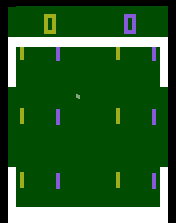
Video Olympics (Atari VCS2600, 1977)
Video Olympics - Atari 2600

Released in the year of my birth, the Atari VCS-2600 holds a special place in my heart.  The hardware was incredibly primitive and yet some of the games were surprisingly playable.  I must have spent weeks of my childhood playing Combat for instance.  Sadly,Video Olympics is one of the less playable games for the 2600 and should really be renamed ‘Variations on the theme of Pong.’

Hyper Sports (Arcade, 1984)

One of my abiding memories of the early 80s was spending Sunday afternoons in the children’s room of our village’s local pub.  This particular village pub was a geek child’s paradise as the kids room included up to 3 arcade games at any one time.  My brother and I would be given 20p each to play on these games, a sum of money that would be expected to last us at least an hour, while dad enjoyed a quiet pint in the bar.

I remember Konami’s Hyper Sports very clearly and the youtube above brings back a flood of memories for me.  Hyper Sports was released in time for the 1984 Los Angeles  Olympics and was the sequel to Konami’s superb Track and Field.

Micro Olympics (BBC Micro, 1984)

If you had walked into any UK primary school in the early 80s you’d have found a BBC Micro, an 8 bit computer developed by Acorn Computers (the guys who went on to develop the ARM processor used in the vast majority of mobile devices).  My primary school had exactly one of these high powered beasts and each pupil only got a few minutes on it a month on average.  I remember that my dad had a chat with the head master though and scored me a lot of extra time on it.  As long as I didn’t make any noise whatsoever, I could use the computer just outside the headmasters office for an hour after school and I used the time to work through my collection of Marshall Cavendish Input magazines.  Happy days.

The BBC wasn’t known for its games however.  Micro Olympics was rubbish!

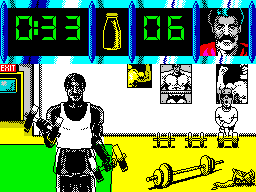
Daley Thompson’s Olympic Challenge (Sinclair Spectrum, 1988)
Olympic Challenge

Ahhh the humble speccy— Oh how I loved thee!  The spectrum was my first ‘proper’ computer and I received it for my 8th birthday.  All I wanted to do was play games but my father insisted that I also learn how to program it and so I probably owe my career to dear old dad and Sinclair’s 48K wonder.

Released in time for the 1988 Seoul Olympics, Daley Thompson’s Olympic Challenge was a joystick waggler pure and simple.  The game included several events: 100 metres, Long Jump, Shot Putt, High Jump and 400 metres, 110 metres Hurdles, Discus, Pole Vault, Javelin and 1500 metres but gameplay consisted of nothing more than frantically waggling your joystick side to side and occasionally pressing the fire button.

Olympic Gold (Sega MegaDrive, 1992)

I remember reading articles that previewed Sega’s megadrive.  Back then its power seemed nothing short of astonishing but, sadly, I didn’t have one.  One of my friends, however, did have one and many a happy hour was spent over at his house playing Mortal Kombat and Sonic the Hedgehog.

Olympic gold was the first officially licensed Olympic video game and was released in time for the Barcelona Olympics.  Although the graphics are much better than older games, the game mechanic is essentially exactly the same, mash buttons as fast as you can.

1996 and beyond

By the time the 1996 Atlanta games came around, I had better things to do than play video games.  That summer was my last before starting my undergraduate studies in theoretical physics.  Many Olympic video games have since been released of course but I haven’t played them and neither do I want to.

So, I’ll hand over to The Complete History of Official Olympic Video Games which picks up where I left off.

July 23rd, 2012 | Categories: Financial Math, matlab, NAG Library, programming | Tags:

A MATLAB user at Manchester University contacted me recently asking about Black-Scholes option pricing.  The MATLAB Financial Toolbox has a range of functions that can calculate Black-Scholes put and call option prices along with several of the sensitivities (or ‘greeks‘) such as blsprice, blsdelta and so on.

The user’s problem is that we don’t have any site-wide licenses for the Financial Toolbox.  We do, however, have a full site license for the NAG Toolbox for MATLAB which has a nice set of option pricing routines.  Even though they calculate the same things, NAG Toolbox option pricing functions look very different to the Financial Toolbox ones and so I felt that a Rosetta Stone type article might be useful.

For Black-Scholes option pricing, there are three main differences between the two systems:

  1. The Financial Toolbox has separate functions for calculating the option price and each greek (e.g. blsprice, blsgamma, blsdelta etc) whereas NAG calculates the price and all greeks simultaneously with a single function call.
  2. Where appropriate, The MATLAB functions calculate Put and Call values with one function call whereas with NAG you need to explicitly specify Call or Put.
  3. NAG calculates more greeks than MATLAB.

The following code example pretty much says it all.  Any variable calculated with the NAG Toolbox is prefixed NAG_ whereas anything calculated with the financial toolbox is prefixed MW_.  When I developed this, I was using MATLAB 2012a with NAG Toolbox Mark 22.

%Input parameters for both NAG and MATLAB.
Price=50;
Strike=40;
Rate=0.1;
Time=0.25;
Volatility=0.3;
Yield=0;

%calculate all greeks for a put using NAG
[NAG_Put, NAG_PutDelta, NAG_Gamma, NAG_Vega, NAG_PutTheta, NAG_PutRho, NAG_PutCrho, NAG_PutVanna,...
NAG_PutCharm, NAG_PutSpeed, NAG_PutColour, NAG_PutZomma,NAG_PutVomma, ifail] =...
 s30ab('p', Strike, Price, Time, Volatility, Rate, Yield);

%calculate all greeks for a Call using NAG
[NAG_Call, NAG_CallDelta, NAG_Gamma, NAG_Vega, NAG_CallTheta, NAG_CallRho, NAG_CallCrho, NAG_CallVanna,...
 NAG_CallCharm, NAG_CallSpeed, NAG_CallColour,NAG_CallZomma, NAG_CallVomma, ifail] = ...
s30ab('c', Strike, Price, Time, Volatility, Rate, Yield);

%Calculate the Elasticity (Lambda)
NAG_CallLambda = Price/NAG_Call*NAG_CallDelta;
NAG_PutLambda = Price/NAG_Put*NAG_PutDelta;

%Calculate the same set of prices and greeks using the MATLAB Finance Toolbox
[MW_Call, MW_Put] = blsprice(Price, Strike, Rate, Time, Volatility, Yield);
[MW_CallDelta, MW_PutDelta] = blsdelta(Price, Strike, Rate, Time, Volatility, Yield);
MW_Gamma = blsgamma(Price, Strike, Rate, Time, Volatility, Yield);
MW_Vega = blsvega(Price, Strike, Rate, Time, Volatility, Yield);
[MW_CallTheta, MW_PutTheta] = blstheta(Price, Strike, Rate, Time,Volatility, Yield);
[MW_CallRho, MW_PutRho]= blsrho(Price, Strike, Rate, Time, Volatility,Yield);
[MW_CallLambda,MW_PutLambda]=blslambda(Price, Strike, Rate, Time, Volatility,Yield);

Note that NAG doesn’t output the elasticity (Lambda) directly but it is trivial to obtain it using values that it does output. Also note that as far as I can tell, NAG outputs more Greeks than the Financial Toolbox does.

I’m not going to show the entire output of the above program because there are a lot of numbers.  However, here are the Put values as calculated by NAG shown to 4 decimal places. I have checked and they agree with the Financial Toolbox to within numerical noise.

NAG_Put =0.1350
NAG_PutDelta =-0.0419
NAG_PutLambda =-15.5066
NAG_Gamma =0.0119
NAG_Vega =2.2361
NAG_PutTheta =-1.1187
NAG_PutRho =-0.5572
NAG_PutCrho = -0.5235
NAG_PutVanna =-0.4709
NAG_PutCharm =0.2229
NAG_PutSpeed =-0.0030
NAG_PutColour =-0.0275
NAG_PutZomma =0.0688
NAG_PutVomma =20.3560