April 4th, 2013 | Categories: The internet, walking randomly | Tags:

When I first started this blog, there were only really two methods by which readers could keep up with new content – by subscribing to the RSS feed or by regularly dropping by the site to see what’s new. Since then readers have steadily been requesting other ways to follow the blog and, for the most part, I have obliged.  Here’s a list of current methods:

  • Subscribe to the RSS feed
  • Follow me on Twitter – I post every WR article to my twitter feed along with whatever else I find interesting. Twitter is also a great way of contacting me and is the social media platform on which I am most active.
  • WalkingRandomly on Facebook – A small following compared to the other channels but useful to some it seems.
  • Drop by the site whenever the mood strikes you
April 3rd, 2013 | Categories: Month of Math Software | Tags:

Welcome to the latest edition of A Month of Math Software where I look back over the last month and report on all that is new and shiny in the world of mathematical software.  I’ve recently restarted work after the Easter break and so it seems fitting that I offer you all Easter Eggs courtesy of Lijia Yu and R.  Enjoy!

General purpose mathematical systems

MATLAB add-ons

  • The multiprecision MATLAB toolbox from Advanpix has been upgraded to version 3.4.3.3431 with the addition of multidimensional arrays.
  • The superb, free chebfun project has now been extended to 2 dimensions with the release of chebfun2.

GPU accelerated computation

Statistics and visualisation 

Finite elements

  • Version 7.3 of deal.II is now available.  deal.II is a C++ program library targeted at the computational solution of partial differential equations using adaptive finite elements.


March 25th, 2013 | Categories: mathematica | Tags:

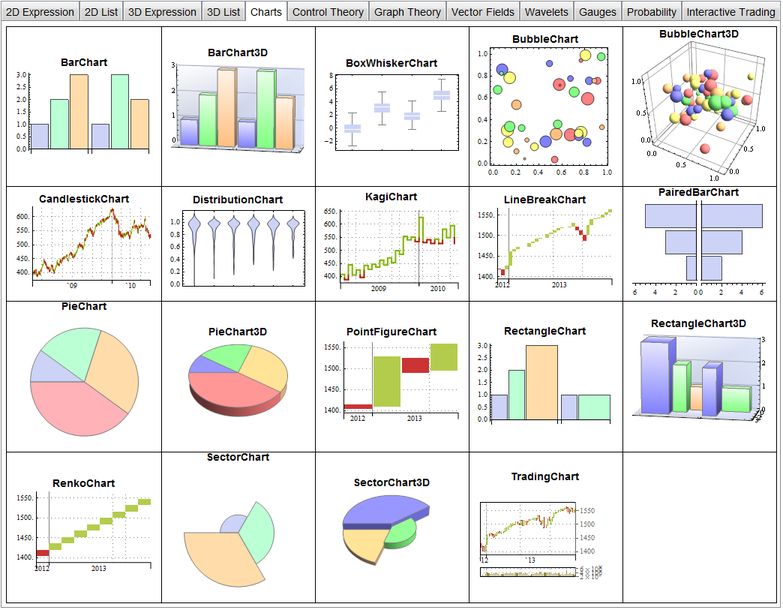
I’m working on a presentation involving Mathematica 9 at the moment and found myself wanting a gallery of all built-in plots using default settings.  Since I couldn’t find such a gallery, I made one myself.  The notebook is available here and includes 99 built-in plots, charts and gauges generated using default settings.  If you hover your mouse over one the plots in the Mathematica notebook, it will display a ToolTip showing usage notes for the function that generated it.

The gallery only includes functions that are fully integrated with Mathematica so doesn’t include things from add-on packages such as StatisticalPlots.

A screenshot of the gallery is below.  I haven’t made an in-browser interactive version due to size.

Mathematica 9 charts

March 15th, 2013 | Categories: The internet | Tags:

Google Reader has been a part of my life for several years now, forming the basis of my news reading habits.  Barely a day goes by that I don’t use it via my Android phone, iPad or the web and I have dozens of feeds effortlessly synced across all platforms.  It is, along with Dropbox, one of the most useful cloud services I have signed up for…and now its gone.

I guess I shouldn’t complain too much–after all it is a free service just like Twitter, Facebook, Evernote, Dropbox, Gmail, etc and so Google has every right to yank it away from me if that’s what they want to do.  What the cloud giveth, the cloud taketh away and all that.

What if your favourite cloud-based service was switched off?

This has led me to face up to something I’ve always had at the back of my mind but, until now, never really worried about too much– I rely far too much on services that are potentially ephemeral and I have no control over.  The loss of Google Reader from my life is frustrating but hardly the end of the world.  The loss of something like Dropbox, Evernote, Facebook or Gmail would cause me a lot more pain.

The data I upload to these services may be mine but the platforms are not and since I don’t pay a penny for any of them (Dropbox being a major exception) I am not sure what my legal rights may be.  If, for example, a company such as Evernote were to suddenly say ‘This free-access stuff isn’t working out for us so we deleted all your stuff and closed your account, thanks for playing.’, would I have any legal recourse?  Even more importantly, would I have a local backup?

Longevity and owning your own platform.

Another issue to consider is longevity.  Over the years I have invested time and money in dozens of software applications and, apart from a few notable exceptions where the licensing was crazy, I can still run any one of them today.  Languishing in the depths of my hard drives are files so old that they can only be read by ancient applications written by long-dead software development companies yet I can still launch the application and access the data.  I can do this because I physically own the platform.  The only way someone could prevent me from using the software and data on this platform is to physically take it from me.

To prevent me from using a cloud based service, however, it seems that all it takes is for that service to become unpopular.


March 10th, 2013 | Categories: CUDA, GPU, Making MATLAB faster, matlab, random numbers | Tags:

Ever since I took a look at GPU accelerating simple Monte Carlo Simulations using MATLAB, I’ve been disappointed with the performance of its GPU random number generator. In MATLAB 2012a, for example, it’s not much faster than the CPU implementation on my GPU hardware.  Consider the following code

function gpuRandTest2012a(n)

mydev=gpuDevice();
disp('CPU - Mersenne Twister');
tic
CPU = rand(n);
toc

sg = parallel.gpu.RandStream('mrg32k3a','Seed',1);
parallel.gpu.RandStream.setGlobalStream(sg);
disp('GPU - mrg32k3a');
tic
Rg = parallel.gpu.GPUArray.rand(n);
wait(mydev);
toc

Running this on MATLAB 2012a on my laptop gives me the following typical times (If you try this out yourself, the first run will always be slower for various reasons I’ll not go into here)

>> gpuRandTest2012a(10000)
CPU - Mersenne Twister
Elapsed time is 1.330505 seconds.
GPU - mrg32k3a
Elapsed time is 1.006842 seconds.

Running the same code on MATLAB 2012b, however, gives a very pleasant surprise with typical run times looking like this

CPU - Mersenne Twister
Elapsed time is 1.590764 seconds.
GPU - mrg32k3a
Elapsed time is 0.185686 seconds.

So, generation of random numbers using the GPU is now over 7 times faster than CPU generation on my laptop hardware–a significant improvment on the previous implementation.

New generators in 2012b

The MATLAB developers went a little further in 2012b though.  Not only have they significantly improved performance of the mrg32k3a combined multiple recursive generator, they have also implemented two new GPU random number generators based on the Random123 library.  Here are the timings for the generation of 100 million random numbers in MATLAB 2012b

CPU - Mersenne Twister
Elapsed time is 1.370252 seconds.
GPU - mrg32k3a
Elapsed time is 0.186152 seconds.
GPU - Threefry4x64-20
Elapsed time is 0.145144 seconds.
GPU - Philox4x32-10
Elapsed time is 0.129030 seconds.

Bear in mind that I am running this on the relatively weak GPU of my laptop!  If anyone runs it on something stronger, I’d love to hear of your results.

  • Laptop model: Dell XPS L702X
  • CPU: Intel Core i7-2630QM @2Ghz software overclockable to 2.9Ghz. 4 physical cores but total 8 virtual cores due to Hyperthreading.
  • GPU: GeForce GT 555M with 144 CUDA Cores.  Graphics clock: 590Mhz.  Processor Clock:1180 Mhz. 3072 Mb DDR3 Memeory
  • RAM: 8 Gb
  • OS: Windows 7 Home Premium 64 bit.
  • MATLAB: 2012a/2012b
March 4th, 2013 | Categories: math software, Month of Math Software | Tags:

Welcome to the latest Month of Math Software here at WalkingRandomly.  If you have any mathematical software news or blogposts that you’d like to share with a larger audience, feel free to contact me.  Thanks to everyone who contributed news items this month, I couldn’t do it without you.

The NAG Library for Java

MATLAB-a-likes

  • Version 3.6.4 of Octave, the free, open-source MATLAB clone has been released.  This version contains some minor bug fixes.  To see everything that’s new since version 3.6, take a look at the NEWS file.  If you like MATLAB syntax but don’t like the price, Octave may well be for you.
  • The frequently updated Euler Math Toolbox is now at version 20.98 with a full list of changes in the log.  Scanning through the recent changes log, I came across the very nice iteratefunction which works as follows
    >iterate("cos(x)",1,100,till="abs(cos(x)-x)<0.001")
    
    [ 1  0.540302305868  0.857553215846  0.654289790498  0.793480358743
    0.701368773623  0.763959682901  0.722102425027  0.750417761764
    0.731404042423  0.744237354901  0.735604740436  0.74142508661
    0.737506890513  0.740147335568  0.738369204122  0.739567202212 ]

Mathematical and Scientific Python

  • The Python based computer algebra system, SAGE, has been updated to version 5.7.  The full list of changes is at http://www.sagemath.org/mirror/src/changelogs/sage-5.7.txt
  • Numpy is the fundamental Python package required for numerical computing with Python.  Numpy is now at version 1.7 and you can see what’s new by taking a look at the release notes

Spreadsheet news

R and stuff

This and that

  • The commercial computer algebra system, Magma, has seen another incremental update in version 2.19-3.
  • The NCAR Command Language was updated to version 6.1.2.
  • IDL was updated to version 8.2.2.  Since I’m currenty obsessed with random number generators, I’ll point out that in this release IDL finally moves away from an old Numerical Recipies generator and now uses the Mersenne Twister like almost everybody else.

From the blogs

March 2nd, 2013 | Categories: programming, random numbers, Statistics | Tags:

In a recent article, Matt Asher considered the feasibility of doing statistical computations in JavaScript.  In particular, he showed that the generation of 10 million normal variates can be as fast in Javascript as it is in R provided you use Google’s Chrome for the web browser.  From this, one might infer that using javascript to do your Monte Carlo simulations could be a good idea.

It is worth bearing in mind, however, that we are not comparing like for like here.

The default random number generator for R uses the Mersenne Twister algorithm which is of very high quality, has a huge period and is well suited for Monte Carlo simulations.  It is also the default algorithm for modern versions of MATLAB and is available in many other high quality mathematical products such as Mathematica, The NAG library, Julia and Numpy.

The algorithm used for Javascript’s math.random() function depends upon your web-browser.  A little googling uncovered a document that gives details on some implementations.  According to this document, Internet Explorer and Firefox both use 48 bit Linear Congruential Generator (LCG)-style generators but use different methods to set the seed.  Safari on Mac OS X uses a 31 bit LCG generator and Version 8 of Chrome on Windows uses 2 calls to rand() in msvcrt.dll.  So, for V8 Chrome on Windows, Math.random() is a floating point number consisting of the second rand() value, concatenated with the first rand() value, divided by 2^30.

The points I want to make here are:-

  • Javascript’s math.random() uses different algorithms between browsers.
  • These algorithms have relatively small periods.  For example, a 48-bit LCG has a period of 2^48 compared to 2^19937-1 for Mersenne Twister.
  • They have poor statistical properties.  For example, the 48bit LCG implemented in Java’s java.util.Random function fails 21 of the BigCrush tests.  I haven’t found any test results for JavaScript implementations but expect them to be at least as bad. I understand that Mersenne Twister fails 2 of the BigCrush tests but these are not considered to be an issue by many people.
  • You can’t manually set the seed for math.random() so reproducibility is impossible.
February 19th, 2013 | Categories: programming, software deployment, Windows | Tags:

From time to time I find myself having to write or modify windows batch files.  Sometimes it might be better to use PowerShell, VBScript or Python but other times a simple batch script will do fine.  As I’ve been writing these scripts, I’ve kept notes on how to do things for future reference.  Here’s a summary of these notes.  They were written for my own personal use and I put them here for my own convenience but if you find them useful, or have any comments or corrections, that’s great.

These notes were made for Windows 7 and may contain mistakes, please let me know if you spot any.  If you use any of the information here, we agree that its not my fault if you break your Windows installation.  No warranty and all that.

These notes are not meant to be a tutorial.

Comments

Comments in windows batch files start with REM. Some people use :: which is technically a label. Apparently using :: can result in faster script execution (See here and here). I’ve never checked.

REM This is a comment
:: This is a comment too...but different. Might be faster.

If statements

If "%foo%"=="bar" (
REM Do stuff
REM Do more stuff
)
else (
REM Do different stuff
)

Check for existence of file

if exist {insert file name here} (
    rem file exists
) else (
    rem file doesn't exist
)

Or on a single line (if only a single action needs to occur):

if exist {insert file name here} {action}

for example, the following opens notepad for autoexec.bat, if the file exists:

if exist c:\autoexec.bat notepad c:\autoexec.bat

Echoing and piping output
To get a newline in echoed output, chain commands together with &&

echo hello && echo world

gives

hello
world

To pipe output to a file use > or >> The construct 2>&1 ensures that you get both standard output and standard error in your file

REM > Clobbers log.txt, overwriting anything you already have in it
"C:\SomeProgram.exe" > C:\log.txt 2>&1

REM >> concatenates output of SomeProgram.exe to log.txt
"C:\SomeProgram.exe" >> C:\log.txt 2>&1

Environment Variables

set and setx

  • set – sets variable immediately in the current context only.  So, variable will be lost when you close cmd.exe.
  • setx – sets variable permanently but won’t be valid until you start a new context (i.e. open a new cmd.exe)

List all environment variables defined in current session using the set command

set

To check if the environment variable FOO is defined

if defined FOO (
 echo "FOO is defined and is set to %FOO%"
)

To permanently set the system windows environment variable FOO, use setx /m

setx FOO /m "someValue"

To permanently unset the windows environment variable FOO, set it to an empty value

setx FOO ""

A reboot may be necessary. Strictly speaking this does not remove the variable since it will still be in the registry and will still be visible from Control Panel->System->Advanced System Settings->Environment variables. However, the variable will not be listed when you perform a set command and defined FOO will return false.  To remove all trace of the variable, delete it from the registry.

Environment variables in the registry

On Windows 7:

  •  System environment variables are at HKEY_LOCAL_MACHINE\SYSTEM\CurrentControlSet\Control\Session Manager\Environment
  •  User environment variables are at HKEY_CURRENT_USER\Environment

If you change environment variables using the registry, you will need to reboot for them to take effect.

Pausing
This command will pause for 10 seconds

TIMEOUT /T 10

Killing an application

This command will kill the notepad.exe window with the title Readme.txt

taskkill /f /im notepad.exe /fi "WINDOWTITLE eq Readme.txt"

Time stamping

The variable %time% expands to the current time which leads you to do something like the following to create time stamps between the execution of commands.

echo %time%
timeout /t 1
echo %time%

This works fine unless your code is in a block (i.e. surrounded by brackets), as it might be if it is part of an if-statement for example:

(
echo %time%
timeout /t 1
echo %time%
)

If you do this, the echoed time will be identical in both cases because the %time% entries get parsed at the beginning of the code block. This is almost certainly not what you want.

Setlocal EnableDelayedExpansion
(
echo !time!
timeout /t 1
echo !time!
)

Now we get the type of behaviour we expect.

Where is this script?

Sometimes your script will need to know where it is.  Say test.bat is at C:\Users\mike\Desktop\test.bat and contains the following

set whereAmI=%~dp0

When you run test.bat, the variable whereAmI will contain C:\Users\mike\Desktop\

Details on %dp0 can be found at StackOverflow.

Variable substrings
This came from StackOverflow’s Hidden features of Windows batch files which is a great resource.  They’ve tightened up on what constitutes a ‘valid question’ these days and so great Q+A such as this won’t be appearing there in future.

> set str=0123456789
> echo %str:~0,5%
01234
> echo %str:~-5,5%
56789
> echo %str:~3,-3%
3456
February 15th, 2013 | Categories: just for fun, walking randomly | Tags:

I know it’s a day late but someone just sent me this and I simply had to share so please indulge me.  Solve this inequality to find the love

9x-7i>3(3x-7u)

February 13th, 2013 | Categories: Science, walking randomly | Tags:

One of the benefits of working at a university is that you are surrounded by a lot of smart people doing very interesting things and it usually doesn’t take much effort to get them to talk about their research.  I work in the faculty of Engineering and Physical Sciences which means that I’m pretty well covered in subjects such as mathematics, physics, chemistry, engineering, computer science, materials and earth sciences but I have to go all the way to the other side of campus if I want to learn a little about the life sciences.

Last week, I attended a free event called The Rogue Cell which was arranged by The Wellcome Trust Centre for Cell-Matrix Research and hosted by  The Manchester Museum as part of World Cancer Day.  I had no idea what to expect out of the evening but if you were to press me I would have guessed that there was going to be a lot of power point slides and row upon row of gently dozing delegates.  I could not have been more wrong.

The event was arranged in a workshop format where all of the attendees were split into five groups of six or so.  Each group was then assigned a Wellcome Trust Researcher who’s job it was to explain to us one of five defining characteristics of a cancer cell which were

  • Evading the immune system
  • Angiogenesis (formation of blood vessels)
  • Migration/invasion
  • Proliferation
  • Lack of apoptosis (programmed cell death).

Each group kept their researcher for 20 minutes or so before they got assigned a new one who discussed a different topic from the five.  So, by the end of the evening we had covered the lot.  The presentations were intimate, informal and highly interactive and it felt to me like I was having a good chat down my local pub with a group of people who just happened to be world-class cancer researchers.  If only all learning experiences were like this one!

There was a great cross section of attendees from PhD biology students through to clinicians, undergraduates, random people off the street and, of course, the occasional math software geek.  One of the great things about this event was the fact that everyone seemed to get a lot out of it, no matter what their background.  I asked a lot of questions, many of which would have been blindingly obvious to a student of the life sciences but not once was I made to feel stupid or out of place.  It must have been exhausting for the presenters but I can honestly say that it was one of the most enjoyable learning experiences I’ve had for quite some time.

I sincerely hope that The Wellcome Trust Centre for Cell-Matrix Research and The Manchester Museum will be arranging more events like this in the future.

Links:

The following links were sent to us following the event.  I include them here for anyone who’s interested.

Evasion of Immune System:

Migration/Invasion

Proliferation

Angiogenesis